
 v2.0.0
neon_widgets
完整的霓虹灯解决方案。此包提供带和不带闪烁效果的霓虹灯小部件。
102喜欢 121近 30 天下载140Pub 分数
AndroidiOSmacOSWindowsLinux
🌟这是一个Flutter包,提供最常用的组件及其普通版和霓虹灯版本。该包包含多种不同类型的组件,可用于创建更具霓虹主题的组件。

{"sdk":"flutter"}{"sdk":"flutter"}^2.0.1以下为英文项目原文快照,最新内容请访问 GitHub。
https://raw.githubusercontent.com/ojasjain24/neon_widgets_flutter/master/demos/neon_widgets_logo.png
Animation disposal issues resolved. and every class' name have been changed, to comply with the standard dart syntax.
1 : 'oNeonContainer' is now changed to 'NeonContainer'.
2 : 'oNeonCustomVerticesProgressBar' is now changed to 'NeonCustomVerticesProgressBar'.
3 : 'oSearchBar' is now changed to 'SearchBar'.
Readme Changelog Installing Versions Scores Admin Activity log Use this package as a library Depend on it Run this command:
Run this command:
With Dart:
$ dart pub add neon_widgets
With Flutter:
$ flutter pub add neon_widgets
This will add a line like this to your package's pubspec.yaml (and run an implicit dart pub get):
dependencies:
  neon_widgets: ^2.0.0
Alternatively, your editor might support dart pub get or flutter pub get. Check the docs for your editor to learn more.
Import it Now in your Dart code, you can use:
import 'package:neon_widgets/neon_widgets.dart';
Neon Widgets :
https://raw.githubusercontent.com/ojasjain24/neon_widgets_flutter/master/demos/neonWidgets.gif https://raw.githubusercontent.com/ojasjain24/neon_widgets_flutter/master/demos/Screenshot%202022-02-21%20110732.pngFlickering Neon Widgets (with random flicker rate) :
https://raw.githubusercontent.com/ojasjain24/neon_widgets_flutter/master/demos/flickerWidgetsDemo.gifLoaders :
https://raw.githubusercontent.com/ojasjain24/neon_widgets_flutter/master/demos/loaders.gifneonText :
https://user-images.githubusercontent.com/59116312/159339246-fda62119-75c2-4d5d-8f44-6c8f85db9800.gif// neon text
NeonText(
text: "Neon text",
spreadColor: Colors.pink,
blurRadius: 20,
textSize: 74,
textColor: Colors.white,
),
// flickering neon text
FlickerNeonText(
text: "Flicker neon text",
flickerTimeInMilliSeconds: 600,
spreadColor: Colors.blue,
blurRadius: 20,
textSize: 74,
),
neonSearchBar :
https://raw.githubusercontent.com/ojasjain24/neon_widgets_flutter/master/demos/Screenshot%202022-02-21%20110254.pngNeonSearchBar()
Chat widgets :
https://raw.githubusercontent.com/ojasjain24/neon_widgets_flutter/master/demos/Screenshot%202022-02-21%20110417.png// Left message card in neon theme
NeonLeftMsgCard(
lightBlurRadius: 20,
lightSpreadRadius: 5,
msg:
"Hi all, this is brand new library that provides most used widgets in neon and normal effect",
time: "10:45",
),
const SizedBox(
height: 20,
),
// Right message card in neon theme
NeonRightMsgCard(
lightBlurRadius: 20,
lightSpreadRadius: 10,
backgroundColor: Colors.deepPurple,
msg:
"Hi all, this is brand new library that provides most used widgets in neon and normal effect",
time: "10:45",
),
const SizedBox(
height: 20,
),
// Left massage card
LeftMsgCard(
msg:
"Hi all, this is brand new library that provides most used widgets in neon and normal effect",
time: "10:45",
),
const SizedBox(
height: 20,
),
// Right massage card
RightMsgCard(
msg:
"Hi all, this is brand new library that provides most used widgets in neon and normal effect",
time: "10:45",
),
const SizedBox(
height: 20,
),
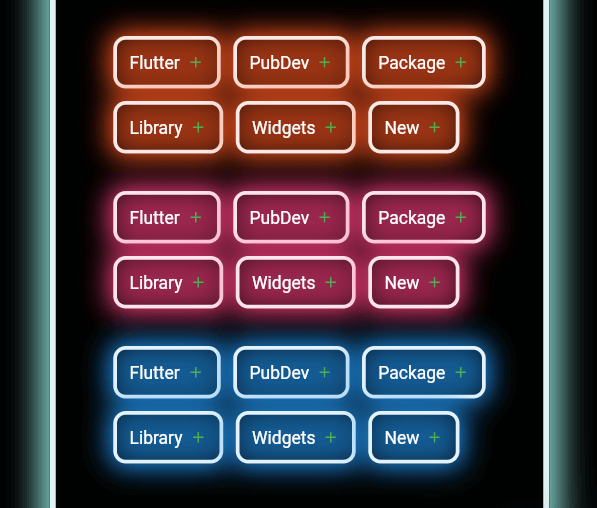
Add items widget :
https://raw.githubusercontent.com/ojasjain24/neon_widgets_flutter/master/demos/Screenshot%202022-02-21%20110455.pngWrap(
direction: Axis.horizontal,
children: <Widget>[
...(searchedResults.map((e) =>
NeonAddItemButton(
data: e,
borderColor: Colors.deepOrange.shade50,
spreadColor: Colors.deepOrange,
lightSpreadRadius: 3,
lightBlurRadius: 18))),
],
),
NeonPoint widget :
https://raw.githubusercontent.com/ojasjain24/neon_widgets_flutter/master/demos/Screenshot%202022-02-21%20190238.pngNeonPoint(
pointSize: 00,
pointColor: Colors.red.shade100,
spreadColor: Colors.red,
),
NeonLine widget :
https://raw.githubusercontent.com/ojasjain24/neon_widgets_flutter/master/demos/Screenshot%202022-02-21%20190619.pngNeonLine(
spreadColor: Colors.brown,
lightSpreadRadius: 30,
lightBlurRadius: 90,
lineWidth: 400,
lineHeight: 0.02,
lineColor: Colors.brown.shade100,
),
Flickering Neon widgets :
// Flickering neon line
FlickerNeonLine(
  spreadColor: Colors.brown,
  lightSpreadRadius: 30,
  lightBlurRadius: 60,
  lineWidth: 300,
  lineHeight: 2,
  lineColor: Colors.brown.shade100,

  // flicker rate which is selects a random value by default
  randomFlicker: false,
  flickerTimeInMilliSeconds: 1000,
),
// Flickering neon point
FlickerNeonPoint(
  pointSize: 010,
  pointColor: Colors.blue.shade100,
  spreadColor: Colors.blue,
),
// Flickering neon container
FlickerNeonContainer(
    spreadColor: Colors.green.shade700,
    child: WIDGET
),
Loaders :
 //loader type 1 : loader made of polynomial of n number of side
 NeonShapeVerticesProgressBar(number: 4)

 //loader type 2 : triangle shape with all colors customizable
 NeonTriangleVerticesProgressBar()

 //loader type 3 : square shape with all colors customizable
 NeonSquareVerticesProgressBar()

 //loader type 4 : image
 ImageProgressBar(image : "assets/images/abc.png")
Non Neon widgets :
https://raw.githubusercontent.com/ojasjain24/neon_widgets_flutter/master/demos/Screenshot%202022-02-21%20110545.pngSearchBar(),
const SizedBox(
height: 20,
),
Wrap(
direction: Axis.horizontal,
children: <Widget>[
...(searchedResults
.map((e) => AddItemButton(data: e))),
],
),
const SizedBox(
height: 20,
),
Container(
padding: const EdgeInsets.all(20),
child: CircumscribingIconButton(
icon: Icons.keyboard_arrow_left_sharp,
onTap: () {},
backgroundColor: Colors.purple),
),
Example code provided
NeonContainer(
  spreadColor: Colors.green.shade700,
  child: CircumscribingIconButton(
        icon: Icons.arrow_right_alt_sharp,
        onTap: () {},
        backgroundColor: Colors.green.shade700),
    borderRadius: BorderRadius.circular(100),
    lightBlurRadius: 100,
    lightSpreadRadius: 50,
  borderColor: Colors.green.shade100
)
Wanna improve this package? Contribute to project on
github : https://github.com/ojasjain24/neon_widgets_flutter
create issue : https://github.com/ojasjain24/neon_widgets_flutter/issues
1 : create an issue describing the feature.
2 : comment on this issue that you are interested in resolving this issue.