
 v3.2.1
status_bar_control
状态栏控制,可让您在 iOS 和 Android 上控制状态栏的颜色、样式(主题)、可见性以及透明属性。
90喜欢 289近 30 天下载130Pub 分数
AndroidiOS
适用于 iOS 和 Android 的 Flutter 状态栏控制

{"sdk":"flutter"}{"sdk":"flutter"}以下为英文项目原文快照,最新内容请访问 GitHub。
Since flutter_statusbar_manager is no longer maintained, this package is a re-publish and will be occasionally updated for continued use in existing projects.
Buy Me A Coffee https://raw.githubusercontent.com/rafaelmaeuer/flutter_statusbar_control/HEAD/img/paypal-donate.png https://raw.githubusercontent.com/rafaelmaeuer/flutter_statusbar_control/HEAD/img/github-sponsor.png
Status Bar Control, lets you control the status bar color, style (theme), visibility, and translucent properties across iOS and Android. With some added bonus for Android to control the Navigation Bar.
This plugin is based on React Native's StatusBar component.
The Navigation Bar code was taken from the awesome flutter-screen-theme-plugin.
The plugin was tested with iOS 15 and Android 12 (API 31).
status_bar_control and re-publish to pub.devcutout-mode for Android and SafeArea to demo appUIOverlay-deprecations and update of demo appSee CHANGELOG for a complete list of changes.
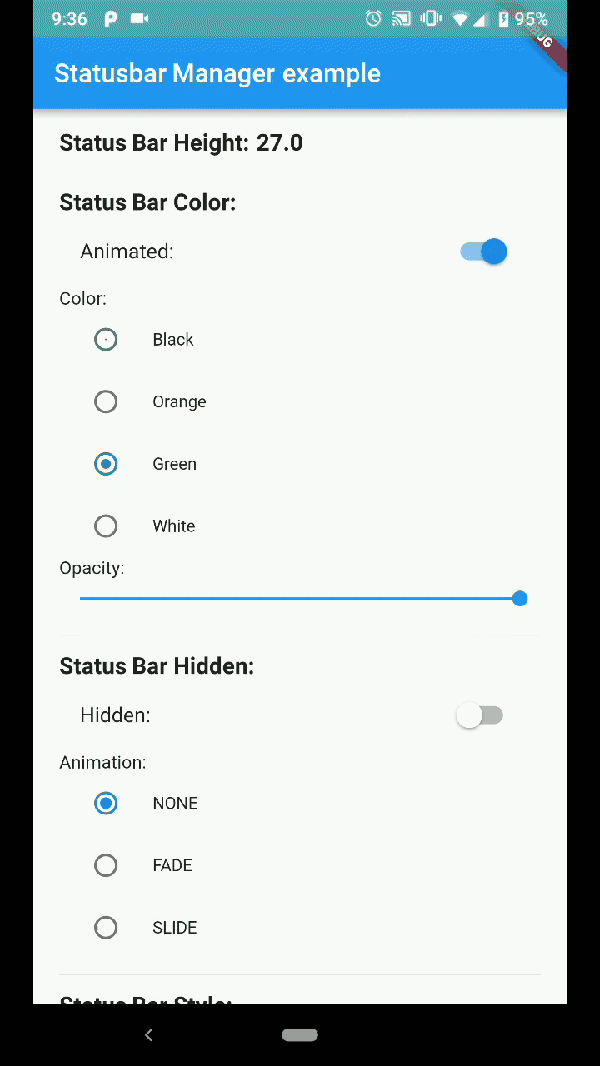
Build the example project for iOS and Android from the example folder.
| Status Bar Color | Status Bar Hide | Navigation Bar |
|---|---|---|
| Demo App Android Status Bar | Demo App Android Status Bar hide | Demo App Android Nav Bar |
| Demo Iphone 8 | Demo Iphone X |
|---|---|
| Demo App Iphone 8 | Demo App Iphone X |
Note: not all of the shown examples might still work in the latest versions of Android or iOS
status_bar_control: ^3.2.1
to your pubspec.yaml and run
flutter pub get
in your project's root directory.
Create a new project with command
flutter create myapp
On iOS add the following in your Info.plist (if not already present):
<key>UIViewControllerBasedStatusBarAppearance</key>
<false/>
On Android add the following in your styles.xml (cutout-mode for API >27):
<item name="android:windowLayoutInDisplayCutoutMode" tools:targetApi="o_mr1">shortEdges</item>
Import the plugin in lib/main.dart like this:
import 'package:status_bar_control/status_bar_control.dart';
The setColor method will set the status bar background color. On iOS the method will always return a successful Future.
| Parameter | Type | Default | Required | Description |
|---|---|---|---|---|
| color | Color |
none | Yes | The color to be set as background, can use colors with opacity. |
| animated | bool |
false | No | Whether or not to animate the color change. |
await StatusBarControl.setColor(Colors.green, animated:true);
The setTranslucent method will set the status bar translucent status. On iOS the methods will always return a successful Future.
| Parameter | Type | Default | Required | Description |
|---|---|---|---|---|
| translucent | bool |
none | Yes | Whether or not the status bar will be translucent. |
await StatusBarControl.setTranslucent(true);
The setHidden will hide the status bar.
| Parameter | Type | Default | Required | Description |
|---|---|---|---|---|
| hidden | bool |
none | Yes | Whether or not to hide the status bar. |
| animation | StatusBarAnimation |
StatusBarAnimation.NONE | No | The hiding animation to use (iOS only). |
await StatusBarControl.setHidden(true, animation:StatusBarAnimation.SLIDE);
The setStyle method will set the status bar theme.
| Parameter | Type | Default | Required | Description |
|---|---|---|---|---|
| style | StatusBarStyle |
none | Yes | The status bar theme to use for styling, can either be light, dark, default. |
await StatusBarControl.setStyle(StatusBarStyle.DARK_CONTENT);
The setNetworkActivityIndicatorVisible method will show or hide the activity indicator, On Android the method will always return a successful Future.
| Parameter | Type | Default | Required | Description |
|---|---|---|---|---|
| visible | bool |
none | Yes | Whether or not to show the activity indicator. |
await StatusBarControl.setNetworkActivityIndicatorVisible(true);
The getHeight getter method will return the height of the status bar.
double height = await StatusBarControl.getHeight
The setNavigationBarColor method will set the navigation bar background color. On iOS the method will always return a successful Future.
| Parameter | Type | Default | Required | Description |
|---|---|---|---|---|
| color | Color |
none | Yes | The color to be set as background. |
| animated | bool |
false | No | Whether or not to animate the color change. |
await StatusBarControl.setNavigationBarColor(Colors.green, animated:true);
The setNavigationBarStyle method will set the navigation bar theme.
| Parameter | Type | Default | Required | Description |
|---|---|---|---|---|
| style | NavigationBarStyle |
none | Yes | The navigation bar theme to use for styling, can either be light, dark, default. |
await StatusBarControl.setNavigationBarStyle(NavigationBarStyle.DARK);
The setFullscreen method will set the app in fullscreen mode.
| Parameter | Type | Default | Required | Description |
|---|---|---|---|---|
| fullscreen | bool |
none | Yes | Whether or not to set the app on fullscreen mode. |
await StatusBarControl.setNavigationBarStyle(NavigationBarStyle.DARK);
Compatibility: Android (6.0+) & iOS
On Android, it will only work with Android 6.0 (Marshmallow) and above devices.
Compatibility: Android only
Android 5.0 (Lollipop) and above: color
Android 8.0 (Oreo) and above: style (dark/light)