
 v1.0.0
folding_menu
一个华丽且易于使用的折叠菜单,适用于 Flutter 应用程序
22喜欢 24近 30 天下载120Pub 分数
AndroidiOSWebmacOSWindowsLinux
一个华丽且易于使用的折叠菜单,适用于 Flutter 应用程序

{"sdk":"flutter"}{"sdk":"flutter"}以下为英文项目原文快照,最新内容请访问 GitHub。
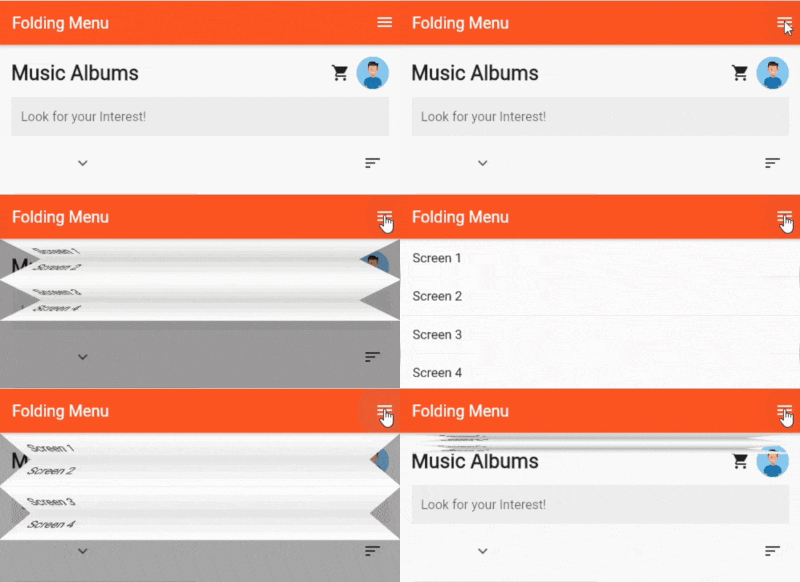
This is an easy to use package for adding Folding Menu to your Flutter Applications
https://github.com/retroportalstudio/folding_menu/blob/main/folding_menu.gif
To Use, simply add Folding Menu to your Stack Widget(as the Last Element for most Cases):
      body: Stack(
        children: [
          Container(
            color: Colors.deepOrange,
            child: Center(child: Text("Other Screen Content",style: TextStyle(color: Colors.white,fontSize: 20),)),),
          // Add FoldingMenu as the Last Child to Stack
          FoldingMenu(duration: Duration(milliseconds: 900), shadowColor: Colors.black26, animationCurve: Curves.decelerate, folded: openMenu, children: [
            ListTile(
              onTap: () {
                Navigator.of(context).push(MaterialPageRoute(
                    builder: (context) => SecondScreen(
                          text: "Page 1",
                        )));
              },
              title: Text("Home Dance"),
              tileColor: Colors.white,
            ),
            ListTile(
              onTap: () {
                Navigator.of(context).push(MaterialPageRoute(
                    builder: (context) => SecondScreen(
                          text: "Page 2",
                        )));
              },
              title: Text("Home Dance 2"),
              tileColor: Colors.white,
            ),
            ListTile(
              onTap: () {
                Navigator.of(context).push(MaterialPageRoute(
                    builder: (context) => SecondScreen(
                          text: "Page 3",
                        )));
              },
              title: Text("Home Dance 3"),
              tileColor: Colors.white,
            ),
            ListTile(
              onTap: () {
                Navigator.of(context).push(MaterialPageRoute(
                    builder: (context) => SecondScreen(
                          text: "Page 4",
                        )));
              },
              title: Text("Home Dance 4"),
              tileColor: Colors.white,
            ),
          ]),
        ],
      ),
Plans to add more customizations.