
 v1.0.3
flat_3d_button
一个带有点击动画的简单3D平面按钮,平面3D按钮包含3种方法:可包含任意小部件作为其子组件的平面3D按钮、以文本作为其子组件的平面3D按钮,以及以图标作为其子组件的平面3D按钮
39喜欢 52近 30 天下载160Pub 分数
AndroidiOSWebmacOSWindowsLinux
一个简单的3D平面按钮,带有点击动画!

{"sdk":"flutter"}{"sdk":"flutter"}^2.0.0以下为英文项目原文快照,最新内容请访问 GitHub。
https://github.com/rijfas/flat_3d_button/raw/main/images/banner.png
A simple 3D flat button with click animation!
dependencies:
  flat_3d_button: ^1.0.3
import 'package:flat_3d_button/flat_3d_button.dart';
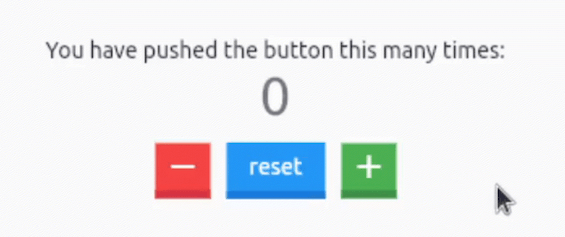
https://github.com/rijfas/flat_3d_button/raw/main/images/flat_3d_button_counter.GIF
  Flat3dButton.icon(
    color: Colors.red,
    onPressed: _decrementCounter,
    icon: Icons.remove,
  ),
  const SizedBox(width: 10),
  Flat3dButton.text(
    onPressed: _resetCounter,
    text: 'reset',
  ),
  const SizedBox(width: 10),
  Flat3dButton.icon(
    color: Colors.green,
    onPressed: _incrementCounter,
    icon: Icons.add,
  ),
refer to the main.dart in the example for complete source code.
https://github.com/rijfas/flat_3d_button/raw/main/images/flat_3d_button_text.GIF
Flat3dButton.text(
  onPressed: () => print('clicked'),
  text: 'Flat',
);
https://github.com/rijfas/flat_3d_button/raw/main/images/flat_3d_button_icon.GIF
Flat3dButton.icon(
  onPressed: () => print('clicked'),
  icon: Icons.rocket,
);
https://avatars.githubusercontent.com/u/67458012?s=40&v=4
MIT License