
flutter_audio_recorder
支持音频录制和电平计量的 Flutter 插件

- 星标
- 124
- 复刻
- 151
- 最近推送(UTC)
- 2024年3月20日
- 项目状态
- 已归档
原始 README
以下为英文项目原文快照,最新内容请访问 GitHub。
flutter_audio_recorder


English | 简体中文
Flutter Audio Record Plugin that supports Record Pause Resume Stop and provide access to audio level metering properties average power peak power
Works for both Android and iOS
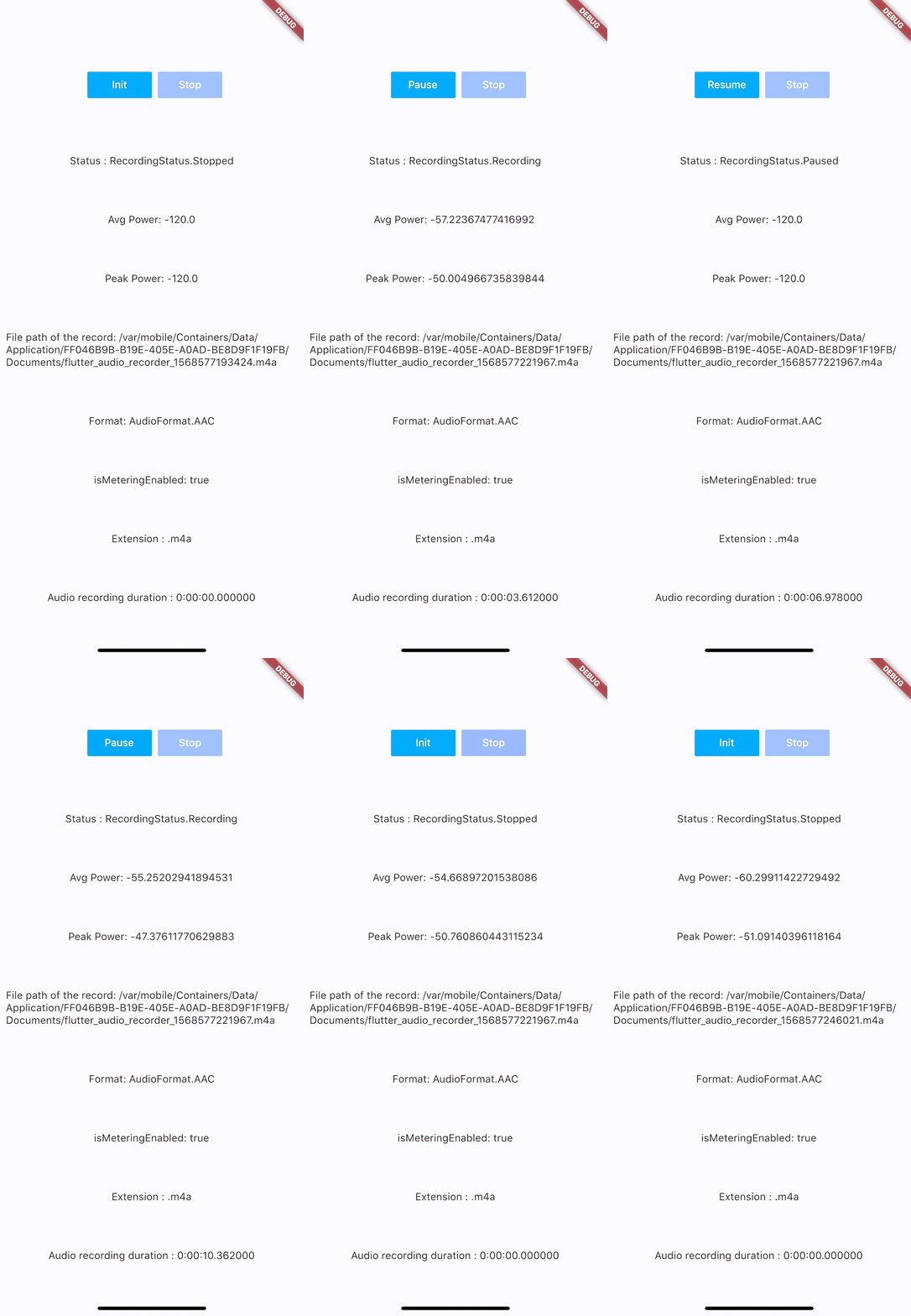
Code Samples:
Installation
add flutter_audio_recorder to your pubspec.yaml
iOS Permission
- Add usage description to plist
<key>NSMicrophoneUsageDescription</key>
<string>Can We Use Your Microphone Please</string>
- Then use
hasPermissionapi to ask user for permission when needed
Android Permission
- Add
uses-permissionto./android/app/src/main/AndroidManifest.xmlin xml root level like below
    ...
    </application>
    <uses-permission android:name="android.permission.RECORD_AUDIO"/>
    <uses-permission android:name="android.permission.WRITE_EXTERNAL_STORAGE"/>
    ...
</manifest>
- Then use
hasPermissionapi to ask user for permission when needed
Configuration
iOS Deployment Target is 8.0 above
Android
- AndroidX: use latest version (
0.5.x) - Legacy Android: use old version (
0.4.9)
Usage
Recommended API Usage: hasPermission => init > start -> (pause <-> resume) * n -> stop, call init again before start another recording
Always check permission first(it will request permission if permission has not been set to true/false yet, otherwise it will return the result of recording permission)
bool hasPermission = await FlutterAudioRecorder.hasPermissions;
Initialize (run this before start, so we could check if file with given name already exists)
var recorder = FlutterAudioRecorder("file_path.mp4"); // .wav .aac .m4a
await recorder.initialized;
or
var recorder = FlutterAudioRecorder("file_path", audioFormat: AudioFormat.AAC); // or AudioFormat.WAV
await recorder.initialized;
Sample Rate
var recorder = FlutterAudioRecorder("file_path", audioFormat: AudioFormat.AAC, sampleRate: 22000); // sampleRate is 16000 by default
await recorder.initialized;
Audio Extension and Format Mapping
| Audio Format | Audio Extension List |
|---|---|
| AAC | .m4a .aac .mp4 |
| WAV | .wav |
Start recording
await recorder.start();
var recording = await recorder.current(channel: 0);
Get recording details
var current = await recording.current(channel: 0);
// print(current.status);
You could use a timer to access details every 50ms(simply cancel the timer when recording is done)
new Timer.periodic(tick, (Timer t) async {
        var current = await recording.current(channel: 0);
        // print(current.status);
        setState(() {
        });
      });
Recording
| Name | Description |
|---|---|
| path | String |
| extension | String |
| duration | Duration |
| audioFormat | AudioFormat |
| metering | AudioMetering |
| status | RecordingStatus |
Recording.metering
| Name | Description |
|---|---|
| peakPower | double |
| averagePower | double |
| isMeteringEnabled | bool |
Recording.status
Unset,Initialized,Recording,Paused,Stopped
Pause
await recorder.pause();
Resume
await recorder.resume();
Stop (after stop, run init again to create another recording)
var result = await recorder.stop();
File file = widget.localFileSystem.file(result.path);
Example
Please check example app using Xcode.
Getting Started
This project is a starting point for a Flutter plug-in package, a specialized package that includes platform-specific implementation code for Android and/or iOS.
For help getting started with Flutter, view our online documentation, which offers tutorials, samples, guidance on mobile development, and a full API reference.

RMBR ONE ↗
分类
使用的依赖
如何选择适合项目的代码仓?
先按使用场景筛选,再比较项目活跃情况,最后到原始仓库核对使用要求。
- 通过仓库名、作者或描述搜索,再按技术分类缩小范围。
- 结合星标、复刻与最近推送比较项目;星标反映社区关注,不代表质量保证。
- 使用前在 GitHub 核对 README、许可证与 Issues。
来源与维护
“A repository is the most basic element of GitHub.”
GitHub Docs — About repositories ↗