
 v3.0.2
detectable_text_field
带有检测功能的 TextField。您可以检测话题标签、@符号、URL 或任何您想要的内容。有助于开发类似 Twitter 的应用。对 hashtagable 的优化。
165喜欢 3180近 30 天下载130Pub 分数
AndroidiOSWebmacOSWindowsLinux
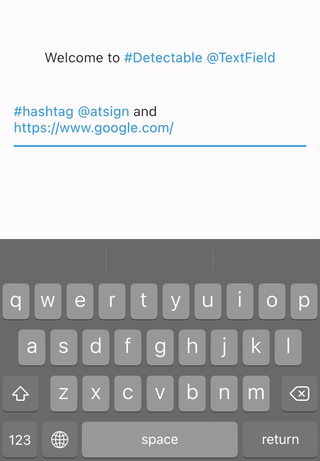
带有检测功能的 TextField 和 Text 小部件。您可以检测标签、@ 符号,或任何您想要的内容。

{"sdk":"flutter"}^0.20.3{"sdk":"flutter"}以下为英文项目原文快照,最新内容请访问 GitHub。
Text widgets with detection features. You can detect hashtags, at sign, url, or anything you want. Helps you develop Twitter like app.
Refinement of hashtagable.
final
    DetectableTextField(
      detectionRegExp: detectionRegExp(),
      detectedStyle: TextStyle(
        fontSize: 20,
        color: Colors.blue,
      ),
    )
detectionRegExp decides the text to detect.detectedStyle is the textStyle for detected text.DetectableTextEditingController allows you to listen to the typingDetection. Ideal for features
like live hashtag or mention detection.
    final controller = DetectableTextEditingController(
      regExp: detectionRegExp(),
    );

    @override
    void initState() {
      super.initState();
      controller.addListener(() {
        setState(() {});
      });
    }

    @override
    Widget build(BuildContext context) {
      return Column(
        mainAxisSize: MainAxisSize.min,
        mainAxisAlignment: MainAxisAlignment.center,
        children: <Widget>[
          Text(
            'Typing detection: ${controller.typingDetection}',
          ),
          DetectableTextField(
            controller: controller,
          ),
        ],
      );
    }
DetectableTextEditingController extends TextEditingController, so you can use it
with TextField, TextFormField or any other widgets that accept TextEditingController.
If you use flutter_hooks, useDetectableTextEditingController is also available.
If you want to use detection feature in the text only to display, use DetectableText.
    DetectableText(
      text: "#HashTag and @AtSign and https://pub.dev/packages/detectable_text_field",
      detectionRegExp: detectionRegExp(),
      detectedStyle: TextStyle(
        fontSize: 20,
        color: Colors.blue,
      ),
      basicStyle: TextStyle(
        fontSize: 20,
      ),
      onTap: (tappedText){
        print(tappedText);
      },
    )
Usage of the arguments like detectionRegExp are same as the ones in DetectableTextField.
The argument onTap(String) is called when user tapped a detected text.
detectionRegExp()The widgets and methods in this package is expected to be used with RegExp.
The function detectionRegExp() returns sample regExp depending on the boolean arguments: hashtag
, atSign, and url.They are all true by default.
If you see the API reference , you will see the function just returns the sample regular expressions below. You can use them directly if you want.
| sample regExp | hashtag | atSign | url |
|---|---|---|---|
hashTagRegExp |
○ | × | × |
atSignRegExp |
× | ○ | × |
urlRegExp |
× | × | ○ |
hashTagAtSignRegExp |
○ | ○ | × |
hashTagUrlRegExp |
○ | × | ○ |
AtSignUrlRegExp |
× | ○ | ○ |
hashTagAtSignUrlRegExp |
○ | ○ | ○ |
# or @.# and @ detection if there's emoji or symbol. print(isDetected("Hello #World", hashTagRegExp));
// true
print(isDetected("Hello World", hashTagRegExp));
// false
  final List<String> detections = extractDetections(
    "#Hello World #Flutter Dart #Thank you",
    hashTagRegExp,
  );
  // ["#Hello", "#Flutter", "#Thank"]
If you have any requests or questions, please feel free to ask on github.
Thanks goes to these wonderful people (emoji key):
This project follows the all-contributors specification. Contributions of any kind welcome!