
 v1.1.3
edge_detection
一个用于检测物体边缘、扫描纸张、检测角落和矩形的 Flutter 插件。它允许裁剪检测到的物体图像,并返回裁剪后图像的路径。
310喜欢 480近 30 天下载150Pub 分数
AndroidiOS
这是一个用于在实时摄像头中检测边缘的Flutter插件,可拍摄检测到的边缘对象的照片,裁剪并保存。

{"sdk":"flutter"}{"sdk":"flutter"}以下为英文项目原文快照,最新内容请访问 GitHub。
A flutter plugin to detect edges of objects, scan paper, detect corners, detect rectangles. It allows cropping of the detected object image and returns the path of the cropped image.
iOS 13.0 or higher is needed to use the plugin. If compiling for any version lower than 13.0 make sure to check the iOS version before using the plugin. Change the minimum platform version to 13 (or higher) in your ios/Podfile file, and inform/request access to the permissions acording with permission_handler
post_install do |installer|
  installer.pods_project.targets.each do |target|
    flutter_additional_ios_build_settings(target)
    target.build_configurations.each do |config|
      config.build_settings['GCC_PREPROCESSOR_DEFINITIONS'] ||= [
        '$(inherited)',

        ## dart: PermissionGroup.camera
         'PERMISSION_CAMERA=1',

        ## dart: PermissionGroup.photos
         'PERMISSION_PHOTOS=1',
      ]

    end
    # End of the permission_handler configuration
  end
end
Add this line to your Podfile in your project:
pod 'WeScan', :path => '.symlinks/plugins/edge_detection/ios/WeScan-3.0.0'
=> like this below:
target 'Runner' do
  use_frameworks!
  use_modular_headers!
  pod 'WeScan', :path => '.symlinks/plugins/edge_detection/ios/WeScan-3.0.0'
  flutter_install_all_ios_pods File.dirname(File.realpath(__FILE__))
end
Add below permission to the ios/Runner/Info.plist:
Privacy - Camera Usage Description and a usage description.Or in text format add the key:
<key>NSCameraUsageDescription</key>
<string>Can I use the camera please?</string>
<key>NSPhotoLibraryUsageDescription</key>
<string>Can I use the photos please?</string>
<key>NSPhotoLibraryAddUsageDescription</key>
<string>Can I use the photos please?</string>
Add to your need localizations to your app through XCode for localize actions buttons from WeScan (https://github.com/WeTransfer/WeScan/tree/master/WeScan/Resources/Localisation)
The plugin code is written in kotlin 1.8.0 so the same has to be set to the android project of yours for compilation.
Change the kotlin_version to 1.8.0 in your android/build.gradle file.
ext.kotlin_version = '1.8.0'
Change the minimum Android SDK version to 21 (or higher) in your android/app/build.gradle file.
minSdkVersion 21
Please check the latest version before installation.
dependencies:
  flutter:
    sdk: flutter
  edge_detection: ^1.1.3
  permission_handler: ^10.0.0
  path_provider: ^2.0.11
  path: ^1.8.2
import 'package:edge_detection/edge_detection.dart';
// Check permissions and request its
bool isCameraGranted = await Permission.camera.request().isGranted;
if (!isCameraGranted) {
    isCameraGranted = await Permission.camera.request() == PermissionStatus.granted;
}

if (!isCameraGranted) {
    // Have not permission to camera
    return;
}

// Generate filepath for saving
String imagePath = join((await getApplicationSupportDirectory()).path,
    "${(DateTime.now().millisecondsSinceEpoch / 1000).round()}.jpeg");

// Use below code for live camera detection with option to select from gallery in the camera feed.

try {
    //Make sure to await the call to detectEdge.
    bool success = await EdgeDetection.detectEdge(imagePath,
        canUseGallery: true,
        androidScanTitle: 'Scanning', // use custom localizations for android
        androidCropTitle: 'Crop',
        androidCropBlackWhiteTitle: 'Black White',
        androidCropReset: 'Reset',
    );
} catch (e) {
    print(e);
}

// Use below code for selecting directly from the gallery.

try {
    //Make sure to await the call to detectEdgeFromGallery.
    bool success = await EdgeDetection.detectEdgeFromGallery(imagePath,
        androidCropTitle: 'Crop', // use custom localizations for android
        androidCropBlackWhiteTitle: 'Black White',
        androidCropReset: 'Reset',
    );
} catch (e) {
    print(e);
}
Demo
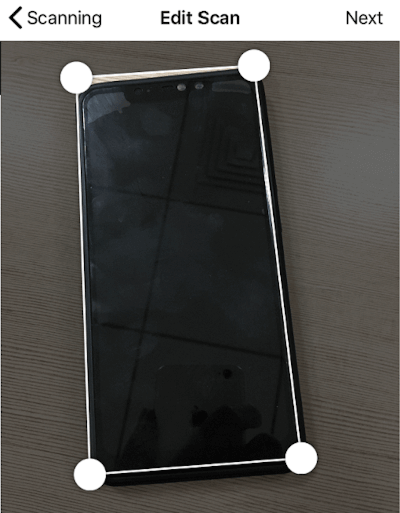
| https://raw.githubusercontent.com/sawankumarbundelkhandi/edge_detection/master/screenshots/android/1.png | https://raw.githubusercontent.com/sawankumarbundelkhandi/edge_detection/master/screenshots/android/2.png | https://raw.githubusercontent.com/sawankumarbundelkhandi/edge_detection/master/screenshots/android/3.png |
| https://raw.githubusercontent.com/sawankumarbundelkhandi/edge_detection/master/screenshots/ios/1.PNG | https://raw.githubusercontent.com/sawankumarbundelkhandi/edge_detection/master/screenshots/ios/2.PNG | https://raw.githubusercontent.com/sawankumarbundelkhandi/edge_detection/master/screenshots/ios/3.PNG |
Using these native implementation
https://github.com/WeTransfer/WeScan