
 v0.3.0
wheel_picker
一个使用输入轮盘选择值/时间的小部件。可自定义且轻量。
82喜欢 9530近 30 天下载160Pub 分数
AndroidiOSWebmacOSWindowsLinux
用于输入滚轮的 Flutter 包

{"sdk":"flutter"}{"sdk":"flutter"}^2.0.0以下为英文项目原文快照,最新内容请访问 GitHub。
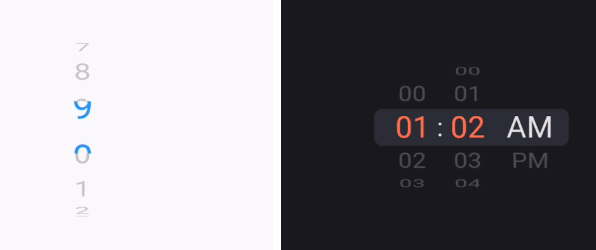
A superset version of original ListWheelScrollView for easily creating wheel scroll input.
WheelPickerStyle.WheelPicker widgets with a WheelPickerController.Add it to your pubspec.yaml file:
dependencies:
  wheel_picker: ^0.3.0
Install packages from the command line:
flutter packages get
To use package, just import package import 'package:wheel_picker/wheel_picker.dart';
Here's a quick example to get you started:
const daysOfWeek = ['Sunday','Monday','Tuesday','Wednesday','Thursday','Friday','Saturday'];
return WheelPicker(
  itemCount: 7,
  builder: (context, index) => Text(daysOfWeek[index]),
  selectedIndexColor: Colors.orange,
  looping: false,
);
For more control, you can attach a controller and adjust it to your liking:
import 'dart:async';

import 'package:flutter/material.dart';
import 'package:wheel_picker/wheel_picker.dart';

class WheelPickerExample extends StatelessWidget {
  const WheelPickerExample({super.key});

  @override
  Widget build(BuildContext context) {
    final secondsWheel = WheelPickerController(itemCount: 10);
    const textStyle = TextStyle(fontSize: 32.0, height: 1.5);

    Timer.periodic(const Duration(seconds: 1), (_) => secondsWheel.shiftDown());

    return WheelPicker(
      builder: (context, index) => Text("$index", style: textStyle),
      controller: secondsWheel,
      selectedIndexColor: Colors.blue,
      onIndexChanged: (index, interactionType) => print("On index $index"),
      style: WheelPickerStyle(
        itemExtent: textStyle.fontSize! * textStyle.height!, // Text height
        squeeze: 1.25,
        diameterRatio: .8,
        surroundingOpacity: .25,
        magnification: 1.2,
      ),
    );
  }
}

class MyApp extends StatelessWidget {
  const MyApp({super.key});

  @override
  Widget build(BuildContext context) {
    return const MaterialApp(
      title: 'Flutter Example',
      home: Scaffold(
        body: Center(
          child: WheelPickerExample(),
        ),
      ),
    );
  }
}

void main() => runApp(const MyApp());
Note: This works for this short example but don't forget to manually dispose controllers you initialize youself.
For more advanced usage, you can also mount controllers, making them shift each other. See example.
const daysOfWeek = ['Sunday','Monday','Tuesday','Wednesday','Thursday','Friday','Saturday'];

return NotificationListener(
  onNotification: (notification) {
    if (notification is ScrollEndNotification) {
      print('User has ended scrolling');
    }
    return false;
  },
  child: WheelPicker(
    itemCount: 7,
    builder: (context, index) => Text(daysOfWeek[index]),
    selectedIndexColor: Colors.orange,
    looping: false,
  ),
);
Feel free to share your feedback, suggestions, or contribute to this package :handshake:.
If you like this package, consider supporting it by giving it a star on GitHub and a like on pub.dev :heart:.