
 v1.2.0
cote_network_logger
用于实时HTTP网络监控的精美Flutter开发工具,配有Web仪表板
28喜欢 192近 30 天下载150Pub 分数
AndroidiOSmacOSWindowsLinux
用于通过美观的 Web 仪表板监控 HTTP 网络活动的 Flutter 开发工具

{"sdk":"flutter"}^5.4.0^1.4.1^1.1.0{"sdk":"flutter"}^5.0.0以下为英文项目原文快照,最新内容请访问 GitHub。
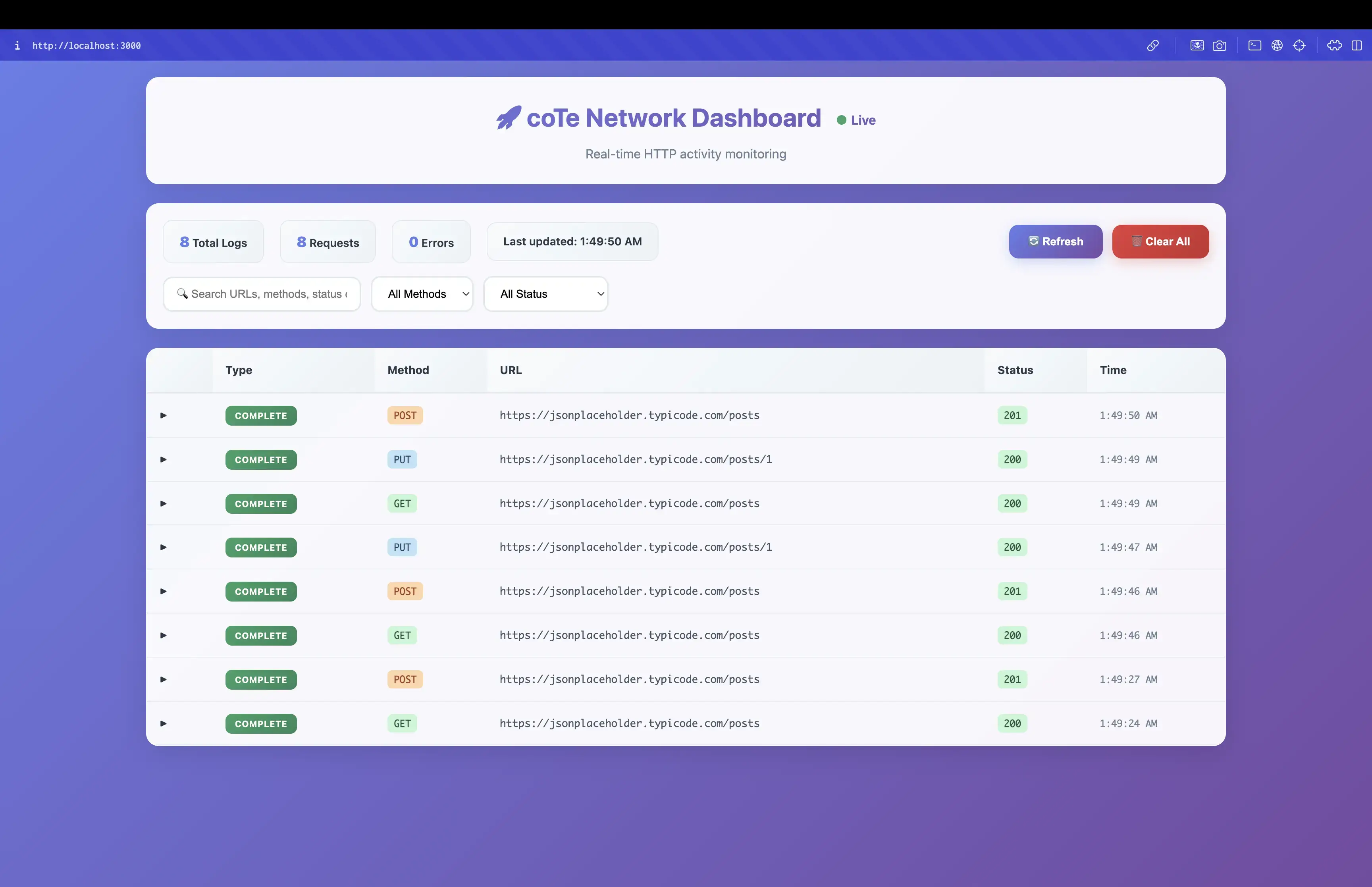
A powerful Flutter package for real-time HTTP network monitoring during development and staging environments.
Add to your pubspec.yaml:
dependencies:
  cote_network_logger: ^1.0.5
Start the server in your main.dart:
import 'package:cote_network_logger/cote_network_logger.dart';

void main() async {
  WidgetsFlutterBinding.ensureInitialized();
  await startNetworkLogServer();
  runApp(MyApp());
}
Add the interceptor to your Dio instance:
import 'package:dio/dio.dart';
import 'package:cote_network_logger/cote_network_logger.dart';

final dio = Dio();
dio.interceptors.add(const CoteNetworkLogger());
Open the dashboard URL in your browser!
The network logger is available in the following environments:
STAGING_ENV=trueNETWORK_LOGGER_ENABLED=trueflutter run
flutter run --dart-define=STAGING_ENV=true
flutter run --release --dart-define=NETWORK_LOGGER_ENABLED=true
For Android:
# Debug flavor
flutter build apk --flavor debug

# Staging flavor
flutter build apk --flavor staging --dart-define=STAGING_ENV=true

# Production flavor
flutter build apk --flavor production
For iOS:
# Debug configuration
flutter build ios --flavor Debug

# Staging configuration
flutter build ios --flavor Staging --dart-define=STAGING_ENV=true

# Release configuration
flutter build ios --flavor Release
// Start the network logger server
Future<bool> startNetworkLogServer()

// Stop the network logger server
Future<void> stopNetworkLogServer()

// Check if server is running
bool isNetworkLogServerRunning()

// Get dashboard URL
String? getNetworkLogDashboardUrl()

// Check platform support
bool isNetworkLoggerSupported()
class NetworkLoggerConfig {
  // Check if logger is enabled
  static bool get isEnabled

  // Get current flavor/environment
  static String get currentFlavor

  // Check if logger is enabled in specific flavor
  static bool isEnabledInFlavor(String flavor)
}
void main() async {
  WidgetsFlutterBinding.ensureInitialized();

  // Start the logger (automatically handles environment)
  await NetworkLogger.start();

  runApp(MyApp());
}
void setupNetworkLogger() {
  // Configure with predefined environments
  NetworkLogger.configure(
    environments: [
      NetworkLoggerEnvironment.debug,
      NetworkLoggerEnvironment.staging,
      NetworkLoggerEnvironment.qa,
    ],
  );
}

// Or use custom environments
NetworkLogger.configure(
  environments: [
    NetworkLoggerEnvironment.custom(
      name: 'uat',
      enableByDefault: true,
      description: 'User Acceptance Testing',
    ),
    NetworkLoggerEnvironment.custom(
      name: 'preprod',
      enableByDefault: true,
      description: 'Pre-Production Environment',
    ),
  ],
);
// Enable logger in release mode for specific environments
NetworkLogger.configure(
  environments: [NetworkLoggerEnvironment.staging],
  enableInRelease: true,
);
// Check if logger is running
if (NetworkLogger.isRunning) {
  // Get dashboard URL
  final url = NetworkLogger.dashboardUrl;
  print('Dashboard available at: $url');
}
// The logger automatically handles different environments:
// - Debug: Always enabled
// - Staging: Enabled by default
// - QA: Enabled by default
// - Beta: Enabled by default
// - Production: Always disabled
// - Custom: Configurable via enableByDefault
void main() async {
  WidgetsFlutterBinding.ensureInitialized();
  await NetworkLogger.start();
  runApp(MyApp());
}
void setupForQATesting() {
  NetworkLogger.configure(
    environments: [NetworkLoggerEnvironment.qa],
    enableInRelease: true,
  );
}
void setupAllEnvironments() {
  NetworkLogger.configure(
    environments: [
      NetworkLoggerEnvironment.debug,
      NetworkLoggerEnvironment.staging,
      NetworkLoggerEnvironment.qa,
      NetworkLoggerEnvironment.beta,
    ],
  );
}
void setupCustomEnvironment() {
  NetworkLogger.configure(
    environments: [
      NetworkLoggerEnvironment.custom(
        name: 'demo',
        enableByDefault: true,
        description: 'Demo Environment',
      ),
    ],
  );
}
The network logger supports custom environment types for flexible configuration:
Add Custom Environments
// Add your custom environments
NetworkLoggerConfig.addCustomEnvironment('qa');
NetworkLoggerConfig.addCustomEnvironment('beta');
NetworkLoggerConfig.addCustomEnvironment('uat');
Run with Custom Environment
# Run with QA environment
flutter run --dart-define=CUSTOM_ENV=qa --dart-define=NETWORK_LOGGER_ENABLED=true

# Run with Beta environment
flutter run --dart-define=CUSTOM_ENV=beta --dart-define=NETWORK_LOGGER_ENABLED=true
Environment-Specific Behavior
The network logger is particularly useful for QA teams testing release builds in staging environment:
Release Mode Testing
# Build release version with staging environment
flutter build apk --release --dart-define=STAGING_ENV=true
Enable Logger in Release
# Enable logger in release mode for staging environment
flutter run --release --dart-define=STAGING_ENV=true --dart-define=NETWORK_LOGGER_ENABLED=true
Benefits for QA Teams
Local Development
Staging Testing
Production Deployment
Check out the example directory for a complete working example.
This project is licensed under the MIT License - see the LICENSE file for details.