
可展开的底部抽屉
torbenkeller/expandable_bottom_sheet open-source repository details.
- 星标
- 33
- 复刻
- 25
- 最近推送(UTC)
- 2023年1月27日
- 项目状态
- 已归档
原始 README
以下为英文项目原文快照,最新内容请访问 GitHub。
ExpandableBottomSheet

This is a BottomSheet with a draggable height like the Google Maps App on Android.
If you have suggestions or find bugs please write an issue at github. PR's are welcome.
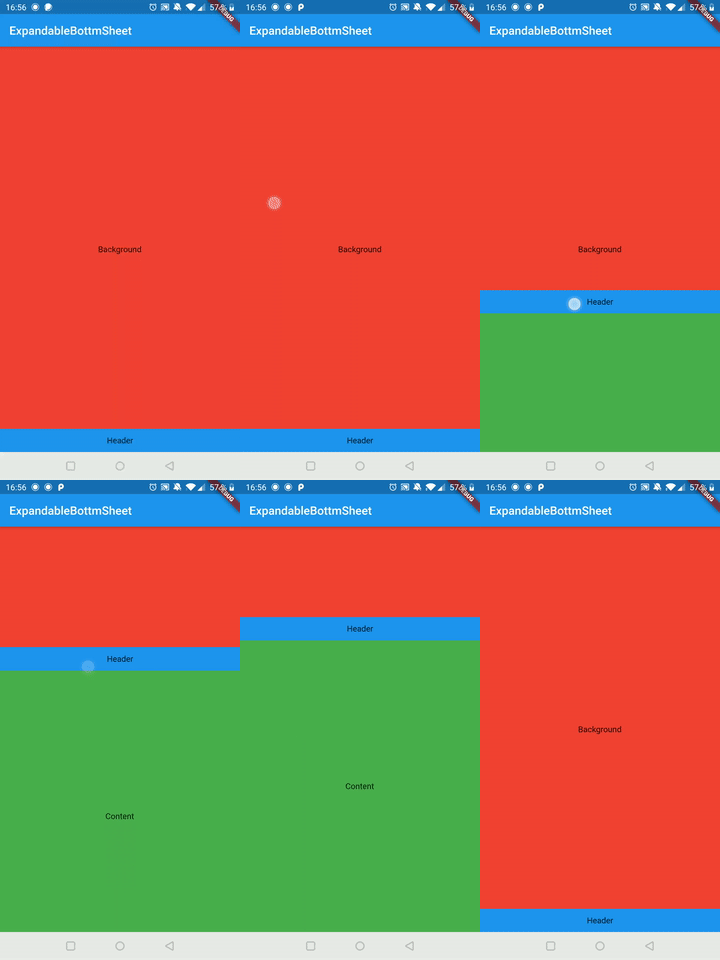 |
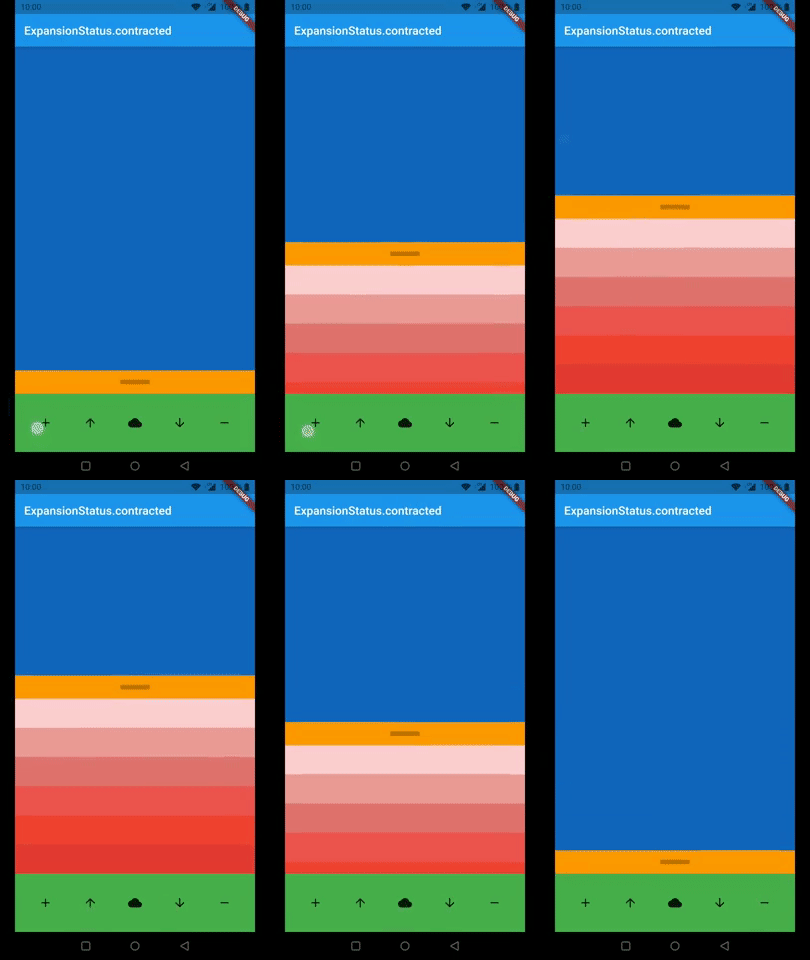 |
Arguments
| Argument | Description |
|---|---|
| expandableContent | This is the widget which you can hide and show by dragging. It has to be a widget with a constant height. |
| background | This is the widget behind the expandableContent which holds usually the content of your page. |
| persistentHeader | This is a Widget which is on top of the expandableContent and will never be hidden. It is made for a widget which indicates the user he can expand the content by dragging. |
| persistentFooter | This is a widget which is always shown at the bottom. The expandableContentis if it is expanded on top of it so you don't need margin to see all of your content. You can use it for example for navigation or a menu. |
| persistentContentHeight | This is the height of the content which will never been contracted. It only relates to expandableContent. persistentHeader and persistentFooter will not be affected by this. |
| animationDurationExtend | This is the duration for the animation if you stop dragging with high speed. |
| animationDurationContract | is the duration for the animation to bottom if you stop dragging with high speed. If it is null animationDurationExtend will be used. |
| animationCurveExpand | This is the curve of the animation for expanding the expandableContent if the drag ended with high speed. |
| animationCurveContract | This is the curve of the animation for contracting the expandableContent if the drag ended with high speed. |
| onIsExtendedCallback | This will be executed if the extend reaches its maximum. |
| onIsContractedCallback | This will be executed if the extend reaches its minimum. |
| enableToggle | This will enable tap to toggle option on header. |
| isDraggable | This will make the ExpandableBottomSheet draggable by the user or not. |
Examples
This are two examples how to use the ExpandableBottomSheet
Import Library
import 'package:expandable_bottom_sheet/expandable_bottom_sheet.dart';
Easy Example
ExpandableBottomSheet(
  background: Container(
    color: Colors.red,
    child: Center(
      child: Text('Background'),
    ),
  ),
  persistentHeader: Container(
    height: 40,
    color: Colors.blue,
    child: Center(
      child: Text('Header'),
    ),
  ),
  expandableContent: Container(
    height: 500,
    color: Colors.green,
    child: Center(
      child: Text('Content'),
    ),
  ),
);
Call expand, contract, or status programmatically
...
GlobalKey<ExpandableBottomSheetState> key = new GlobalKey();
...

@override
Widget build(BuildContext context) {
  return ExpandableBottomSheet(
    key: key
    ...
  );
}

void expand() => key.currentState.expand();

void contract() key.currentState.contract();

ExpansionStatus status() => key.currentState.expansionStatus;
Expert Example
class ExampleExpert extends StatefulWidget {
  @override
  _ExampleExpertState createState() => _ExampleExpertState();
}

class _ExampleExpertState extends State<ExampleExpert> {
  GlobalKey<ExpandableBottomSheetState> key = new GlobalKey();
  int _contentAmount = 0;
  ExpansionStatus _expansionStatus = ExpansionStatus.contracted;

  @override
  Widget build(BuildContext context) {
    return MaterialApp(
      home: Scaffold(
        appBar: AppBar(
          title: Text(_expansionStatus.toString()),
        ),
        body: ExpandableBottomSheet(
          //use the key to get access to expand(), contract() and expansionStatus
          key: key,

          //optional
          //callbacks (use it for example for an animation in your header)
          onIsContractedCallback: () => print('contracted'),
          onIsExtendedCallback: () => print('extended'),

          //optional; default: Duration(milliseconds: 250)
          //The durations of the animations.
          animationDurationExtend: Duration(milliseconds: 500),
          animationDurationContract: Duration(milliseconds: 250),

          //optional; default: Curves.ease
          //The curves of the animations.
          animationCurveExpand: Curves.bounceOut,
          animationCurveContract: Curves.ease,

          //optional
          //The content extend will be at least this height. If the content
          //height is smaller than the persistentContentHeight it will be
          //animated on a height change.
          //You can use it for example if you have no header.
          persistentContentHeight: 220,

          //required
          //This is the widget which will be overlapped by the bottom sheet.
          background: Container(
            color: Colors.blue[800],
          ),

          //optional
          //This widget is sticking above the content and will never be contracted.
          persistentHeader: Container(
            color: Colors.orange,
            constraints: BoxConstraints.expand(height: 40),
            child: Center(
              child: Container(
                height: 8.0,
                width: 50.0,
                color: Color.fromARGB((0.25 * 255).round(), 0, 0, 0),
              ),
            ),
          ),

          //required
          //This is the content of the bottom sheet which will be extendable by dragging.
          expandableContent: Container(
            constraints: BoxConstraints(maxHeight: 400),
            child: SingleChildScrollView(
              child: Column(
                mainAxisSize: MainAxisSize.min,
                children: <Widget>[
                  for (int i = 0; i < _contentAmount; i++)
                    Container(
                      height: 50,
                      color: Colors.red[((i % 8) + 1) * 100],
                    ),
                ],
              ),
            ),
          ),

          //optional
          //This is a widget aligned to the bottom of the screen and stays there.
          //You can use this for example for navigation.
          persistentFooter: Container(
            color: Colors.green,
            height: 100,
            child: Row(
              mainAxisSize: MainAxisSize.max,
              mainAxisAlignment: MainAxisAlignment.spaceEvenly,
              children: <Widget>[
                IconButton(
                  icon: Icon(Icons.add),
                  onPressed: () => setState(() {
                    _contentAmount++;
                  }),
                ),
                IconButton(
                  icon: Icon(Icons.arrow_upward),
                  onPressed: () => setState(() {
                    key.currentState!.expand();
                  }),
                ),
                IconButton(
                  icon: Icon(Icons.cloud),
                  onPressed: () => setState(() {
                    _expansionStatus = key.currentState!.expansionStatus;
                  }),
                ),
                IconButton(
                  icon: Icon(Icons.arrow_downward),
                  onPressed: () => setState(() {
                    key.currentState!.contract();
                  }),
                ),
                IconButton(
                  icon: Icon(Icons.remove),
                  onPressed: () => setState(() {
                    if (_contentAmount > 0) _contentAmount--;
                  }),
                ),
              ],
            ),
          ),
        ),
      ),
    );
  }
}

GitHub 作者
Torben Keller ↗
语言DartHTMLSwiftKotlinObjective-C
分类
使用的依赖
依赖清单 3 项
- flutter
{"sdk":"flutter"} - flutter_test开发依赖
{"sdk":"flutter"} - very_good_analysis开发依赖
^2.3.0
如何选择适合项目的代码仓?
先按使用场景筛选,再比较项目活跃情况,最后到原始仓库核对使用要求。
- 通过仓库名、作者或描述搜索,再按技术分类缩小范围。
- 结合星标、复刻与最近推送比较项目;星标反映社区关注,不代表质量保证。
- 使用前在 GitHub 核对 README、许可证与 Issues。
来源与维护
“A repository is the most basic element of GitHub.”
GitHub Docs — About repositories ↗