
 v3.1.0
animation_list
一个 Flutter 包项目,包含一个简单的动画 ListView 小部件。
76喜欢 1220近 30 天下载150Pub 分数
AndroidiOSWebmacOSWindowsLinux
turlvo/flutter_animation_list open-source repository details.
以下为英文项目原文快照,最新内容请访问 GitHub。
A simple animation listview widget.
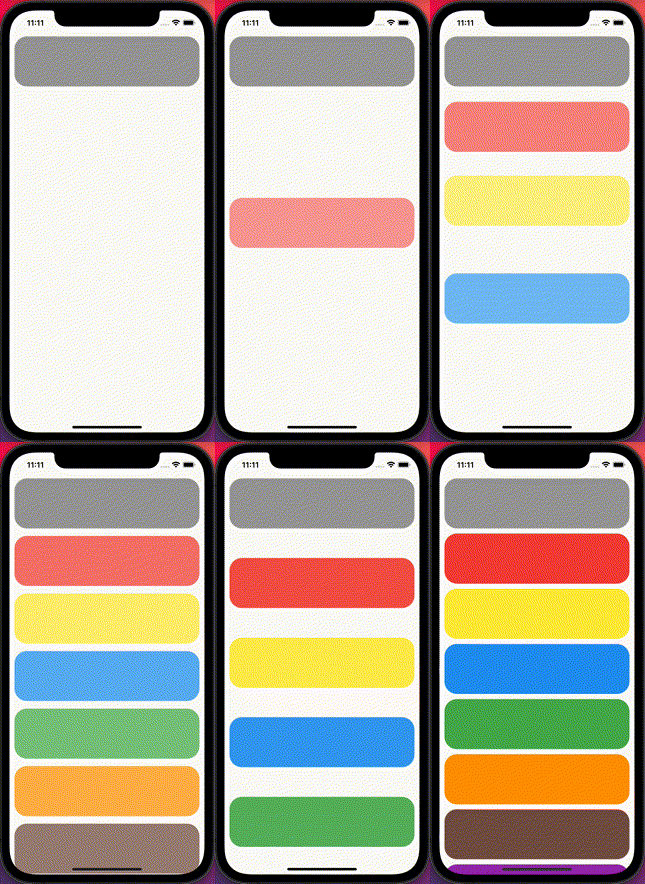
When it is built, list item is shown by sliding and bouncing.


Add animation_list: ^3.1.0 to your pubspec.yaml dependecies. And import it:
import 'package:animation_list/animation_list.dart';
Simply add a Animation List widget with required params.
final List<Map<String, dynamic>> data = [
    {
      'title': '1111',
      'backgroundColor': Colors.grey,
    },
    {
      'title': '2222',
      'backgroundColor': Colors.red,
    },
    {
      'title': '3333',
      'backgroundColor': Colors.yellow,
    },
    {
      'title': '4444',
      'backgroundColor': Colors.blue,
    },
    {
      'title': '5555',
      'backgroundColor': Colors.green,
    },
    {
      'title': '6666',
      'backgroundColor': Colors.orange,
    },
    {
      'title': '7777',
      'backgroundColor': Colors.brown,
    },
    {
      'title': '8888',
      'backgroundColor': Colors.purple,
    },
  ];

  Widget _buildTile(String title, Color backgroundColor) {
    return Container(
        height: 100,
        margin: EdgeInsets.symmetric(horizontal: 10, vertical: 5),
        decoration: BoxDecoration(
          borderRadius: BorderRadius.all(Radius.circular(25)),
          color: backgroundColor,
        ));
  }

  @override
  Widget build(BuildContext context) {
    return Scaffold(
      body: Center(
        child: AnimationList(
            animationDirection: AnimationDirection.horizontal,
            duration: 1000,
            reBounceDepth: 10.0,
            children: data.map((item) {
              return _buildTile(item['title'], item['backgroundColor']);
            }).toList()),
      ),
    );
  }
| Attribute | Data type | Description | Default |
|---|---|---|---|
| key | Key | Controls how one widget replaces another widget in the tree | - |
| controller | ScrollController | An object that can be used to control the position to which this scroll view is scrolled | - |
| primary | bool | Whether this is the primary scroll view associated with the parent PrimaryScrollController | - |
| physics | ScrollPhysics | How the scroll view should respond to user input | - |
| shrinkWrap | bool | Whether the extent of the scroll view in the scrollDirection should be determined by the contents being viewed | false |
| padding | EdgeInsetsGeometry | The amount of space by which to inset the children | - |
| cacheExtent | double | The viewport has an area before and after the visible area to cache items that are about to become visible when the user scrolls | - |
| children | List | The children are required to fill the ListView | [] |
| semanticChildCount | int | The number of children that will contribute semantic information | - |
| dragStartBehavior | DragStartBehavior | Determines the way that drag start behavior is handled | DragStartBehavior.start |
| keyboardDismissBehavior | Key | ScrollViewKeyboardDismissBehavior the defines how this ScrollView will dismiss the keyboard automatically | ScrollViewKeyboardDismissBehavior.manual |
| restorationId | String | Restoration ID to save and restore the scroll offset of the scrollable | - |
| clipBehavior | Clip | The content will be clipped (or not) according to this option | Clip.hardEdge |
| duration | int | The milliseconds the animation runs | 1300 |
| reBounceDepth | double | A value of bounce depth | 10.0 |
| opacityRange | Tween | A Tween value of opacity animation range | Tween(begin: 0.3, end: 1.0) |
| animationDirection | AnimationDirection | A animation direction(vertical / horizontal / both) | AnimationDirection.vertical |
Contributions are welcome! Feel free to open an issue or submit a pull request if you have a way to improve this project.
Make sure your request is meaningful and you have tested the app locally before submitting a pull request.
💙 If you like this project, give it a ⭐ and share it with friends!

依赖清单 2 项
{"sdk":"flutter"}{"sdk":"flutter"}先按使用场景筛选,再比较项目活跃情况,最后到原始仓库核对使用要求。
“A repository is the most basic element of GitHub.”
GitHub Docs — About repositories ↗