
 v4.0.1
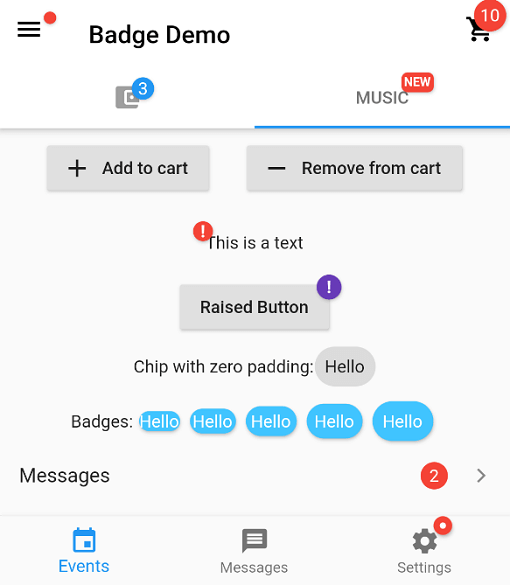
badges
一个用于创建徽章的包。徽章可用于任何小部件的附加标记,例如在购物车中显示项目数量。
3760喜欢 34.5万近 30 天下载160Pub 分数
AndroidiOSWebmacOSWindowsLinux
一个用于创建徽章的 Flutter 包。

{"sdk":"flutter"}{"sdk":"flutter"}^6.0.0以下为英文项目原文快照,最新内容请访问 GitHub。
Pub Version popularity likes building style: flutter lints Package of the week
https://github.com/yako-dev/flutter_badges/blob/master/images/readme_header.png?raw=true
https://github.com/yako-dev/flutter_badges/blob/master/images/showcase.gif?raw=true
In your pubspec.yaml
dependencies:
  badges: ^3.2.0
Attention! In Flutter 3.7 the Badge widget was introduced in the Material library, so to escape the ambiguous imports you need to import the package like this:
Option 1: namespace prefix
import 'package:badges/badges.dart' as badges;
and then use the "badges.Badge" widget instead of the "Badge" widget. The same for all the classes from this package.
Option 2: hide Flutter's Material Badge widget
import 'package:badges/badges.dart';
import 'package:flutter/material.dart' hide Badge;
    badges.Badge(
      badgeContent: Text('3'),
      child: Icon(Icons.settings),
    )
    badges.Badge(
      position: badges.BadgePosition.topEnd(top: -10, end: -12),
      showBadge: true,
      ignorePointer: false,
      onTap: () {},
      badgeContent:
          Icon(Icons.check, color: Colors.white, size: 10),
      badgeAnimation: badges.BadgeAnimation.rotation(
        animationDuration: Duration(seconds: 1),
        colorChangeAnimationDuration: Duration(seconds: 1),
        loopAnimation: false,
        curve: Curves.fastOutSlowIn,
        colorChangeAnimationCurve: Curves.easeInCubic,
      ),
      badgeStyle: badges.BadgeStyle(
        shape: badges.BadgeShape.square,
        badgeColor: Colors.blue,
        padding: EdgeInsets.all(5),
        borderRadius: BorderRadius.circular(4),
        borderSide: BorderSide(color: Colors.white, width: 2),
        borderGradient: badges.BadgeGradient.linear(
            colors: [Colors.red, Colors.black]),
        badgeGradient: badges.BadgeGradient.linear(
            colors: [Colors.blue, Colors.yellow],
            begin: Alignment.topCenter,
            end: Alignment.bottomCenter,
        ),
        elevation: 0,
      ),
      child: Text('Badge'),
    ),
https://github.com/yako-dev/flutter_badges/blob/master/images/badge_animations_preview.gif?raw=true
From left to right:https://github.com/yako-dev/flutter_badges/blob/master/images/badge_shapes_preview.png?raw=true
From left to right:https://github.com/yako-dev/flutter_badges/blob/master/images/migration_guide.png?raw=true
and more to come!