
智能文本字段
SmartTextField 是一个 TextInput,旨在从原始文本中无缝提取有价值的信息,使收集各种类型的数据变得更加轻松,同时不会打断用户流程。

- 星标
- 3
- 复刻
- 1
- 最近推送(UTC)
- 2024年12月20日
- 项目状态
- 未归档
原始 README
以下为英文项目原文快照,最新内容请访问 GitHub。
SmartTextField - Capture information seamlessly with natural language input
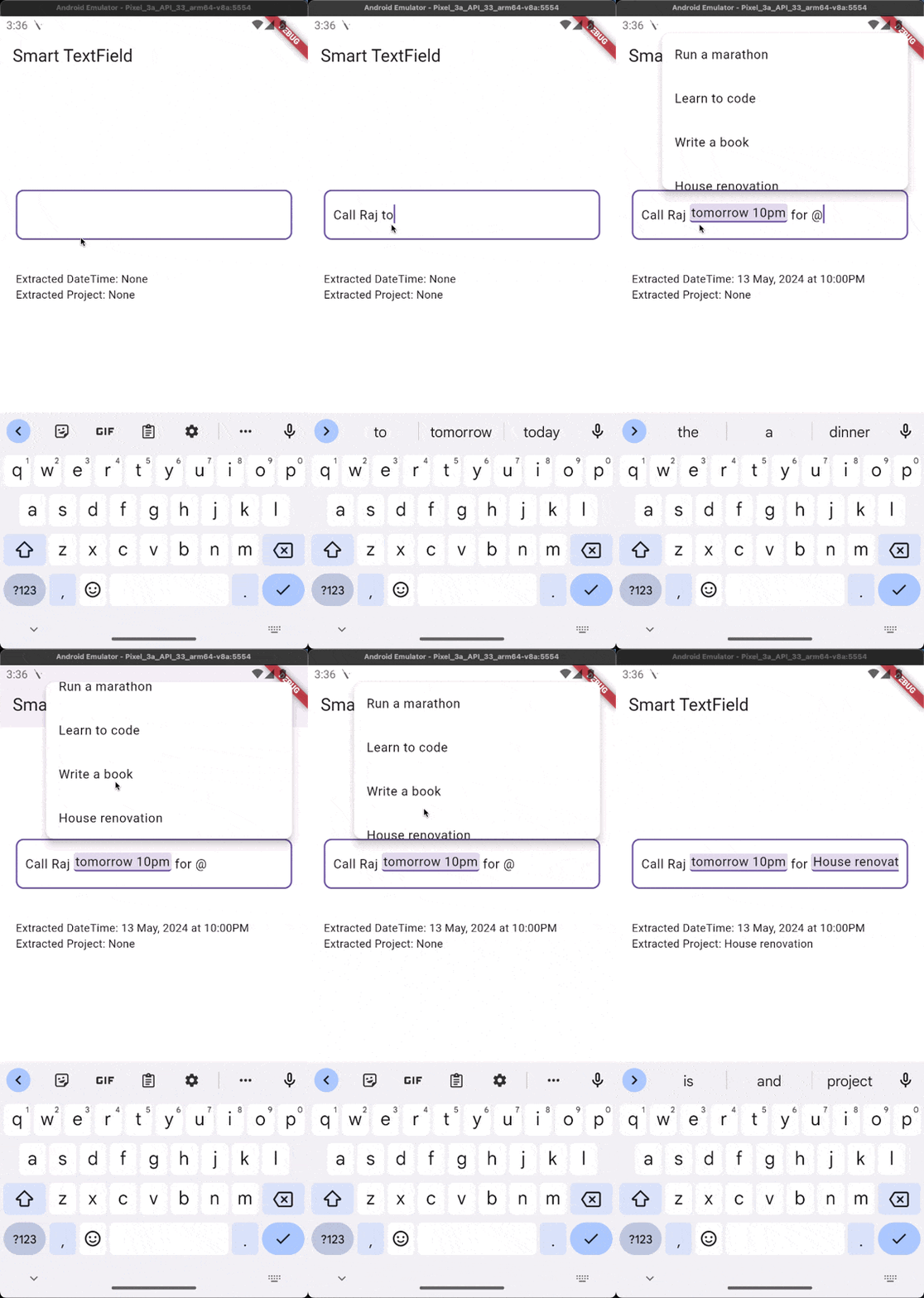
SmartTextField is a TextInput that aims to extract valuable information seamlessly from raw text, making it easier to collect various types of data without breaking the user flow. 🚀
🌟 Introduction
In traditional user interfaces, users often need to navigate through multiple input fields to provide different types of information, which can disrupt the flow and lead to a suboptimal user experience. SmartTextField addresses this issue by allowing users to enter all the required information in a single text field, using a natural language format.
💡 Use Case
For instance, in a task management app, if a user wants to provide the due date, project, and priority for a task, they can simply type all the information in the text field as a normal, readable text in one flow. Instead of having separate input fields for each piece of information, the user can enter something like: "Buy groceries tomorrow @personal #p2"
SmartTextField will then parse and extract the relevant information from the user's input text:
- Due date:
tomorrow - Project:
personal - Priority:
p2
🛠️ Implementation
SmartTextField achieves this functionality by taking a set of patterns and possible values from the client. The client implements a Tokenizer component, which has the following properties:
- pattern: A regular expression used to match patterns in the user's input text and invoke a list of possible values. 🔍
- values: A list of values that will be shown to the user if a pattern is matched. Fuzzy matching can be used to find the closest value to the user's input. Value can be any type and must implement
Tokenable.
@immutable
class Project implements Tokenable {
  const Project({required this.name});

  final String name;

  @override
  String get prefix => ProjectTokenizer.prefixId;

  @override
  String get stringValue => name;
}
  ProjectTokenizer({
    required super.values,
    super.prefix = prefixId,
  });

  static const prefixId = '@';
const _projects = <Project>[
  Project(name: 'Run a marathon'),
  Project(name: 'Learn to code'),
  Project(name: 'Write a book'),
  Project(name: 'House renovation'),
  Project(name: 'Travel to Japan'),
  Project(name: 'Learn to play the guitar'),
];
The client can define multiple Tokenizer instances, each with its own pattern & values, to handle different types of information (e.g., dates, projects, priorities, etc.) and pass it to the SmartTextFieldController.
final _controller = SmartTextFieldController(
  tokenizers: [
    ProjectTokenizer(values: _projects),
  ],
);

return SmartTextField(
  controller: _controller,
  textFormFieldBuilder: (context, controller) => TextFormField(
    controller: controller,
    decoration: const InputDecoration(
      hintText: 'Enter your task...',
    ),
  ),
  // Optional: Customize how suggestions appear
  suggestionItemBuilder: (context, suggestion) => ListTile(
    title: Text(suggestion),
    leading: const Icon(Icons.task),
  ),
);
⚠️ Important: Always use the controller provided by the textFieldBuilder function in your TextFormField. The builder receives the same controller instance that was passed to SmartTextField, ensuring proper synchronization.
Ensure that the root of your app is wrapped with SmartTextFieldOverlay to display the overlay of suggestions.
return SmartTextFieldOverlay(
  child: MaterialApp(
    title: 'Smart TextField',
      home: Builder(builder: (context) => const SmartTextFieldScreen()),
    ),
  );
📖 Reading Extracted Values
highlightedTokens stores a list of extracted values from the raw text. To listen for latest changes, attach a listener on initState. 👂
@override
void initState() {
  super.initState();
  _controller.highlightedTokens.addListener(_onHighlightedTokensChanged);
}

void _onHighlightedTokensChanged() {
  final _extractedTime = _controller.highlightedDateTime; /// Returns the extracted DateTime from the raw text.

  final highlightedTokens = _controller.highlightedTokens.value; /// Map of extracted tokens that can be looked up by their prefix.

  final _project = highlightedTokens[ProjectTokenizer.prefixId];
}
🚀 Benefits
- Streamlined User Experience: Users can enter all the required information in a single, continuous flow, without the need to navigate between multiple input fields. 🏃♀️
- Natural Language Input: Users can express information using natural language, making the input process more intuitive and user-friendly. 🗣️
- Customizable Patterns and Values: Clients can define their own patterns and possible values based on their specific requirements, making SmartTextField highly flexible and adaptable. 🔧
Ready to take your app's user experience to the next level? Give SmartTextField a try! 🎉

Yogesh Parwani ↗
分类
使用的依赖
依赖清单 6 项
- collection
^1.18.0 - flutter
{"sdk":"flutter"} - flutter_portal
^1.1.4 - meta
^1.10.0 - flutter_test开发依赖
{"sdk":"flutter"} - lints_y开发依赖
{"git":{"url":"https://github.com/Yogi-7y/Project-Y.git","path":"packages/lints_y","ref":"main"}}
如何选择适合项目的代码仓?
先按使用场景筛选,再比较项目活跃情况,最后到原始仓库核对使用要求。
- 通过仓库名、作者或描述搜索,再按技术分类缩小范围。
- 结合星标、复刻与最近推送比较项目;星标反映社区关注,不代表质量保证。
- 使用前在 GitHub 核对 README、许可证与 Issues。
来源与维护
“A repository is the most basic element of GitHub.”
GitHub Docs — About repositories ↗