
v3.4.3
riverpod
एक प्रतिक्रियाशील कैशिंग और डेटा बाइंडिंग फ्रेमवर्क। Riverpod असिंक्रोनस कोड के साथ काम करना आसान बनाता है।
4 हज़ारलाइक 33.3 लाख30-दिन डाउनलोड160Pub अंक
AndroidiOSWebmacOSWindowsLinux
चित्र के भागों को पारदर्शी बनाने की अनुमति देने वाला ग्राफिकल पेंट संपादक एप्लिकेशन।

एक प्रतिक्रियाशील कैशिंग और डेटा बाइंडिंग फ्रेमवर्क। Riverpod असिंक्रोनस कोड के साथ काम करना आसान बनाता है।
आपके Flutter एप्लिकेशन के लिए प्रकार सुरक्षित, प्रतिक्रियाशील और हल्का SQLite अबस्ट्रैक्शन। यह लाइब्रेरी रनटाइम डिपेंडेंसी है।
कैनवस) पथ निर्माण और संशोधन में मदद करने वाली फ्लटर पुस्तकालय
 v0.3.0
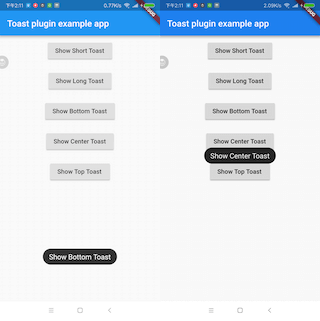
एक फ्लटर टोस्ट प्लगइन।
मानवीय फ़ाइल आकार प्राप्त करने के लिए एक पैकेज। कच्चे फ़ाइल आकार को मानव-पठनीय स्ट्रिंग में बदलें।
सुरक्षित प्रोग्रामिंग को बढ़ावा देने के लिए Rust-जैसे प्रकार, Option और Result की परिभाषाएं।
Flutter Localization एक पैकेज है जिसका उपयोग मानचित्र डेटा के साथ ऐप में स्थानीयकरण के लिए किया जाता है। इसे अधिक आसान और तेजी से लागू करने के लिए बनाया गया है और flutter_localizations से प्रेरित है।
{"sdk":"flutter"}{"sdk":"flutter"}^0.3.2^0.20.2^1.0.2^2.3.6^2.1.1^2.0.15^2.4.1^2.0.3^4.8.1^1.17.1^6.1.6^0.3.0^5.2.0^1.1.0^8.3.0^2.0.1^1.0.0+2^3.2.0^11.4.0^9.1.2^1.1.2^2.0.11^8.3.5^1.2.0^2.3.0^1.0.1{"path":"packages/colorpicker"}{"sdk":"flutter"}{"sdk":"flutter"}^5.2.0^0.9.3^5.0.0^1.4.2^2.2.4^2.0.0^2.2.0^2.4.1^2.3.7^6.7.1यह अंग्रेज़ी मूल स्नैपशॉट है। नवीनतम सामग्री GitHub पर देखें।
Paintroid, also known as Pocket Paint, is associated to Catroid. It is a graphical paint editor application for the Android platform that, among others, allows setting parts of pictures to transparent.
Since Pocket Paint is now available in Google Play store you can also download Paintroid (Pocket Paint) from here. Alternatively, you can find it on **F-Droid ** here.
For more information oriented towards developers please visit our developers page.
Note This repository is the Flutter version of Paintroid
make getmake runAlternatively make all can be used to:
flutter clean→flutter pub get→build_runner build→ →flutter run
make buildmake testmake unitmake widgetmake integrationFor integration tests:
Run the integration tests without device:
make integration to run all integration testsmake integration target=name_test to run a specific integration test file
example: make integration target=line_toolmake integration target=name_test id=n to run a specific test in a file
example: make integration target=line_tool id=1
(make sure to add the test suffix to the test file name)Run the integration tests with device:
flutter devicesmake integration-drive to run all integration testsmake integration-drive target=name_test to run a specific integration test file
example: make integration-drive target=line_toolmake integration-drive target=name_test id=x to run a specific test in a file
example: make integration-drive target=line_tool id=1
(make sure to add the test suffix to the file name)Please report all bugs on our Jira Bugtracker
If you want to contribute we suggest that you start with forking our repository and browse the code. Then you can look at our Issue-Tracker and start with fixing one ticket. Please make sure to pick a ticket with the status "Ready for development" and comment on the ticket that you are working on it. We strictly use Test-Driven Development and Clean Code, so first read everything you can about these development methods. Code developed in a different style will not be accepted. When you are done, comment again on the ticket and create a pull request on github. After you've created a pull request we will review your code and do a full testrun on your branch.
Let's start to set up the working environment using the instructions in our Wiki!
License of our project (mainly AGPL v3).