https://img.shields.io/github/stars/Ch4rl3B/inquiry?logo=github
https://img.shields.io/github/license/Ch4rl3B/inquiry?logo=github
https://img.shields.io/badge/latest-0.0.5-blue.svg
https://img.shields.io/badge/flutter-v3.3.0-blue.svg
https://img.shields.io/badge/dart-v2.18.0-blue.svg
Customizable Questionnaire for Flutter.
This package allows to create questionnaire (similar to poll but with a valid value option)
that is customizable by the developer. It can be used to create very fancy quiz that you can
adapt to your app design and will run in all platforms.
The idea of this package was based in Flutter Polls
Features
Animated
animated demo
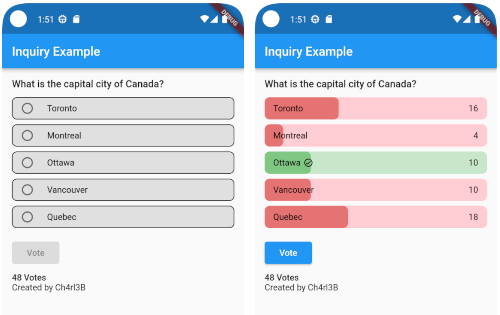
How do it look
animated demo
animated demo
Getting started
In the pubspec.yaml of your flutter project, add the following dependency:
dependencies:
  ...
  inquiry: latest_version
Import it:
import 'package:inquiry/inquiry.dart';
Usage
You can create a simple inquiry with
Inquiry(
  inquiryId: 'inquiry',
  options: List.generate(
    5, (index) {
      return InquiryOption(
        id: index,
        title: Text(
          'Option $index',
        ),
        votes: 0,
        rightAnswer: index == 2,
      );
    },
  ),
  titleWidget: Text(
    "Title of the Inquiry",
    style: const TextStyle(
      fontWeight: FontWeight.w500,
      fontSize: 16,
    ),
  ),
  onVoted: (option, amount) {
    print("Voted option: ${option.title}. "
        "The option is ${option.rightAnswer ? 'correct' : 'incorrect'}");
    return Future.value(true);
  },
);
You can customize the look and feel with InquiryStyle
  InquiryStyle(
    optionsBorderRadius: BorderRadius.circular(8),
    votedInquiryPercentRadius: const Radius.circular(8),
    optionsBorder: Border.all(color: Colors.black),
    rightAnswerBorder: Border.all(color: Colors.green),
    optionsBackgroundColor: Colors.grey.shade300,
    wrongBackgroundColor: Colors.red.shade100,
    rightBackgroundColor: Colors.green.shade100,
    optionsSplashColor: Colors.blue,
    votedWrongProgressColor: Colors.red.shade300,
    votedRightProgressColor: Colors.green.shade300,
    voteInProgressColor: Colors.blue,
    voteButtonStyle: ElevatedButton.styleFrom(
      backgroundColor: Colors.blue,
      foregroundColor: Colors.white,
      padding:
      const EdgeInsets.symmetric(horizontal: 24, vertical: 8),
    ),
    crossAxisAlignment: CrossAxisAlignment.start,
  )
for more information look at the example
Additional information
You can contribute to the package any time, just create a Pull Request.
All contributions are welcome 👍🏼


 v0.0.6