

 v0.1.0-dev.5
storage_view
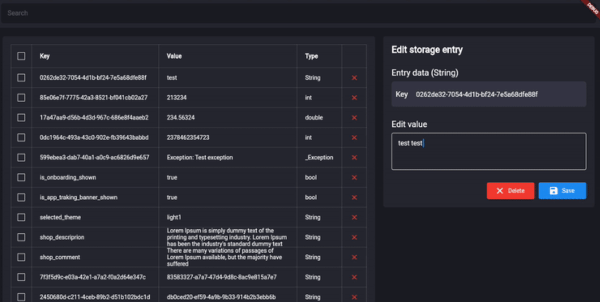
किसी भी डेटाबेस, स्टोरेज और shared_preferences के लिए Flutter इंस्पेक्टर टूल
29लाइक 39430-दिन डाउनलोड140Pub अंक
AndroidiOSWebmacOSWindowsLinux
किसी भी डेटाबेस, स्टोरेज और shared_preferences के लिए फ्लटर इंस्पेक्टर टूल।

यह अंग्रेज़ी मूल स्नैपशॉट है। नवीनतम सामग्री GitHub पर देखें।
Show some ❤️ and star the repo to support the project!

Follow these steps to use this package
dependencies:
  storage_view: ^0.1.0-dev.5
import 'package:storage_view/storage_view.dart';
The package uses a driver StorageDriver to interact with the database.
In order to connect your database you should use one of available drivers:
Or create your own StorageDriver implementation like there:
class MockStorageDriver implements StorageDriver {
  final _data = <String, dynamic>{
    'test_id' : 'test',
  };

  @override
  FutureOr<Set<String>> getKeys<String>() {
    return _data.keys.toSet() as Set<String>;
  }

  @override
  FutureOr<T?> read<T>(String key) {
    return _data[key] as T;
  }

  @override
  FutureOr<void> write<T>({required String key, required T value}) {
    _data[key] = value;
  }

  @override
  FutureOr<void> delete(String key) {
    _data.remove(key);
  }
}
After the driver was connected, you can use StorageView anywhere in your application.
final _mockStorageDriver = MockStorageDriver();
Scaffold(
    body: StorageView(storageDriver: _mockStorageDriver),
),

The project is under development and ready for your pull-requests and issues 👍
Thank you for support ❤️
For help getting started with 😍 Flutter, view online documentation, which offers tutorials, samples, guidance on mobile development, and a full API reference.
उपयोग के अनुसार छाँटें, गतिविधि की तुलना करें और अपनाने से पहले मूल प्रोजेक्ट की आवश्यकताएँ जाँचें।
“A repository is the most basic element of GitHub.”
GitHub Docs — About repositories ↗