
 v2.2.2
app_runner
अपने Flutter ऐप को प्रो की तरह लॉन्च करें! AppRunner आपके एप्लिकेशन के त्वरित और नियंत्रित लॉन्च के लिए एक कॉन्फ़िगरेटर है।
61लाइक 11330-दिन डाउनलोड160Pub अंक
AndroidiOSWebmacOSWindowsLinux
अपने Flutter ऐप को प्रो की तरह लॉन्च करें! AppRunner आपके एप्लिकेशन के त्वरित और नियंत्रित लॉन्च के लिए एक कॉन्फ़िगरेटर है।

{"sdk":"flutter"}{"sdk":"flutter"}यह अंग्रेज़ी मूल स्नैपशॉट है। नवीनतम सामग्री GitHub पर देखें।
https://firebasestorage.googleapis.com/v0/b/mad-brains-web.appspot.com/o/banner.png?alt=media https://firebasestorage.googleapis.com/v0/b/mad-brains-web.appspot.com/o/apprunner.png?alt=media
Launch your Flutter app like a pro! AppRunner is a configurator for quick and controlled launch of your application, with features that runApp does not have.
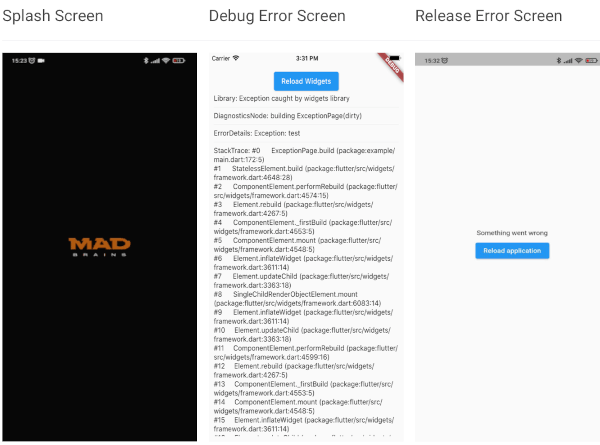
| Splash Screen | Debug Error Screen | Release Error Screen |
| run | debug-error | release-error |
BREAKING: Note, starting with version 2.2.0, Flutter 3.10.0+ is used by default. If you need to use a Flutter version lower than 3.10.0, then use package version 2.1.2 and below.
Add this to your package's pubspec.yaml file:
dependencies:
  app_runner: <last version>
This is how your application launch looked like before:
import 'package:flutter/material.dart';

void main() {
  runApp(MyApp());
}
It is simply by attaching your widget to the root. But in order to catch errors, it was necessary to use runZonedGuarded, then our code will become like this:
import 'dart:async';

import 'package:flutter/material.dart';

void main() {
  runZonedGuarded<void>(
    () {
      runApp(MyApp());
    },
    (Object error, StackTrace stackTrace) {...},
    zoneValues: ...,
    zoneSpecification: ...,
  );
}
But we also need to initialize some code to launch the application, for example Firebase:
import 'dart:async';

import 'package:flutter/material.dart';
void main() {
  runZonedGuarded<void>(
    () async {
      WidgetsFlutterBinding.ensureInitialized();

      await Firebase.initializeApp();

      HydratedBloc.storage = await HydratedStorage.build(
        storageDirectory: await getApplicationDocumentsDirectory(),
      );

      Bloc.observer = MyBlocObserver();

      runApp(MyApp());
    },
    (Object error, StackTrace stackTrace) {},
    zoneValues: ...,
    zoneSpecification: ...,
  );
}
And what do we have:
Let's fix this with AppRunner (all possible parameters are shown here, it is not necessary to use all of them):
import 'package:app_runner/app_runner.dart';
import 'package:flutter/material.dart';

void main() {
  final WidgetConfiguration widgetConfiguration = WidgetConfiguration(
    child: AppBuilder<String>(
      preInitialize: (WidgetsBinding binding) async {
        // Custom code initialization.
        // You don't need to call WidgetsFlutterBinding.ensureInitialized();
        // WidgetsBinding is also available here if you need it.

        await Firebase.initializeApp();

        HydratedBloc.storage = await HydratedStorage.build(
          storageDirectory: await getApplicationDocumentsDirectory(),
        );

        Bloc.observer = MyBlocObserver();

        return 'Mad Brains';
      },
      // Our application
      builder: (
        BuildContext context,
        AsyncSnapshot<String?> snapshot,
        Widget? child,
      ) {
        late final Widget _child;
        switch (snapshot.connectionState) {
          case ConnectionState.none:
          case ConnectionState.active:
          case ConnectionState.waiting:
            _child = const Splash(); // show Splash
            continue display;
          case ConnectionState.done:
            final String? data = snapshot.data; // data from preInitialize
            log(data);
            _child = const MyApp(); // show App
            continue display;
          display:
          default:
            return AnimatedSwitcher(
              duration: const Duration(milliseconds: 150),
              child: _child,
            );
        }
      },
    ),
    errorBuilder: (BuildContext context, FlutterErrorDetails errorDetails) => MyErrorScreen(errorDetails), // Our flutter error screen during debugging
    releaseErrorBuilder: (BuildContext context) => MyReleaseErrorScreen(), // Our flutter error screen during release
    onFlutterError: (FlutterErrorDetails errorDetails) {
      // Flutter error handling
      log(
        errorDetails.toStringShort(),
        name: 'onFlutterError',
        stackTrace: errorDetails.stack,
        error: errorDetails.exception,
      );
    },
    initializeBinding: () => CustomWidgetsFlutterBinding(), // Creating your WidgetsFlutterBinding
  );

  final ZoneConfiguration zoneConfiguration = ZoneConfiguration(
    onZoneError: (Object error, StackTrace stackTrace) {
      // Dart error handling
      log(
        error.runtimeType.toString(),
        name: 'onZoneError',
        stackTrace: stackTrace,
        error: error,
      );
    },
    zoneValues: ..., // Your zone parameters
    zoneSpecification: ..., // Your zone specifications
  );

  appRunner(
    kIsWeb
        ? RunnerConfiguration(
            widgetConfig: widgetConfiguration,
            // optional, isolate error handling
            onPlatformError: (Object exception, StackTrace stackTrace) {
              log(
                exception.runtimeType.toString(),
                name: 'onPlatformError',
                stackTrace: stackTrace,
                error: exception,
              );

              return false;
            },
          )
        : RunnerConfiguration.guarded(
            widgetConfig: widgetConfiguration,
            zoneConfig: zoneConfiguration,
          ),
  );
}
If you need to reload the widgets, you can do:
reloadWidget(context);

// or

context.reloadWidget();
The Example is in the corresponding folder