

 v2.2.5
validation_textformfield
Flutter टेक्स्टफील्ड सत्यापन आपको अपने Flutter ऐप में विभिन्न टेक्स्टफॉर्म फ़ील्ड्स को सत्यापित करने की अनुमति देता है।
37लाइक 4130-दिन डाउनलोड130Pub अंक
AndroidiOSWebmacOSWindowsLinux
फ्लटर टेक्स्टफील्ड वैधता आपको अपने फ्लटर ऐप में विभिन्न टेक्स्टफॉर्म फ़ील्ड्स को वैधता देने की अनुमति देती है

यह अंग्रेज़ी मूल स्नैपशॉट है। नवीनतम सामग्री GitHub पर देखें।
dart pub get):dependencies:
validation_textformfield: Update version
import 'package:validation_textformfield/validation_textformfield.dart';
A Flutter package for launching a Validation TextFormField . Supports iOS, Android, web, Windows, macOS, and Linux.
EmailValidationTextField(
 whenTextFieldEmpty: "Please enter  email",
 validatorMassage: "Please enter valid email",
 decoration: InputDecoration(
 focusedBorder: OutlineInputBorder(
 borderSide: BorderSide(color: Colors.black, width: 0.5),
),
 enabledBorder: OutlineInputBorder(
 borderSide: BorderSide(color: Colors.black, width: 0.5),
),
 border: OutlineInputBorder(),
 counterText: '',
 hintStyle: TextStyle(color: Colors.black, fontSize: 18.0)),
 textEditingController: txtEmailCtrl,
)
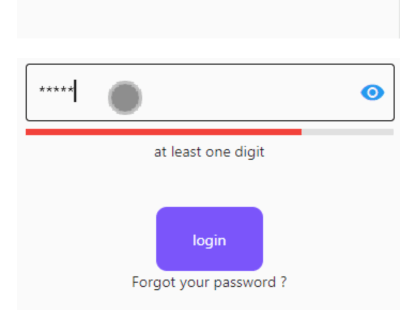
PassWordValidationTextFiled(
 lineIndicator:false,
 passwordMinError: "Must be more than 5 charater",
 hasPasswordEmpty: "Password is Empty",
 passwordMaxError: "Password to long",
 passWordUpperCaseError: "at least one Uppercase (Capital)lette",
 passWordDigitsCaseError: "at least one digit",
 passwordLowercaseError: "at least one lowercase character",
 passWordSpecialCharacters: "at least one Special Characters",
 obscureText: _isObscure,
 scrollPadding: EdgeInsets.only(left: 60),
 onChanged: (value) {
  // print(value);
 },
 passTextEditingController: txtPasswordCtrl,
 passwordMaxLength: 10,
 passwordMinLength: 5,
),
ConfirmPassWordValidationTextFromField(
 obscureText: _isObscure,
// obscureText: _isObscure,
 scrollPadding: EdgeInsets.only(left: 60),
 onChanged: (value) {
// print(value);
 },
 whenTextFieldEmpty: "Empty",
 validatorMassage: "Password not Match",
 confirmtextEditingController: txtConfPasswordCtrl,
// passtControllername:txtPasswordCtrl
),
See the example app for more complex examples.


For help getting started with Flutter, view our online documentation.
निर्भरता सूची 3 आइटम
{"sdk":"flutter"}{"sdk":"flutter"}^1.0.0उपयोग के अनुसार छाँटें, गतिविधि की तुलना करें और अपनाने से पहले मूल प्रोजेक्ट की आवश्यकताएँ जाँचें।
“A repository is the most basic element of GitHub.”
GitHub Docs — About repositories ↗