
 v0.2.7
csc_picker
एक फ्लटर पैकेज जो चयनित पर निर्भर करते हुए देशों, राज्यों और शहरों की सूची प्रदर्शित करता है, साथ ही आप दुनिया भर में देश, राज्य और शहर की खोज कर सकते हैं।
223लाइक 2.1 हज़ार30-दिन डाउनलोड70Pub अंक
प्लेटफ़ॉर्म डेटा नहीं
एक फ्लटर पैकेज जो देश, राज्य और शहरों को दिखाता है। इसके अलावा, यह चयनित देश के आधार पर देशों, राज्यों और शहरों की सूची चुनने की संभावना प्रदान करता है। साथ ही, आप दुनिया भर में देश, राज्य और शहरों की खोज कर सकते हैं।

{"sdk":"flutter"}{"sdk":"flutter"}यह अंग्रेज़ी मूल स्नैपशॉट है। नवीनतम सामग्री GitHub पर देखें।
version version
A flutter package to display a country, states, and cities. In addition it gives the possibility to select a list of countries, States and Cities depends on Selected, also you can search country, state, and city all around the world.
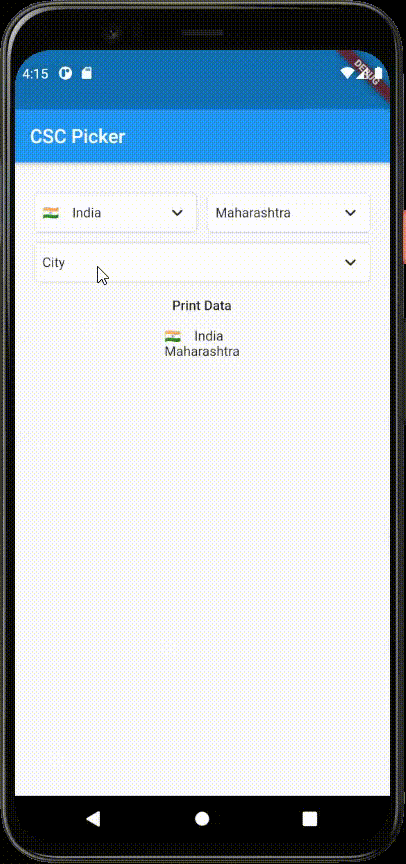
| Horizontal Layout | Vertical Layout |
To use this Package, add csc_picker as a dependency in your pubspec.yaml.
      	CSCPicker(
              onCountryChanged: (value) {
      			setState(() {
      					countryValue = value;
      				});
                  },
                  onStateChanged:(value) {
                      setState(() {
      					stateValue = value;
      				});
                  },
                  onCityChanged:(value) {
                  setState(() {
                      cityValue = value;
      			});
      		},
          ),
you will get feedback in onChanged functions
| Parameters | Type | Description |
| flagState | CountryFlag | Enable (get flag with country name) / Disable (Disable flag) / ShowInDropdownOnly (display flag in dropdown only) |
| layout | Layout | Toggle dropdown layout (Horizontal / Vertical) |
| showStates | Boolean | Enable disable States dropdown (true / false) |
| showCities | Boolean | Enable disable Cities dropdown (true / false) |
| dropdownDecoration | BoxDecoration | Dropdown box decoration to style your dropdown selector [OPTIONAL PARAMETER] (USE with disabledDropdownDecoration) |
| disabledDropdownDecoration | BoxDecoration | Disabled Dropdown box decoration to style your dropdown selector [OPTIONAL PARAMETER] (USE with disabled dropdownDecoration) |
| selectedItemStyle | TextStyle | To change selected item style |
| dropdownHeadingStyle | TextStyle | To change DropdownDialog Heading style |
| dropdownItemStyle | TextStyle | To change DropdownDialog Item style |
| dropdownDialogRadius | double | To change DropdownDialogBox radius |
| searchBarRadius | double | To change search bar radius |
| defaultCountry | CscCountry | To select default country |
| disableCountry | Boolean | Disable country dropdown (Note: use it with default country) |
| countryFilter | List of CscCountry | Show only countries in dropdown that you want |
| countrySearchPlaceholder | String | Placeholder for country search field |
| stateSearchPlaceholder | String | Placeholder for state search field |
| citySearchPlaceholder | String | Placeholder for city search field |
| countryDropdownLabel | String | Label/Title for country dropdown |
| countryDropdownLabel | String | Label/Title for state dropdown |
| countryDropdownLabel | String | Label/Title for city dropdown |
import 'package:csc_picker/csc_picker.dart';
import 'package:flutter/material.dart';

/// This is a implementation of the Country State City Picker.
void main() {
  runApp(MyApp());
}

class MyApp extends StatelessWidget {
  @override
  Widget build(BuildContext context) {
    return MaterialApp(
      title: 'CSC Picker',
      theme: ThemeData(
        primarySwatch: Colors.blue,
        visualDensity: VisualDensity.adaptivePlatformDensity,
      ),
      home: MyHomePage(title: 'CSC Picker'),
    );
  }
}

class MyHomePage extends StatefulWidget {
  MyHomePage({Key key, this.title}) : super(key: key);

  final String title;

  @override
  _MyHomePageState createState() => _MyHomePageState();
}

class _MyHomePageState extends State<MyHomePage> {
  /// Variables to store country state city data in onChanged method.
  String countryValue = "";
  String stateValue = "";
  String cityValue = "";
  String address = "";

  @override
  Widget build(BuildContext context) {

    GlobalKey<CSCPickerState> _cscPickerKey = GlobalKey();

    return Scaffold(
      appBar: AppBar(
        title: Text(widget.title),
      ),
      body: Center(
        child: Container(
            padding: EdgeInsets.symmetric(horizontal: 20),
            height: 600,
            child: Column(
              children: [
                ///Adding CSC Picker Widget in app
                CSCPicker(
                  ///Enable disable state dropdown [OPTIONAL PARAMETER]
                  showStates: true,

                  /// Enable disable city drop down [OPTIONAL PARAMETER]
                  showCities: true,

                  ///Enable (get flag with country name) / Disable (Disable flag) / ShowInDropdownOnly (display flag in dropdown only) [OPTIONAL PARAMETER]
                  flagState: CountryFlag.DISABLE,

                  ///Dropdown box decoration to style your dropdown selector [OPTIONAL PARAMETER] (USE with disabledDropdownDecoration)
                  dropdownDecoration: BoxDecoration(
                      borderRadius: BorderRadius.all(Radius.circular(10)),
                      color: Colors.white,
                      border:
                      Border.all(color: Colors.grey.shade300, width: 1)),

                  ///Disabled Dropdown box decoration to style your dropdown selector [OPTIONAL PARAMETER]  (USE with disabled dropdownDecoration)
                  disabledDropdownDecoration: BoxDecoration(
                      borderRadius: BorderRadius.all(Radius.circular(10)),
                      color: Colors.grey.shade300,
                      border:
                      Border.all(color: Colors.grey.shade300, width: 1)),

                  ///placeholders for dropdown search field
                  countrySearchPlaceholder: "Country",
                  stateSearchPlaceholder: "State",
                  citySearchPlaceholder: "City",

                  ///labels for dropdown
                  countryDropdownLabel: "*Country",
                  stateDropdownLabel: "*State",
                  cityDropdownLabel: "*City",

                  ///Default Country
                  //defaultCountry: CscCountry.India,

                  ///Disable country dropdown (Note: use it with default country)
                  //disableCountry: true,

                  ///Country Filter [OPTIONAL PARAMETER]
                  countryFilter: [CscCountry.India,CscCountry.United_States,CscCountry.Canada],

                  ///selected item style [OPTIONAL PARAMETER]
                  selectedItemStyle: TextStyle(
                    color: Colors.black,
                    fontSize: 14,
                  ),

                  ///DropdownDialog Heading style [OPTIONAL PARAMETER]
                  dropdownHeadingStyle: TextStyle(
                      color: Colors.black,
                      fontSize: 17,
                      fontWeight: FontWeight.bold),

                  ///DropdownDialog Item style [OPTIONAL PARAMETER]
                  dropdownItemStyle: TextStyle(
                    color: Colors.black,
                    fontSize: 14,
                  ),

                  ///Dialog box radius [OPTIONAL PARAMETER]
                  dropdownDialogRadius: 10.0,

                  ///Search bar radius [OPTIONAL PARAMETER]
                  searchBarRadius: 10.0,

                  ///triggers once country selected in dropdown
                  onCountryChanged: (value) {
                    setState(() {
                      ///store value in country variable
                      countryValue = value;
                    });
                  },

                  ///triggers once state selected in dropdown
                  onStateChanged: (value) {
                    setState(() {
                      ///store value in state variable
                      stateValue = value;
                    });
                  },

                  ///triggers once city selected in dropdown
                  onCityChanged: (value) {
                    setState(() {
                      ///store value in city variable
                      cityValue = value;
                    });
                  },
                ),

                ///print newly selected country state and city in Text Widget
                TextButton(
                    onPressed: () {
                      setState(() {
                        address = "$cityValue, $stateValue, $countryValue";
                      });
                    },
                    child: Text("Print Data")),
                Text(address)
              ],
            )),
      ),
    );
  }
}