

v1.0.7
flexible_wrap
एक विशेष लेआउट गुणों को बनाए रखते हुए उपलब्ध स्थान के अनुसार बढ़ने की अनुमति देता है, जो अपने बच्चों को लचीले रूप से लेआउट में व्यवस्थित करता है।
41लाइक 97230-दिन डाउनलोड160Pub अंक
AndroidiOSWebmacOSWindowsLinux
Flutter पैकेज एक पंक्ति में उपलब्ध स्थान को स्वचालित रूप से आइटम के बीच वितरित करता है, Wrap विशेषता के समान लेकिन अतिरिक्त विशेषताओं के साथ https://bixat.github.io/flexible_wrap/
यह अंग्रेज़ी मूल स्नैपशॉट है। नवीनतम सामग्री GitHub पर देखें।






FlexibleWrap is a Flutter widget that provides an advanced wrap layout with flexible spacing and RTL support. It automatically distributes available space between items in a row, similar to Wrap widget but with additional features
Perfect for implementing uniform grid layouts like product cards, image galleries, or any UI that requires evenly-spaced wrapped items.
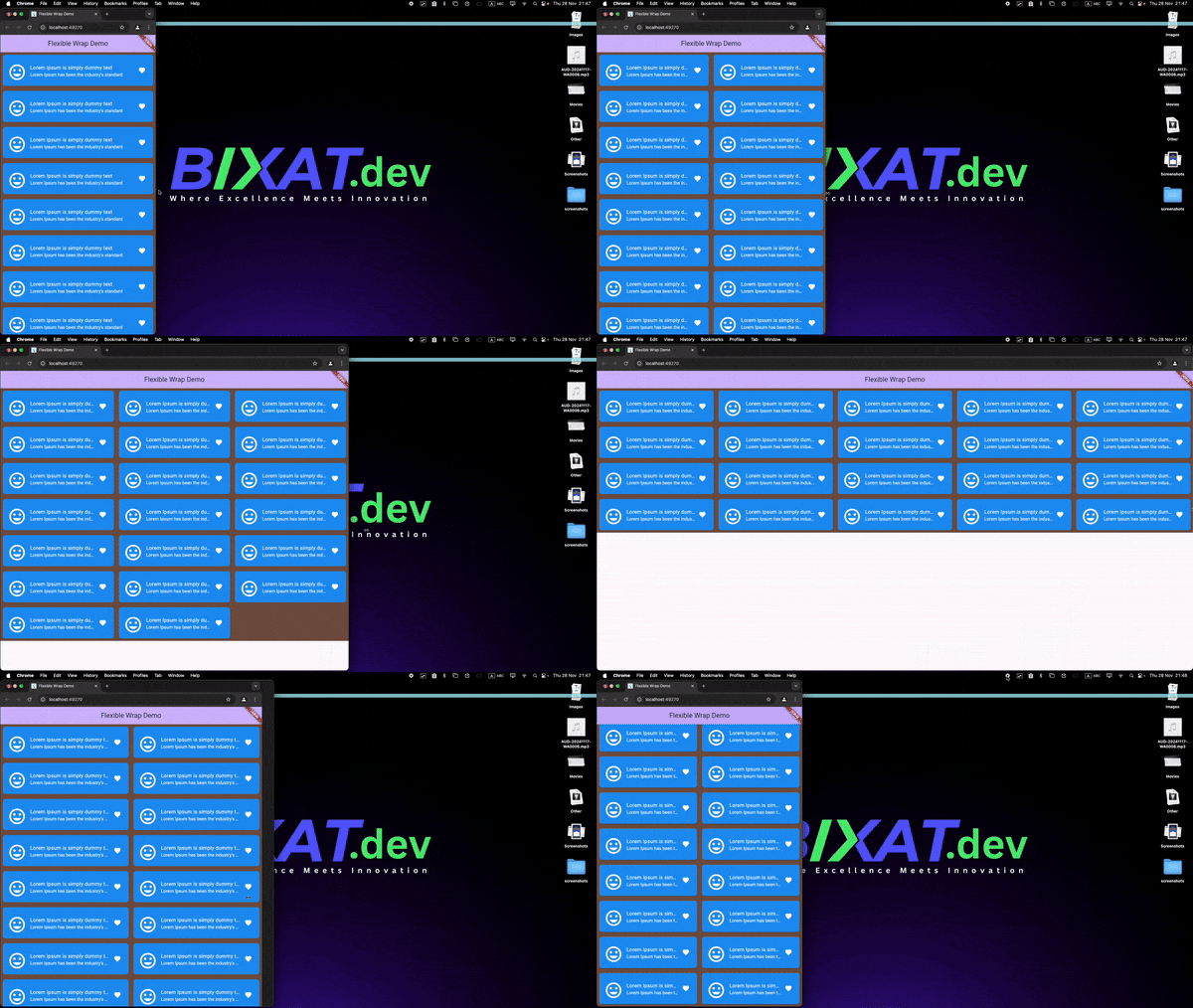
Note: We currently support only items that have the same width; height direction is not supported yet
| Feature | GridView | FlexibleWrap |
|---|---|---|
| Description | A layout that arranges items in a grid format. | It automatically distributes available space between items in a row. |
| Usage | Efficient for uniform item sizes. | Ideal for dynamic item sizes and wrapping. |
| Performance | Better performance with a builder pattern. | Currently does not support a builder; uses children instead. |
| Screen Recording |
Add this to your package's pubspec.yaml file:
dependencies:
  flexible_wrap: ^latest_version
Then run:
$ flutter pub get
Check out the live demo of FlexibleWrap at https://bixat.github.io/flexible_wrap/
First, import the package:
import 'package:flexible_wrap/flexible_wrap.dart';
Here's a basic example of how to use FlexibleWrap:
class MyHomePage extends StatefulWidget {
  const MyHomePage({super.key, required this.title});

  final String title;

  @override
  State<MyHomePage> createState() => _MyHomePageState();
}

class _MyHomePageState extends State<MyHomePage> {
  final spacing = 12.0;
  @override
  Widget build(BuildContext context) {
    return Scaffold(
      appBar: AppBar(
        backgroundColor: Theme.of(context).colorScheme.inversePrimary,
        title: Text(widget.title),
      ),
      body: SingleChildScrollView(
        child: FlexibleWrap(
          spacing: spacing,
          runSpacing: spacing,
          textDirection: TextDirection.rtl,
          children: List.generate(20, (int index) {
            return Container(
              height: 100,
              width: 300,
              decoration: BoxDecoration(
                  color: Colors.blue, borderRadius: BorderRadius.circular(8.0)),
              child: const Center(
                child: ListTile(
                  title: Text(
                    "Lorem Ipsum is simply dummy text",
                    style: TextStyle(color: Colors.white),
                    overflow: TextOverflow.ellipsis,
                  ),
                  subtitle: Text(
                    "Lorem Ipsum has been the industry's standard",
                    style: TextStyle(color: Colors.white),
                    overflow: TextOverflow.ellipsis,
                  ),
                  leading: Icon(
                    Icons.insert_emoticon,
                    color: Colors.white,
                    size: 60.0,
                  ),
                  trailing: Icon(
                    Icons.favorite,
                    color: Colors.white,
                  ),
                ),
              ),
            );
          }).toList(),
        ),
      ),
    );
  }
}
When using FlexibleWrap with dynamic dimensions (height, width, or item count), you should add a ValueKey to force widget rebuilds when these properties change:
FlexibleWrap(
  key: ValueKey('$itemHeight-$itemWidth-$itemCount'), // Force rebuild when dimensions change
  spacing: spacing,
  runSpacing: runSpacing,
  isOneRowExpanded: isOneRowExpanded,
  textDirection: isRTL ? TextDirection.rtl : TextDirection.ltr,
  children: [
    // Your widgets here
  ],
)
Why is this needed?
The ValueKey ensures that Flutter recognizes the widget as "changed" when dimensions are updated, forcing a complete rebuild of the render object. This is particularly important when:
Without the ValueKey, Flutter's widget tree optimization might prevent the render object from properly updating, leading to visual inconsistencies where dimension changes don't immediately reflect in the UI.
FlexibleWrap offers several customization options to tailor the layout to your needs:
| Parameter | Type | Default | Description |
|---|---|---|---|
children |
List<Widget> |
Required | The widgets to display in the wrap layout |
spacing |
double |
0.0 |
Horizontal space between children |
runSpacing |
double |
0.0 |
Vertical space between runs |
textDirection |
TextDirection |
null |
The text direction for RTL support |
isOneRowExpanded |
bool |
false |
Whether to expand items when they fit in one row |
FlexibleWrap(
  spacing: 8.0,
  runSpacing: 8.0,
  children: items,
)
FlexibleWrap(
  spacing: 8.0,
  textDirection: TextDirection.rtl,
  children: items,
)
We welcome contributions to FlexibleWrap! Here's how you can help:
git checkout -b feature/amazing-feature)git commit -m 'Add some amazing feature')git push origin feature/amazing-feature)Please make sure to update tests and documentation as appropriate.
FlexibleWrap is licensed under the MIT License. See the LICENSE file for details.

निर्भरता सूची 3 आइटम
{"sdk":"flutter"}{"sdk":"flutter"}^3.0.0उपयोग के अनुसार छाँटें, गतिविधि की तुलना करें और अपनाने से पहले मूल प्रोजेक्ट की आवश्यकताएँ जाँचें।
“A repository is the most basic element of GitHub.”
GitHub Docs — About repositories ↗