

 v2.3.0
fl_paging
एक नया Flutter पैकेज ListView, GridView और NestedScrollView के लिए पेजिनेशन समर्थन करता है
27लाइक 32530-दिन डाउनलोड125Pub अंक
AndroidiOSmacOSWindowsLinux
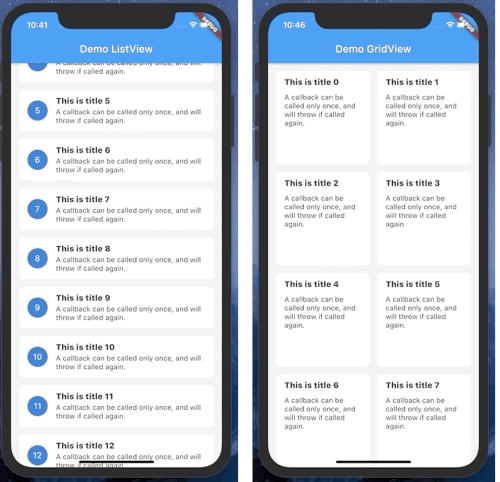
एक छोटी पुस्तकालय जो ListView - GridView के लिए अनंत लोड का समर्थन करता है - Flutter में।

यह अंग्रेज़ी मूल स्नैपशॉट है। नवीनतम सामग्री GitHub पर देखें।




A Flutter package that supports pagination(load infinite) for ListView, GridView
 |
 |
 |
To create a PagingListView or PagingGridView you will need create class which extended from PageKeyedDataSource.
When extended from PageKeyedDataSource, you will need override 2 methods is loadInitial and loadPageAfter.
Output of those function is a Tuple2 with item1 is List is List of data, end item2 is next page index.
Example: if your list start with page index is 0. -> on loadInitial output is Tuple2([...], 1) 1 is next page when load more item.
Example:
class ListViewDataSource extends paging.PageKeyedDataSource<int, Note> {
  NoteRepository noteRepository;

  ListViewDataSource(this.noteRepository);

  @override
  Future<Tuple2<List<Note>, int>> loadInitial(int pageSize) async {
    return Tuple2(await noteRepository.getNotes(0), 1);
  }

  @override
  Future<Tuple2<List<Note>, int>> loadPageAfter(int params, int pageSize) async {
    return Tuple2(await noteRepository.getNotes(params), params + 1);
  }
}
To display on UI, currently you can use PagingListView or PagingGridView.
Example:
      ListViewDataSource dataSource = ListViewDataSource(NoteRepository());

      PagingListView<Note>(
        itemBuilder: (context, data, child) => NoteWidget(data),
        pageDataSource: dataSource,
      ),
निर्भरता सूची 7 आइटम
{"sdk":"flutter"}^3.0.0^2.0.22.13.0{"sdk":"flutter"}^2.4.15^3.0.6उपयोग के अनुसार छाँटें, गतिविधि की तुलना करें और अपनाने से पहले मूल प्रोजेक्ट की आवश्यकताएँ जाँचें।
“A repository is the most basic element of GitHub.”
GitHub Docs — About repositories ↗