


 v0.11.0
swipe_image_gallery
एक स्क्रॉल करने योग्य, स्वाइप करके बंद करने योग्य, ज़ूम करने योग्य गैलरी जिस पर आप एक डायनामिक ओवरले जोड़ सकते हैं।
101लाइक 11.1 हज़ार30-दिन डाउनलोड160Pub अंक
AndroidiOSWebmacOSWindowsLinux
एक स्क्रॉल करने योग्य, स्वाइप करके बंद करने योग्य, ज़ूम करने योग्य फ्लटर गैलरी, जिस पर आप एक डायनामिक ओवरले जोड़ सकते हैं।

यह अंग्रेज़ी मूल स्नैपशॉट है। नवीनतम सामग्री GitHub पर देखें।
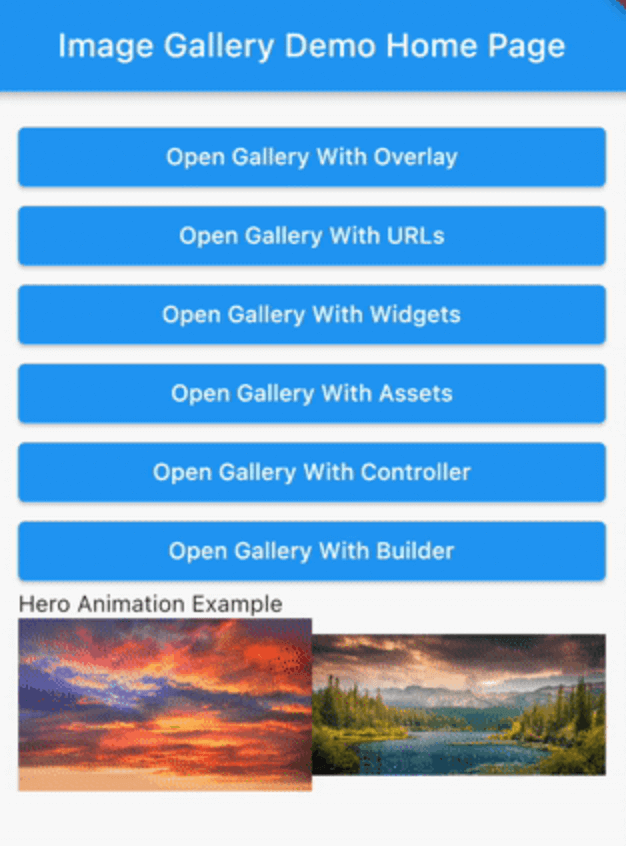
A scrollable, dismissable by swiping, zoomable gallery on which you can add a dynamic overlay. While it is intended for an image gallery different types of widgets can also be used.
Add swipe_image_gallery as a dependency in your pubspec.yaml file.
final assets = const [
  Image(image: AssetImage('assets/1.jpeg')),
  Image(image: AssetImage('assets/2.jpeg')),
  Image(image: AssetImage('assets/3.jpeg')),
  Image(image: AssetImage('assets/4.jpeg')),
];

...

SwipeImageGallery(
  context: context,
  children: assets,
).show();

final widgets = [
  Container(
    color: Colors.white,
    child: Center(
      child: Text('First Page', style: TextStyle(fontSize: 24.0)),
    ),
  ),
  Container(
    color: Colors.grey,
    child: Center(
      child: Text('Second Page', style: TextStyle(fontSize: 24.0)),
    ),
  ),
];

...

SwipeImageGallery(
  context: context,
  children: widgets,
).show();

final urls = [
  'https://via.placeholder.com/400',
  'https://via.placeholder.com/800',
  'https://via.placeholder.com/900x350',
  'https://via.placeholder.com/1000',
  'https://via.placeholder.com/100',
];

...

SwipeImageGallery(
  context: context,
  itemBuilder: (context, index) {
    return Image.network(urls[index]);
  },
  itemCount: urls.length,
).show();
You can find the OverlayExample widget here.
  StreamController<Widget> overlayController =
      StreamController<Widget>.broadcast();

  @override
  void dispose() {
    overlayController.close();
    super.dispose();
  }

  ...

  SwipeImageGallery(
    context: context,
    children: remoteImages,
    onSwipe: (index) {
      overlayController.add(OverlayExample(
        title: '${index + 1}/${remoteImages.length}',
      ));
    },
    overlayController: overlayController,
    initialOverlay: OverlayExample(
      title: '1/${remoteImages.length}',
    ),
  ).show();

final heroProperties = [
  ImageGalleryHeroProperties(tag: 'imageId1'),
  ImageGalleryHeroProperties(tag: 'imageId2'),
];

final assets = const [
  Image(image: AssetImage('assets/1.jpeg')),
  Image(image: AssetImage('assets/2.jpeg')),
];

...

Row(
  children: [
    Expanded(
      child: InkWell(
        onTap: () => SwipeImageGallery(
          context: context,
          children: assets,
          heroProperties: heroProperties,
        ).show(),
        child: Hero(
          tag: 'imageId1',
          child: Image(
            image: AssetImage('assets/1.jpeg'),
          ),
        ),
      ),
    ),
    Expanded(
      child: InkWell(
        onTap: () => SwipeImageGallery(
          context: context,
          children: assets,
          initialIndex: 1,
          heroProperties: heroProperties,
        ).show(),
        child: Hero(
          tag: 'imageId2',
          child: Image(
            image: AssetImage('assets/2.jpeg'),
          ),
        ),
      ),
    ),
  ],
),

For more detailed examples you can check out the example project.
निर्भरता सूची 3 आइटम
{"sdk":"flutter"}{"sdk":"flutter"}^6.0.0उपयोग के अनुसार छाँटें, गतिविधि की तुलना करें और अपनाने से पहले मूल प्रोजेक्ट की आवश्यकताएँ जाँचें।
“A repository is the most basic element of GitHub.”
GitHub Docs — About repositories ↗