

 v0.1.10
flutter_zalo_login
एक फ्लटर प्लगइन जो उपयोगकर्ताओं को मूल एंड्रॉइड और आईओएस ज़ालो लॉगिन SDK के साथ प्रमाणीकरण की अनुमति देता है।
25लाइक 6330-दिन डाउनलोड150Pub अंक
AndroidiOS
एक फ्लटर प्लगइन जो उपयोगकर्ताओं को मूल एंड्रॉइड और आईओएस ज़ालो लॉगिन SDK के साथ प्रमाणीकरण की अनुमति देता है।

यह अंग्रेज़ी मूल स्नैपशॉट है। नवीनतम सामग्री GitHub पर देखें।

Flutter Zalo Login
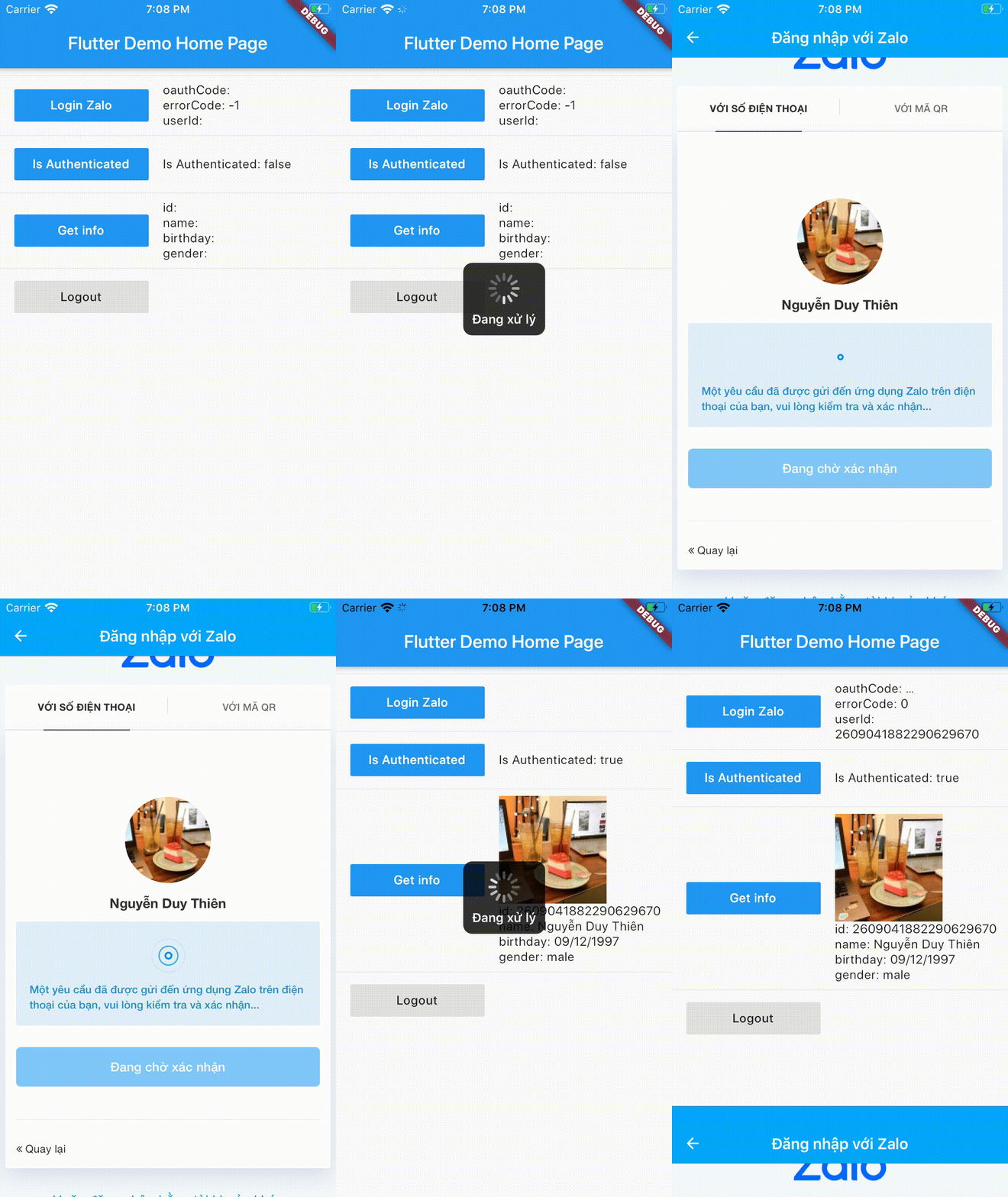
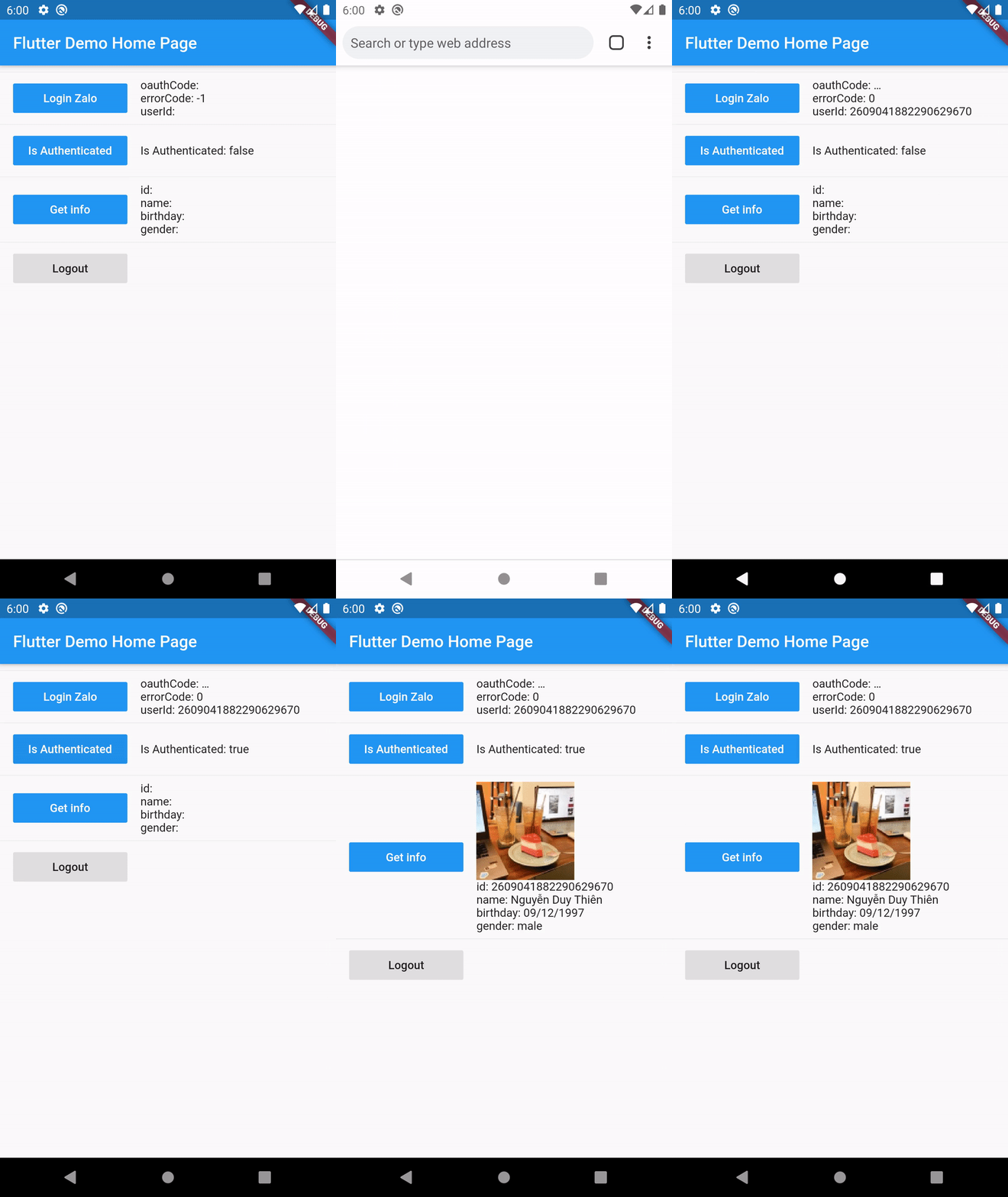
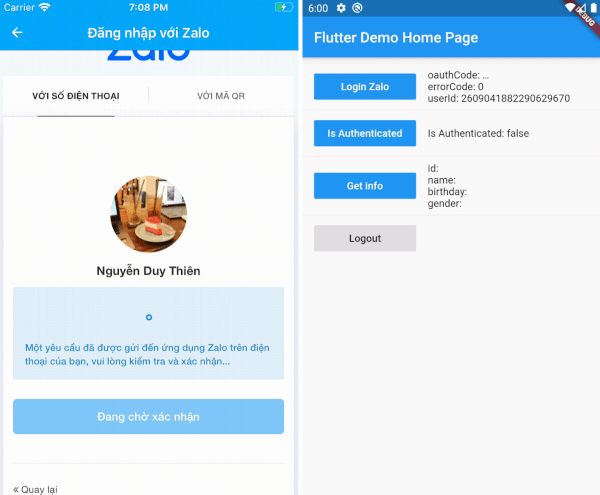
Add this to your package's pubspec.yaml file:
dependencies:
  flutter_zalo_login:
Call init function on initState
ZaloLogin().init();
Login function return type https://pub.dev/documentation/flutter_zalo_login/latest/flutter_zalo_login/ZaloLoginResult-class.html
| Properties | Type |
|---|---|
| userId | String |
| errorCode | int |
| errorMessage | String |
| oauthCode | String |
ZaloLoginResult res = await ZaloLogin().logIn();
Check is authenticated
bool isAuthenticated = await ZaloLogin().isAuthenticated();
Logout
await ZaloLogin().logOut();
Get info from user return type https://pub.dev/documentation/flutter_zalo_login/latest/flutter_zalo_login/ZaloProfileModel-class.html
| Properties | Type |
|---|---|
| id | String |
| name | String |
| birthday | String |
| gender | String |
| picture.data.url | String |
ZaloProfileModel info = await ZaloLogin().getInfo();
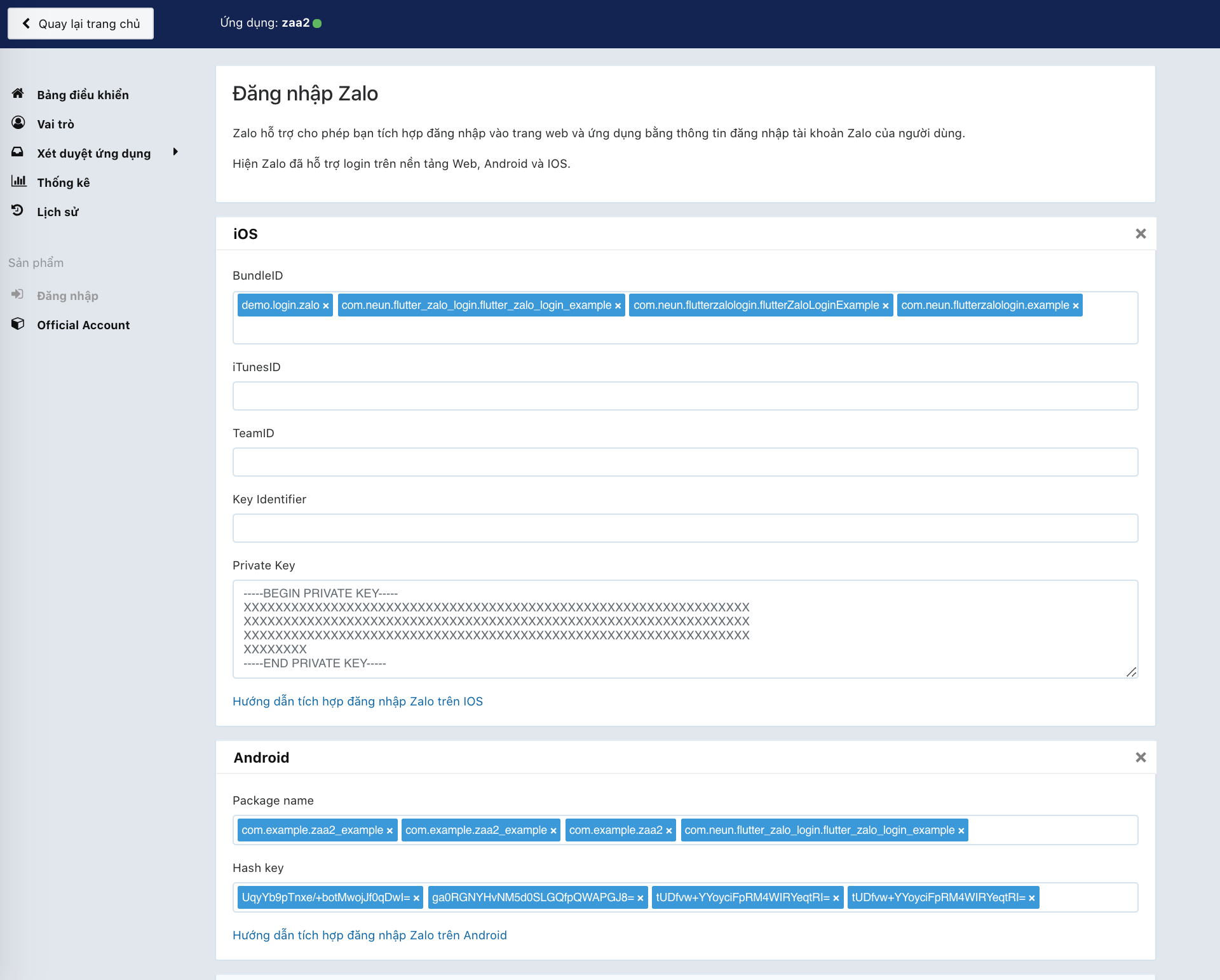
To make this plugin working we need to have there key:
First go to this page: https://developers.zalo.me and create account/new app
It will have 2 value
ID: YOUR_ZALO_APP_ID
Secret Key: YOUR_ZALO_APP_SECRET_KEY
IOS will need
YOUR_ZALO_APP_IDandYOUR_ZALO_APP_SECRET_KEY
Android will need
YOUR_ZALO_APP_IDandHash Key
Android Hash Key will be show on console log when you run ZaloLogin().init(); like below
V/ZaloLogin(28932): ---------------------------------------------------------------------------
V/ZaloLogin(28932): |     Please add this Hash Key to Zalo developers dashboard for Login     |
V/ZaloLogin(28932): tUDfvw+YYoyciFpRM4WIRYeqtRI= <-- YOUR ANDROID HASH CODE
V/ZaloLogin(28932): ---------------------------------------------------------------------------
As of
0.2.0the Android side uses Zalo SDK v4 (me.zalo:sdk-*on Maven Central) with the OAuth PKCE flow, AGP 8, Gradle 8.9 and compileSdk 35. iOS usesZaloSDK ~> 4.1with deployment target 12.0.
Open android/app/build.gradle and edit
minSdkVersion 21 // or bigger
/android/app/src/main/AndroidManifest.xml and add config on bottom under flutterEmbedding block <application
android:name=".FlutterApplication"
android:label="zaa_example"
android:icon="@mipmap/ic_launcher">
<!-- ... -->
<!-- ... -->
<!-- Don't delete the meta-data below.
This is used by the Flutter tool to generate GeneratedPluginRegistrant.java -->
<meta-data
android:name="flutterEmbedding"
android:value="2" />
<!-- ADD HERE -->
<meta-data
android:name="com.zing.zalo.zalosdk.appID"
android:value="@string/appID" />
<activity
android:name="com.zing.zalo.zalosdk.oauth.BrowserLoginActivity">
<intent-filter>
<action android:name="android.intent.action.VIEW"/>
<category android:name="android.intent.category.DEFAULT"/>
<category android:name="android.intent.category.BROWSABLE"/>
<data android:scheme="@string/zalosdk_login_protocol_schema"/>
</intent-filter>
</activity>
<!-- ADD HERE -->
<!-- ... -->
</application>
string.xml file on folder /android/app/src/main/res/values/string.xmland change YOUR_ZALO_APP_ID to your app_id
<?xml version="1.0" encoding="utf-8"?>
<resources>
    <string name="app_name">zaa2</string>
    <string name="appID">YOUR_ZALO_APP_ID</string>
    <string name="zalosdk_app_id">YOUR_ZALO_APP_ID</string>
    <string name="zalosdk_login_protocol_schema">zalo-YOUR_ZALO_APP_ID</string>
</resources>
:warning: Replace package your.app.name with your app's package name. If you don't know your package name, you can find it at the 1st line in MainActivity.kt.
package your.app.name;  // <-- replace this

import io.flutter.app.FlutterApplication;
import io.flutter.plugin.common.PluginRegistry;
import com.zing.zalo.zalosdk.oauth.ZaloSDKApplication;

class MyApplication : FlutterApplication(), PluginRegistry.PluginRegistrantCallback {
  override fun onCreate() {
    super.onCreate();
    ZaloSDKApplication.wrap(this);
  }
  override fun registerWith(registry: PluginRegistry) {}
}
:warning: Replace package your.app.name with your app's package name. If you don't know your package name, you can find it at the 1st line in MainActivity.kt.
package your.app.name;  // <-- replace this

import io.flutter.embedding.android.FlutterActivity
import android.content.Intent
import com.zing.zalo.zalosdk.oauth.ZaloSDK // <-- Add this

class MainActivity: FlutterActivity() {
    override fun onActivityResult(requestCode:Int, resultCode:Int, data:Intent) {
        super.onActivityResult(requestCode, resultCode, data)
        ZaloSDK.Instance.onActivityResult(this, requestCode, resultCode, data) // <-- Add this
    }
}
:warning: MyApplication, MainActivity should be the same with the code have been edit
    <application
        android:name=".MyApplication"
        ...
        <activity
            android:name=".MainActivity"
String hashKey = await ZaloLogin().init();
if project have been setup success it will show like this:
V/ZaloLogin(28932): ---------------------------------------------------------------------------
V/ZaloLogin(28932): |     Please add this Hash Key to Zalo developers dashboard for Login     |
V/ZaloLogin(28932): tUDfvw+YYoyciFpRM4WIRYeqtRI= <-- YOUR ANDROID HASH CODE
V/ZaloLogin(28932): ---------------------------------------------------------------------------
Same with 4. Setup for Android Kotlin
Check folder example/android for java code version of
MyApplication.kt and MainActivity.kt
/ios/Runner/Info.plist and add the following: ...
<key>CFBundleURLTypes</key>
<array>
<dict>
<key>CFBundleTypeRole</key>
<string>Editor</string>
<key>CFBundleURLName</key>
<string>zalo</string>
<key>CFBundleURLSchemes</key>
<array>
<string>zalo-<YOUR_ZALO_APP_ID></string>
</array>
</dict>
</array>
<key>ZaloAppID</key>
<string><YOUR_ZALO_APP_ID></string>
<key>ZaloAppKey</key>
<string><YOUR_ZALO_APP_SECRET_KEY></string>
...
ios/Runner/AppDelegate.swift and add code below: ...
override func application(
_ application: UIApplication,
open url: URL,
sourceApplication: String?,
annotation: Any
) -> Bool {
return ZDKApplicationDelegate.sharedInstance().application(application,
open: url,
sourceApplication: sourceApplication,
annotation: annotation
)
}
@available(iOS 9.0, *)
override func application(
_ app: UIApplication,
open url: URL,
options: [UIApplication.OpenURLOptionsKey : Any] = [:]) -> Bool {
return ZDKApplicationDelegate
.sharedInstance()
.application(app,
open: url as URL?,
sourceApplication: options[UIApplication.OpenURLOptionsKey.sourceApplication] as! String?,
annotation: options[UIApplication.OpenURLOptionsKey.annotation]
)
return false
}
override func application(
_ application: UIApplication,
didFinishLaunchingWithOptions launchOptions: [UIApplication.LaunchOptionsKey: Any]?
) -> Bool {
GeneratedPluginRegistrant.register(with: self)
return super.application(application, didFinishLaunchingWithOptions: launchOptions)
}
ios/Runner/AppDelegate.m:
...

- (BOOL)application:(UIApplication *)application openURL:(nonnull NSURL *)url options:(nonnull NSDictionary<NSString *,id> *)options {
  return [[ZDKApplicationDelegate sharedInstance] application:application openURL:url options:options];
}
TODO: Lấy danh sách bạn bè More info: https://developers.zalo.me/docs/sdk/android-sdk/open-api/lay-danh-sach-ban-be-post-437
TODO: Gửi tin nhắn tới bạn bè More info: https://developers.zalo.me/docs/sdk/android-sdk/open-api/gui-tin-nhan-toi-ban-be-post-1205
TODO: Đăng bài viết More info: https://developers.zalo.me/docs/sdk/android-sdk/open-api/dang-bai-viet-post-1212
TODO: Mời sử dụng ứng dụng More info: https://developers.zalo.me/docs/sdk/android-sdk/open-api/moi-su-dung-ung-dung-post-1218
TODO: Gửi tin nhắn tới bạn bè More info: https://developers.zalo.me/docs/sdk/android-sdk/tuong-tac-voi-app-zalo/gui-tin-nhan-toi-ban-be-post-452 Future shareMessage() async {}
TODO: Đăng bài viết More info: https://developers.zalo.me/docs/sdk/android-sdk/tuong-tac-voi-app-zalo/dang-bai-viet-post-447
निर्भरता सूची 2 आइटम
{"sdk":"flutter"}{"sdk":"flutter"}उपयोग के अनुसार छाँटें, गतिविधि की तुलना करें और अपनाने से पहले मूल प्रोजेक्ट की आवश्यकताएँ जाँचें।
“A repository is the most basic element of GitHub.”
GitHub Docs — About repositories ↗