

 v0.0.8
simple_sidebar
आइकन, पाठ, हेडर और स्मूथिंग के साथ एक बहुत ही सरल साइडबार। आसानी से लागू करें और उपयोग करें
5लाइक 2030-दिन डाउनलोड150Pub अंक
AndroidiOSWebmacOSWindowsLinux
https://pub.dev/packages/simple_sidebar का गितहब रिपोज़िटरी

यह अंग्रेज़ी मूल स्नैपशॉट है। नवीनतम सामग्री GitHub पर देखें।
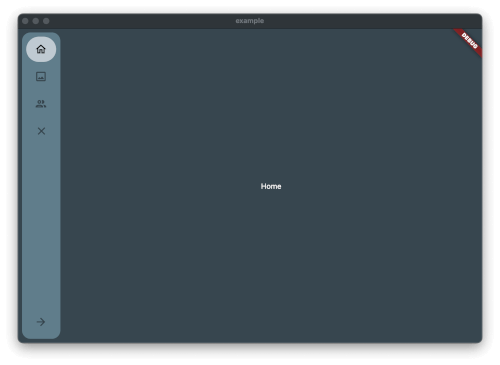
Simple and quick to set up sidebar. Soft animations

Just add the package to pubspec.yaml and start using it.
Create Theme & Controller and List of the Item you want to have in the Sidebar
final SimpleSidebarTheme theme = SimpleSidebarTheme()
    ..expandedShape = const BorderRadius.all(Radius.circular(8))
    ..collapsedShape = const BorderRadius.all(Radius.circular(8));
  final List<SimpleSidebarItem> sidebarItems = [
    SimpleSidebarItem(onTap: () {}, title: "Home", leading: Icons.home_outlined),
    SimpleSidebarItem(onTap: () {}, title: "Gallery", leading: Icons.image_outlined),
    SimpleSidebarItem(onTap: () {}, title: "Users", leading: Icons.group_outlined),
    SimpleSidebarItem(onTap: () {}, title: "Extra long name for a menu item", leading: Icons.list),
  ];
  final List<SimpleSidebarItem> footerItems = [
    SimpleSidebarItem(onTap: () {}, title: "Settings", leading: Icons.settings),
    SimpleSidebarItem(onTap: () {}, title: "Logout", leading: Icons.close),
  ];
After this create the Scaffold with the lists
Scaffold(
  backgroundColor: kcBackground,
  body: Row(
    children: [
      SimpleSidebar(
        theme: widget.theme,
        initialExpanded: true,
        initialIndex: 1,
        childrens: widget.sidebarItems,
        footerItems: widget.footerItems,
        onTap: (value) {
          setState(() {
            selected = value;
          });
          log("selected value $value");
        },
      ),
      Expanded(
        child: AnimatedOpacity(
          opacity: isVisible ? 1 : 0,
          duration: const Duration(milliseconds: 300),
          child: Container(
              margin: const EdgeInsets.all(8),
              child: const <Widget>[
                Text("hallo"),
                Text("hallo2"),
                Text("hallo3"),
                Text("hallo4"),
                Text("hallo5"),
                Text("hallo6"),
              ][selected]),
        ),
      ),
    ],
  ),
);
Should there be any questions, wishes mail me: [Contact](mailto:support@glocknerstudios.at)
create an issue on GitHub for bugs. And now have fun with the sidebar
निर्भरता सूची 4 आइटम
{"sdk":"flutter"}^4.2.0^2.0.0{"sdk":"flutter"}उपयोग के अनुसार छाँटें, गतिविधि की तुलना करें और अपनाने से पहले मूल प्रोजेक्ट की आवश्यकताएँ जाँचें।
“A repository is the most basic element of GitHub.”
GitHub Docs — About repositories ↗