
get_version
वर्जन प्राप्त करें - iOS और Android पर वर्जन नाम, वर्जन कोड, प्लेटफॉर्म और ओएस संस्करण, और एप्प आईडी प्राप्त करें। रखरखावकर्ता: @rodydavis
- स्टार
- 96
- फ़ोर्क
- 59
- अंतिम पुश (UTC)
- 4 अक्टू॰ 2023
- प्रोजेक्ट स्थिति
- सक्रिय
मूल README
यह अंग्रेज़ी मूल स्नैपशॉट है। नवीनतम सामग्री GitHub पर देखें।



get_version
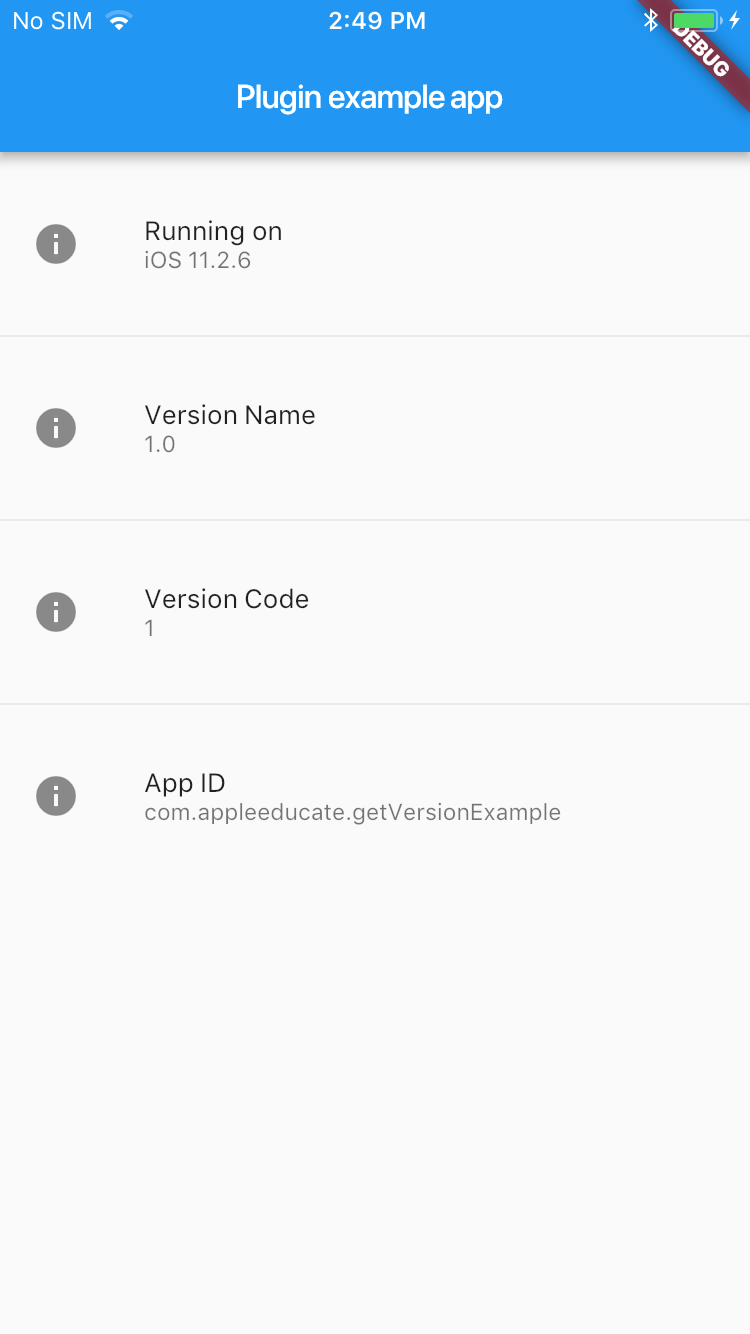
Online Demo: https://fluttercommunity.github.io/get_version/
Description
Get the Version Name, Version Code and App ID on iOS and Android.
Setup
Android
Go to build.gradle and update:
defaultConfig {
  versionCode 1
  versionName "1.0"
  minSdkVersion 16
  testInstrumentationRunner "android.support.test.runner.AndroidJUnitRunner"
}
iOS
Already good to go.
How to Use
Get OS Version:
String platformVersion;
// Platform messages may fail, so we use a try/catch PlatformException.
try {
  platformVersion = await GetVersion.platformVersion;
} on PlatformException {
  platformVersion = 'Failed to get platform version.';
}
Get Version Name:
String projectVersion;
// Platform messages may fail, so we use a try/catch PlatformException.
try {
  projectVersion = await GetVersion.projectVersion;
} on PlatformException {
  projectVersion = 'Failed to get project version.';
}
Get Version Code:
String projectCode;
// Platform messages may fail, so we use a try/catch PlatformException.
try {
  projectCode = await GetVersion.projectCode;
} on PlatformException {
  projectCode = 'Failed to get build number.';
}
Get App ID:
String projectAppID;
// Platform messages may fail, so we use a try/catch PlatformException.
try {
  projectAppID = await GetVersion.appID;
} on PlatformException {
  projectAppID = 'Failed to get app ID.';
}
Get App Name:
String projectName;
// Platform messages may fail, so we use a try/catch PlatformException.
try {
  projectName = await GetVersion.appName;
} on PlatformException {
  projectName = 'Failed to get app name.';
}
Example
import 'package:flutter/material.dart';
import 'package:flutter/services.dart';
import 'package:get_version/get_version.dart';

void main() => runApp(new MyApp());

class MyApp extends StatefulWidget {
  @override
  _MyAppState createState() => new _MyAppState();
}

class _MyAppState extends State<MyApp> {
  String _platformVersion = 'Unknown';
  String _projectVersion = '';
  String _projectCode = '';
  String _projectAppID = '';
  String _projectName = '';

  @override
  initState() {
    super.initState();
    initPlatformState();
  }

  // Platform messages are asynchronous, so we initialize in an async method.
  initPlatformState() async {
    String platformVersion;
    // Platform messages may fail, so we use a try/catch PlatformException.
    try {
      platformVersion = await GetVersion.platformVersion;
    } on PlatformException {
      platformVersion = 'Failed to get platform version.';
    }

    String projectVersion;
    // Platform messages may fail, so we use a try/catch PlatformException.
    try {
      projectVersion = await GetVersion.projectVersion;
    } on PlatformException {
      projectVersion = 'Failed to get project version.';
    }

    String projectCode;
    // Platform messages may fail, so we use a try/catch PlatformException.
    try {
      projectCode = await GetVersion.projectCode;
    } on PlatformException {
      projectCode = 'Failed to get build number.';
    }

    String projectAppID;
    // Platform messages may fail, so we use a try/catch PlatformException.
    try {
      projectAppID = await GetVersion.appID;
    } on PlatformException {
      projectAppID = 'Failed to get app ID.';
    }

    String projectName;
    // Platform messages may fail, so we use a try/catch PlatformException.
    try {
      projectName = await GetVersion.appName;
    } on PlatformException {
      projectName = 'Failed to get app name.';
    }

    // If the widget was removed from the tree while the asynchronous platform
    // message was in flight, we want to discard the reply rather than calling
    // setState to update our non-existent appearance.
    if (!mounted) return;

    setState(() {
      _platformVersion = platformVersion;
      _projectVersion = projectVersion;
      _projectCode = projectCode;
      _projectAppID = projectAppID;
      _projectName = projectName;
    });
  }


  @override
  Widget build(BuildContext context) {
    return new MaterialApp(
      home: new Scaffold(
        appBar: new AppBar(
          title: new Text('Plugin example app'),
        ),
        body: new SingleChildScrollView(
          child: new ListBody(
            children: <Widget>[
              new Container(
                height: 10.0,
              ),
              new ListTile(
                leading: new Icon(Icons.info),
                title: const Text('Name'),
                subtitle: new Text(_projectName),
              ),
              new Container(
                height: 10.0,
              ),
              new ListTile(
                leading: new Icon(Icons.info),
                title: const Text('Running on'),
                subtitle: new Text(_platformVersion),
              ),
              new Divider(
                height: 20.0,
              ),
               new ListTile(
                leading: new Icon(Icons.info),
                title: const Text('Version Name'),
                subtitle: new Text(_projectVersion),
              ),
              new Divider(
                height: 20.0,
              ),
              new ListTile(
                leading: new Icon(Icons.info),
                title: const Text('Version Code'),
                subtitle: new Text(_projectCode),
              ),
              new Divider(
                height: 20.0,
              ),
              new ListTile(
                leading: new Icon(Icons.info),
                title: const Text('App ID'),
                subtitle: new Text(_projectAppID),
              ),
            ],
          ),
        ),
      ),
    );
  }
}

GitHub लेखक
Flutter Community ↗
भाषाएँDartRubySwiftKotlinHTMLShellObjective-C
श्रेणियाँ
उपयोग की गई निर्भरताएँ
निर्भरता सूची 2 आइटम
- flutter
{"sdk":"flutter"} - package_info
^2.0.2
अपने प्रोजेक्ट के लिए रिपॉज़िटरी कैसे चुनें?
उपयोग के अनुसार छाँटें, गतिविधि की तुलना करें और अपनाने से पहले मूल प्रोजेक्ट की आवश्यकताएँ जाँचें।
- नाम, लेखक या विवरण से खोजें और तकनीकी विषय से परिणाम सीमित करें।
- स्टार, फ़ोर्क और हाल के पुश की तुलना करें। स्टार रुचि दर्शाते हैं, गुणवत्ता की गारंटी नहीं।
- उपयोग से पहले GitHub पर README, लाइसेंस और Issues जाँचें।
स्रोत और रखरखाव
“A repository is the most basic element of GitHub.”
GitHub Docs — About repositories ↗