यह अंग्रेज़ी मूल स्नैपशॉट है। नवीनतम सामग्री GitHub पर देखें।
Flutter Gen AI Chat UI
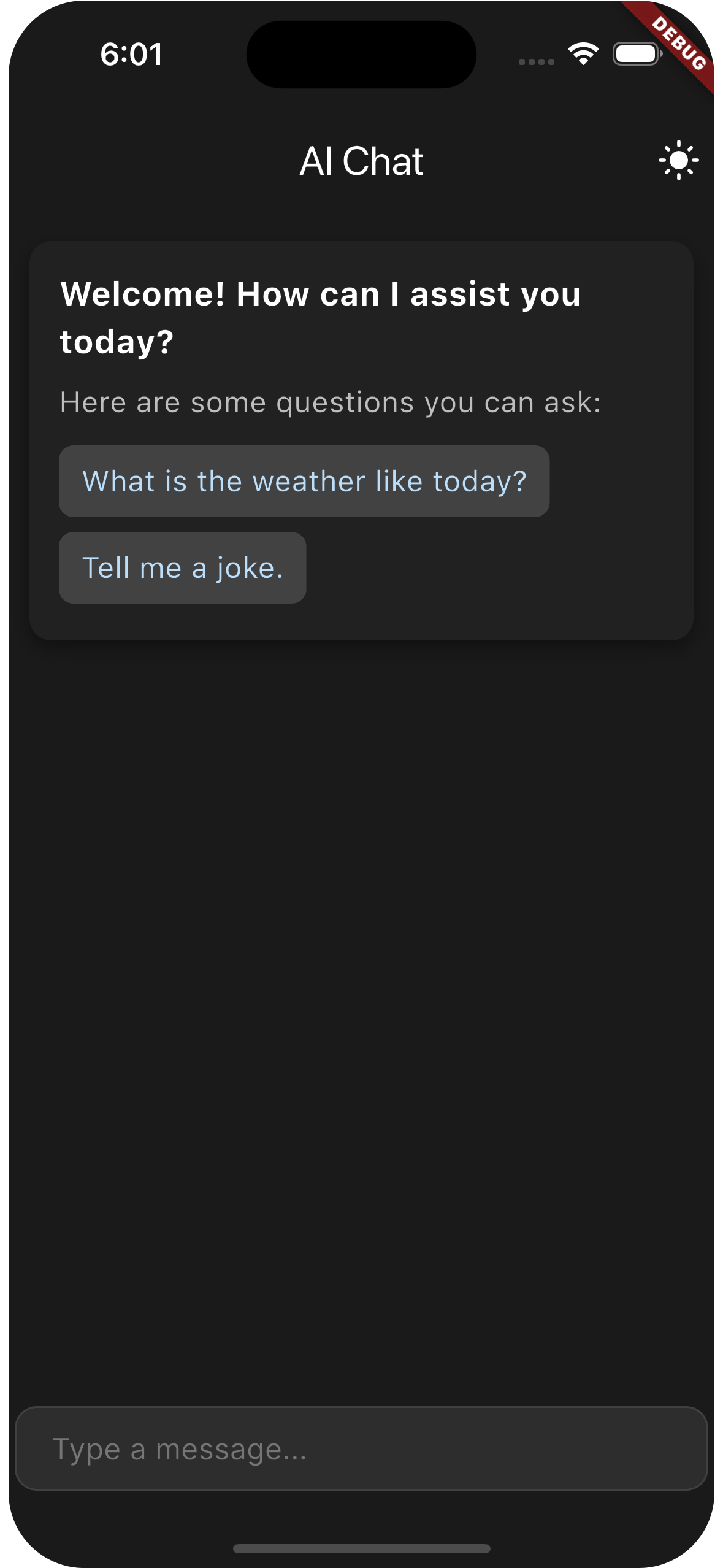
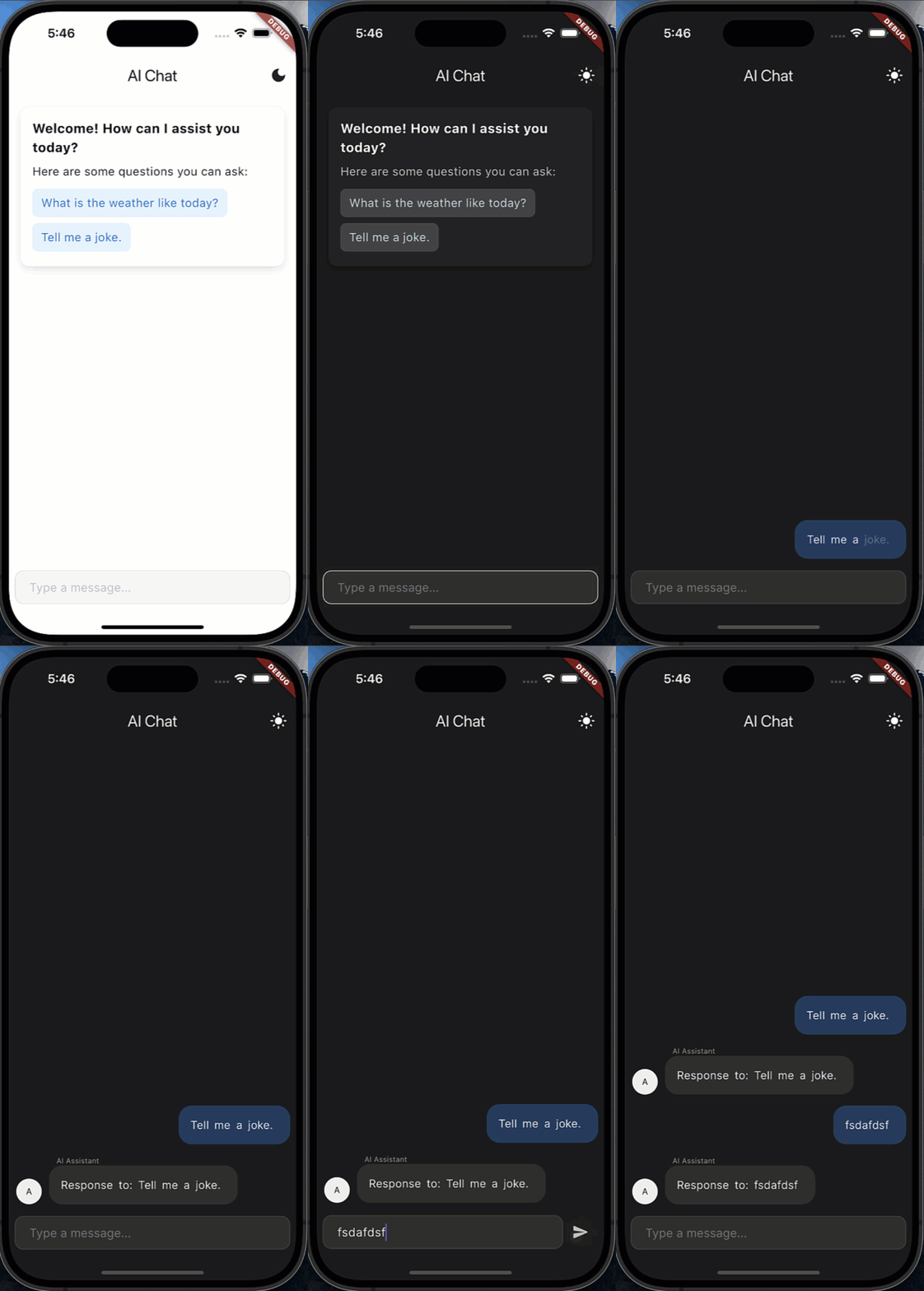
A modern, high-performance Flutter chat UI kit for building beautiful messaging interfaces. Features streaming text animations, markdown support, file attachments, and extensive customization options. Perfect for AI assistants, customer support, team chat, social messaging, and any conversational application.
🚀 Production Ready | 📱 Cross-Platform | ⚡ High Performance | 🎨 Fully Customizable
import'package:flutter_gen_ai_chat_ui/flutter_gen_ai_chat_ui.dart';
classChatScreenextendsStatefulWidget{
@override_ChatScreenStatecreateState() => _ChatScreenState();
}
class_ChatScreenStateextendsState<ChatScreen> {
final _controller = ChatMessagesController();
final _currentUser = ChatUser(id: 'user', firstName: 'User');
final _aiUser = ChatUser(id: 'ai', firstName: 'AI Assistant');
bool _isLoading = false;
@overrideWidgetbuild(BuildContext context) {
returnScaffold(
appBar: AppBar(title: Text('AI Chat')),
body: AiChatWidget(
// Required parameters
currentUser: _currentUser,
aiUser: _aiUser,
controller: _controller,
onSendMessage: _handleSendMessage,
// Optional parameters
loadingConfig: LoadingConfig(isLoading: _isLoading),
inputOptions: InputOptions(
hintText: 'Ask me anything...',
sendOnEnter: true,
),
welcomeMessageConfig: WelcomeMessageConfig(
title: 'Welcome to AI Chat',
questionsSectionTitle: 'Try asking me:',
),
exampleQuestions: [
ExampleQuestion(question: "What can you help me with?"),
ExampleQuestion(question: "Tell me about your features"),
],
),
);
}
Future<void> _handleSendMessage(ChatMessage message) async {
setState(() => _isLoading = true);
try {
// Your AI service logic hereawaitFuture.delayed(Duration(seconds: 1)); // Simulating API call// Add AI response
_controller.addMessage(ChatMessage(
text: "This is a response to: ${message.text}",
user: _aiUser,
createdAt: DateTime.now(),
));
} finally {
setState(() => _isLoading = false);
}
}
}
Why this package?
Three Flutter chat UI packages dominate searches: flutter_gen_ai_chat_ui, flutter_chat_ui, and dash_chat_2. They target different shapes of app. If you have an LLM in the loop, this package was designed for that shape.
Concern
flutter_gen_ai_chat_ui
flutter_chat_ui
dash_chat_2
Word-by-word streaming animation
Built-in
No
No
Markdown + code highlight in messages
Built-in
Manual
Manual
LaTeX / math rendering
Opt-in flag
No
No
Rich inline widget messages (full-width, no bubble)
ChatMessage.rich()
Custom bubble only
No
AI tool-use / function-calling UI
AiActionProvider
No
No
Human-in-the-loop confirmation
Built-in
No
No
Mic/send toggle (ChatGPT-style)
sendOrMicBuilder
No
No
RTL out of the box
Yes
Partial
Partial
AI welcome screen + example questions
Built-in
No
No
Cross-platform incl. desktop hardware Enter
All 6
All 6
Mobile-focused
For general-purpose peer-to-peer chat with no AI features, flutter_chat_ui is a lighter choice. The features above are this package's reason to exist.
Streaming AI responses
ChatGPT/Claude-style word-by-word streaming is built in. It is gated by two flags — both must be on:
enableMarkdownStreaming: true — master gate for the animation pipeline.
streamingWordByWord: true — word-vs-character animation (default is character).
Push an empty message with a stable id, then call updateMessage with a fresh ChatMessage carrying that same id each time your LLM emits a chunk. The controller matches on id and replaces the entry in place.
Try the live web demo → — no install needed, runs the actual example app in your browser. Redeployed automatically on every push to main that touches the package or the example app (see .github/workflows/deploy-web-demo.yml).
Explore all features with our comprehensive example app:
Basic Chat: Simple send & receive, no streaming
Streaming + Markdown: Real-time word-by-word animations with code blocks
Custom Themes: Ocean, Sunset, and Default bubble styles
AI Actions: Calculator, weather, color — function calling with generative UI
Rich Widgets: Weather cards, products, charts rendered inline as bubbles
RTL Chat: Arabic streaming with bidirectional auto-detection
Attachments: File upload button and attached-file rendering (FileUploadOptions)
Voice Input: Mic/send toggle using the VoiceSendButton widget (InputOptions.sendOrMicBuilder)
To run the example app:
cd example/
flutter run
Features
Core Features
🎨 Dark/light mode with adaptive theming
💫 Word-by-word streaming with animations (like ChatGPT and Claude)
📝 Enhanced markdown support with code highlighting for technical content
🎤 Optional speech-to-text integration
📱 Responsive layout with customizable width
🌐 RTL language support for global applications
⚡ High performance message handling for large conversations
📊 Improved pagination support for message history
AI-Specific Features
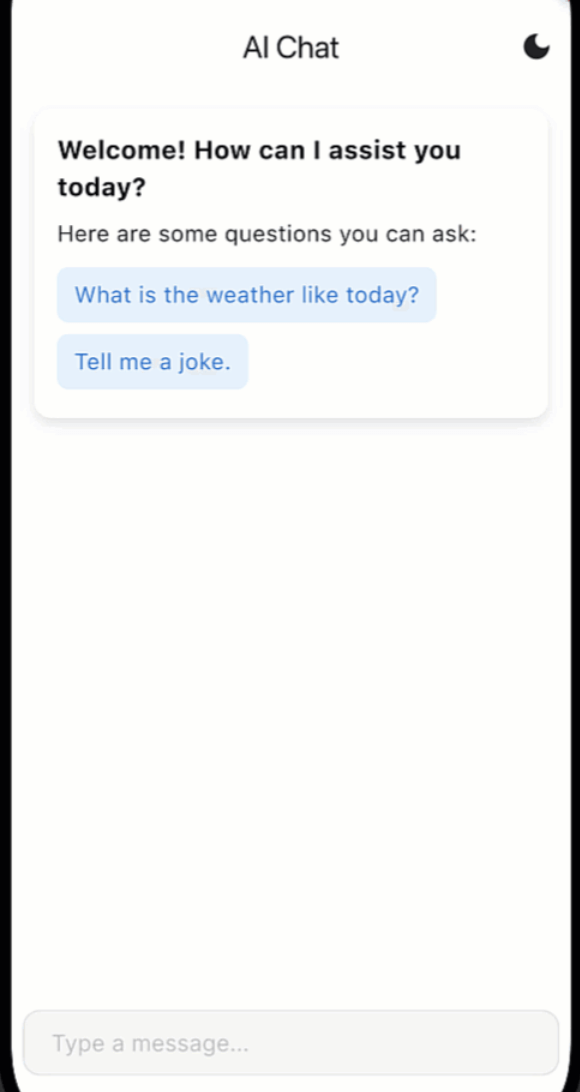
👋 Customizable welcome message similar to ChatGPT and other AI assistants
❓ Example questions component for user guidance
💬 Persistent example questions for better user experience
🔄 AI typing indicators like modern chatbot interfaces
📜 Streaming markdown rendering for code and rich content
🚀 NEW: Rich Widget Messages
🧩 ChatMessage.rich() - Render custom widgets (cards, forms, charts) inline in chat — full-width, no bubble
🎯 Result Renderer Registry - Register builders by type, AI responses auto-render matching widgets
🔧 ChatMessage.widget() - One-off inline widgets without a registry
📦 Zero Config Fallback - Unmatched types fall through to text rendering gracefully
🎤 Input Customization
🎙️ sendOrMicBuilder - Mic/send toggle that auto-switches based on text field empty state (ChatGPT-style)
📎 inputLeadingBuilder - Icons inside the input row, left of text field (attach, mic, etc.)
🖼️ attachmentPreviewBuilder - File/image preview strip above the input area
⬇️ Safe area support - Input respects device home indicator on all paths
⏳ Streaming Loading States
💫 ChatMessage.loading() - Shimmer placeholder that morphs into rich widget via controller.updateMessage()
✋ Human-in-the-Loop - Automatic confirmation dialogs for sensitive operations
📊 Real-time Status - Live updates of action execution progress with animations
🛡️ Type-Safe Parameters - Full validation system with custom validators
🎯 Event Streaming - Track action lifecycle with comprehensive event system
🔧 Error Handling - Rich error management with user-friendly feedback
UI Components
💬 Customizable message bubbles with modern design options
🎨 Custom Bubble Builder for complete message styling control
⌨️ Multiple input field styles (minimal, glassmorphic, custom)
🔄 Loading indicators with shimmer effects
⬇️ Smart scroll management for chat history
🎨 Enhanced theme customization to match your brand
📝 Better code block styling for developers
⚡ Performance & Features
Key Capabilities
✨ Unique Streaming Text: Word-by-word animations like ChatGPT and Claude
📁 Complete File Support: Multi-format, multi-file attachments (images, documents, videos) with a built-in image lightbox and per-file upload progress — see the attachments cookbook recipe
📝 Advanced Markdown: Full support with syntax highlighting for code blocks
🚀 High Performance: Optimized for large conversations (10K+ messages)
🎨 Extensive Theming: Complete customization to match your brand
📱 Cross-Platform: Works on all Flutter-supported platforms
🔗 Backend Agnostic: Compatible with any API or service
⚡ Real-time Ready: Built-in support for live updates
💾 Persistable Threads: Opt-in ChatPersistence hook to restore/save a long-running conversation across app restarts — see the persistence cookbook recipe
Performance Benchmarks
Message Rendering: 60 FPS with 1000+ messages
Memory Efficiency: Optimized for large conversations
Startup Time: <100ms initialization
Streaming Speed: Configurable 10-100ms per word
Web / WebAssembly
Builds and runs cleanly under Flutter's --wasm web compile target (flutter build web --wasm) — no dart:html/dart:js legacy interop or other wasm-incompatible APIs in this package. CI builds the example app with --wasm on every push so a regression is caught immediately (.github/workflows/ci.yml, wasm-build job).
🌟 Works Great With
AI Services: OpenAI, Anthropic Claude, Google Gemini, Llama, Mistral — see the cookbook's provider-wiring recipes for copy-pasteable streaming snippets (OpenAI, Anthropic, Gemini, Ollama)
The package ships first-class support for right-to-left scripts (Arabic, Hebrew, Persian, Urdu, Kurdish) — no extra dependency, no extra widget.
Locale-aware layout — wrap the chat in Directionality(textDirection: TextDirection.rtl, ...) (or rely on your app's Localizations) and every surface mirrors: input row, send button, scroll, bubble alignment, copy button.
Per-message bidi auto-detect — each bubble's TextDirection is inferred from its content (Arabic chars → RTL, ASCII → LTR), so mixed conversations render correctly in a single thread without per-message config.
Arabic word-splitting for streaming — word-by-word streaming animates by whole Arabic words, not by code points (powered by flutter_streaming_text_markdown 1.7.0+).
Markdown still works — headings, code blocks, blockquotes, tables all render bidi-correctly inside RTL bubbles.
AiChatWidget(
// Required parameters
currentUser: ChatUser(...), // The current user
aiUser: ChatUser(...), // The AI assistant
controller: ChatMessagesController(), // Message controller
onSendMessage: (message) { // Message handler// Handle user messages here
},
// ... optional parameters
)
Optional Parameters
AiChatWidget(
// ... required parameters// Message display options
messages: [], // Optional list of messages (if not using controller)
messageOptions: MessageOptions(...), // Message bubble styling
messageListOptions: MessageListOptions(...), // Message list behavior// Input field customization
inputOptions: InputOptions(...), // Input field styling and behavior
readOnly: false, // Whether the chat is read-only// AI-specific features
exampleQuestions: [ // Suggested questions for usersExampleQuestion(question: 'What is AI?'),
],
persistentExampleQuestions: true, // Keep questions visible after welcome
enableAnimation: true, // Enable message animations
enableMarkdownStreaming: true, // Enable streaming text (FIXED in v2.4.2+)
streamingWordByWord: false, // Control word-by-word vs character animation
streamingDuration: Duration(milliseconds: 30), // Stream speed
welcomeMessageConfig: WelcomeMessageConfig(...), // Welcome message styling// Loading states
loadingConfig: LoadingConfig( // Loading configuration
isLoading: false,
showCenteredIndicator: true,
),
// Pagination
paginationConfig: PaginationConfig( // Pagination configuration
enabled: true,
reverseOrder: true, // Newest messages at bottom
),
// Layout
maxWidth: 800, // Maximum width
padding: EdgeInsets.all(16), // Overall padding// Scroll behavior
scrollBehaviorConfig: ScrollBehaviorConfig(
// Control auto-scrolling behavior
autoScrollBehavior: AutoScrollBehavior.onUserMessageOnly,
// Scroll to first message of a response instead of the last (for long responses)
scrollToFirstResponseMessage: true,
// Hold the start of a streaming answer at the top of the viewport (2.16.0+)
pinDuringStreaming: StreamingPinAnchor.responseStart,
),
// Custom bubble styling lives in messageOptions. Use `bubbleBuilder` to wrap// the default bubble, or `customBubbleBuilder` (3-arg) to replace it entirely.
messageOptions: MessageOptions(
bubbleBuilder: (context, message, isCurrentUser, defaultBubble) {
returnContainer(
decoration: BoxDecoration(
borderRadius: BorderRadius.circular(12),
boxShadow: [
BoxShadow(
color: Colors.black.withValues(alpha: 0.1),
blurRadius: 4,
offset: constOffset(0, 2),
),
],
),
child: defaultBubble, // wrap the default, or return your own UI
);
},
),
)
Input Field Customization
The package offers multiple ways to style the input field:
Default Input
InputOptions(
// Basic properties
sendOnEnter: true,
// Focus behavior (NEW in v2.4.2+)
autofocus: true, // Automatically focus the input field
focusNode: myFocusNode, // Custom focus node for external control// Styling
textStyle: TextStyle(...),
decoration: InputDecoration(...),
)
Minimal Input
InputOptions.minimal(
  hintText: 'Ask a question...',
  textColor: Colors.black,
  hintColor: Colors.grey,
  backgroundColor: Colors.white,
  borderRadius: 24.0,
  autofocus: true,        // Available in factory constructors too
  focusNode: myFocusNode, // Custom focus node support
)
Always-Visible Send Button Without Focus Issues (version 2.0.4+)
The send button is now hardcoded to always be visible by design, regardless of text content. This removes the need for an explicit setting and ensures a consistent experience across the package.
By default:
The send button is always shown regardless of text input
Focus is maintained when tapping outside the input field
The keyboard's send button is disabled by default to prevent focus issues on mobile
// Configure input options to ensure a consistent typing experienceInputOptions(
// Prevent losing focus when tapping outside
unfocusOnTapOutside: false,
// Use newline for Enter key to prevent keyboard focus issues on mobile.// Hardware Enter on desktop/web still sends — see "Enter key behavior" below.
textInputAction: TextInputAction.newline,
)
Enter key behavior (version 2.11.1+)
With sendOnEnter: true (the default), pressing Enter on a hardware keyboard sends the message. This works on macOS, Windows, Linux, web, and on iOS/Android devices with an attached physical keyboard.
Enter — sends the current message.
Shift+Enter — inserts a newline (ChatGPT/Claude style).
Numpad Enter — sends.
During CJK / IME composition, Enter commits the composition instead of sending.
Set sendOnEnter: false to disable; Enter then always inserts a newline.
Stop / cancel generating (version 2.12.0+)
Provide an onCancelGenerating callback and the send button automatically turns into a stop button whenever loadingConfig.isLoading is true. The package doesn't run the generation itself, so the callback is where you cancel your own stream / HTTP request.
The stop button only appears when onCancelGenerating != nullandisLoading == true. Otherwise the normal send button is shown.
Send-on-Enter (hardware and soft keyboard) is suppressed while the stop button is visible, so users can't queue a new message behind the in-flight one.
Customize the button with InputOptions(stopButtonIcon: ..., stopButtonColor: ...), or replace it entirely with InputOptions(cancelButtonBuilder: (onCancel) => ...).
See example/lib/examples/streaming_chat.dart for a full working implementation.
Scroll Behavior Configuration
Control how the chat widget scrolls when new messages are added:
// Default configuration with manual parametersScrollBehaviorConfig(
// When to auto-scroll (one of: always, onNewMessage, onUserMessageOnly, never)
autoScrollBehavior: AutoScrollBehavior.onUserMessageOnly,
// Fix for long responses: scroll to first message of response instead of the last message// This prevents the top part of long AI responses from being pushed out of view
scrollToFirstResponseMessage: true,
// Customize animation
scrollAnimationDuration: Duration(milliseconds: 300),
scrollAnimationCurve: Curves.easeOut,
// 2.16.0+: hold the start of the answer (or the user's question) at the top// of the viewport WHILE the answer streams — see the use case below
pinDuringStreaming: StreamingPinAnchor.responseStart,
)
// Or use convenient preset configurations:ScrollBehaviorConfig.smooth() // Smooth easeInOutCubic curveScrollBehaviorConfig.bouncy() // Bouncy elasticOut curveScrollBehaviorConfig.fast() // Quick scrolling with minimal animationScrollBehaviorConfig.decelerate() // Starts fast, slows downScrollBehaviorConfig.accelerate() // Starts slow, speeds up
Use Case: Preventing Long Responses from Auto-Scrolling
When an AI returns a long response in multiple parts, scrollToFirstResponseMessage ensures users see the beginning of the response rather than being automatically scrolled to the end. This is crucial for readability, especially with complex information.
For optimal scroll behavior with long responses:
Mark the first message in a response with 'isStartOfResponse': true
Link related messages in a chain using a shared 'responseId' property
Set scrollToFirstResponseMessage: true in your configuration
Use Case: Reading a Long Answer While It Streams (pinDuringStreaming)
scrollToFirstResponseMessage acts once the answer has finished. For a single long
answer that is still streaming, the classic behaviour is that the bottom of the list
keeps following the new text, so the beginning scrolls out of view and you have to
wait for the end to start reading. pinDuringStreaming (2.16.0+) fixes that:
ScrollBehaviorConfig(
// responseStart: hold the first line of the answer at the top of the viewport// userMessage: hold your own question there instead, so Q and A read together
pinDuringStreaming: StreamingPinAnchor.responseStart,
)
What the reader sees:
They send a question and the list scrolls to it as usual.
The answer starts streaming and the list follows it — until the anchor (the
start of the answer, or the question) reaches the top of the viewport.
From then on the anchor is held there; new text arrives below the fold and the
scroll-to-bottom button appears.
Any scroll gesture, or a tap on the scroll-to-bottom button, hands control back
to the reader for the rest of that answer. In a reverse (newest-at-bottom) list the
text they are reading also stays still while more chunks arrive, instead of being
pushed upwards.
When the stream ends nothing jumps — the reader stays where they are.
The default is StreamingPinAnchor.none (unchanged behaviour). The pin arms whenever a
message streams: addMessage/updateMessage with 'isStreaming': true, or
addStreamingMessage + updateMessage + stopStreamingMessage.
Message Bubble Customization
MessageOptions(
// Basic options
showTime: true,
showUserName: true,
// Timestamp styling. `timeTextStyle` applies to both bubbles; the per-bubble// overrides (2.12.0+) take precedence when set — handy when a colored user// bubble makes the shared timestamp hard to read.
timeTextStyle: constTextStyle(fontSize: 11, color: Colors.grey),
userTimeTextStyle: constTextStyle(fontSize: 11, color: Colors.white70),
aiTimeTextStyle: constTextStyle(fontSize: 11, color: Colors.black45),
// Styling
bubbleStyle: BubbleStyle(
userBubbleColor: Colors.blue.withOpacityCompat(0.1),
aiBubbleColor: Colors.white,
userNameColor: Colors.blue.shade700,
aiNameColor: Colors.purple.shade700,
bottomLeftRadius: 22,
bottomRightRadius: 22,
enableShadow: true,
),
)
Custom Bubble Builder
Create completely custom message bubbles with full control over styling and behavior:
Apply a ChatGPT/Claude/Gemini-style look with one line, via a CustomThemeExtension on your app's ThemeData — no need to set colors on every individual AiChatWidget:
MaterialApp(
  theme: ThemeData(
    extensions: [CustomThemeExtension.chatgpt()], // or .claude() / .gemini()
  ),
  // For dark mode: CustomThemeExtension.chatgpt(dark: true)
  home: MyChatScreen(),
)
Two more presets derive their colors from your app's existing ColorScheme instead of a fixed brand palette — handy when you want a theme-consistent look without picking your own bubble colors:
CustomThemeExtension sets chatBackground, messageBubbleColor/userBubbleColor/messageTextColor, inputBackgroundColor/inputBorderColor/inputTextColor/hintTextColor, and sendButtonColor/backToBottomButtonColor — all consulted only when the more specific BubbleStyle/MessageOptions/InputOptions value is left unset, so any explicit per-widget color you already set keeps winning. Build a fully custom one with CustomThemeExtension(chatBackground: ..., messageBubbleColor: ..., ...).
🚀 AI Actions System
Transform your chat into a powerful AI agent platform! The AI Actions System allows your AI to execute real functions, display rich results, and maintain human oversight - taking your chat beyond simple text exchanges.
⚡ Quick Start with AI Actions
import'package:flutter_gen_ai_chat_ui/flutter_gen_ai_chat_ui.dart';
classMyAiChatextendsStatefulWidget{
@override_MyAiChatStatecreateState() => _MyAiChatState();
}
class_MyAiChatStateextendsState<MyAiChat> {
lateChatMessagesController _controller;
@overrideWidgetbuild(BuildContext context) {
returnAiActionProvider(
config: AiActionConfig(
actions: [
// Define what your AI can doAiAction(
name: 'calculate',
description: 'Perform mathematical calculations',
parameters: [
ActionParameter.number(name: 'a', description: 'First number', required: true),
ActionParameter.number(name: 'b', description: 'Second number', required: true),
ActionParameter.string(
name: 'operation',
description: 'Math operation',
required: true,
enumValues: ['add', 'subtract', 'multiply', 'divide']
),
],
handler: (params) async {
final a = params['a'] asnum;
final b = params['b'] asnum;
final op = params['operation'] asString;
double result;
switch (op) {
case'add': result = a + b; break;
case'subtract': result = a - b; break;
case'multiply': result = a * b; break;
case'divide': result = a / b; break;
default: throw'Unknown operation';
}
returnActionResult.createSuccess({
'result': result,
'equation': '$a$op$b = $result'
});
},
// Custom UI for results
render: (context, status, params, {result, error}) {
if (status == ActionStatus.completed && result?.data != null) {
returnCard(
child: Padding(
padding: EdgeInsets.all(16),
child: Text(
result!.data['equation'],
style: TextStyle(fontSize: 18, fontWeight: FontWeight.bold),
),
),
);
}
returnSizedBox.shrink();
},
),
],
),
child: AiChatWidget(
// Your existing chat configuration
currentUser: currentUser,
aiUser: aiUser,
controller: _controller,
onSendMessage: _handleMessage,
),
);
}
void_handleMessage(ChatMessage message) {
// Add user message
_controller.addMessage(message);
// Simulate AI deciding to use an actionif (message.text.contains('calculate')) {
_executeCalculation(message.text);
}
}
void_executeCalculation(String userMessage) async {
final actionHook = AiActionHook.of(context);
// AI parses user message and calls actionfinal result = await actionHook.executeAction('calculate', {
'a': 15,
'b': 3,
'operation': 'multiply'
});
// Add AI response with result
_controller.addMessage(ChatMessage(
text: result.success ?
'I calculated that for you: ${result.data['equation']}' :
'Sorry, calculation failed: ${result.error}',
user: aiUser,
));
}
}
// Convert actions to OpenAI function formatfinal actionHook = AiActionHook.of(context);
final functions = actionHook.getActionsForFunctionCalling();
// Send to OpenAI with functionsfinal response = await openAI.createChatCompletion(
messages: messages,
functions: functions,
functionCall: 'auto',
);
// Execute function if AI wants to call oneif (response.functionCall != null) {
final result = await actionHook.handleFunctionCall(
response.functionCall.name,
json.decode(response.functionCall.arguments),
);
}
Custom AI Integration
void_processAIMessage(String userMessage) async {
// Your AI logic decides which action to callif (_shouldCalculate(userMessage)) {
final actionHook = AiActionHook.of(context);
// Extract parameters from user messagefinal params = _parseCalculationParams(userMessage);
// Execute actionfinal result = await actionHook.executeAction('calculate', params);
// Show result in chat
_controller.addMessage(ChatMessage(
text: 'Result: ${result.data}',
user: aiUser,
));
}
}
🛡️ Security & Best Practices
Parameter Validation: All inputs are validated before execution
User Confirmation: Sensitive actions require explicit user approval
Error Isolation: Failed actions don't crash your app
Timeout Protection: Long-running actions can be cancelled
Type Safety: Full Dart type checking for all parameters
Event Auditing: Complete log of all action executions
📚 Examples Included
The package includes complete working examples:
Weather Actions - API calls with rich UI display
Calculator Actions - Mathematical operations with validation
Unit Converter - Type conversions with error handling
AI Integration - Pattern matching and function calling
Run the example app to see AI Actions in action:
cd example/
flutter run
🎯 Showcase
Featured Apps Using This Package
AI Customer Support Bot - SaaS company with 10K+ daily conversations
Educational Tutor App - Language learning with interactive chat
Healthcare Assistant - HIPAA-compliant patient communication
E-commerce Support - Real-time shopping assistance
Gaming Guild Chat - Team communication with file sharing
Fixed Streaming Animation Disable: The enableAnimation: false, enableMarkdownStreaming: false, and streamingWordByWord: false parameters now work correctly. Previously, markdown messages would always stream regardless of these settings.
Added Focus Control: New autofocus and focusNode support in InputOptions for better input field control.
InputOptions(
  autofocus: true,          // Auto-focus input on widget load
  focusNode: myFocusNode,   // External focus control
)
Enhanced Factory Constructors: InputOptions.minimal() and InputOptions.glassmorphic() now support the new focus parameters.
What Developers Say
"The streaming text animation is incredibly smooth and the file attachment system saved us weeks of development." - Sarah Chen, Senior Flutter Developer
"Best chat UI package I've used. The performance with large message lists is outstanding." - Ahmed Hassan, Mobile Team Lead
"Finally, a chat package that actually works well for AI applications. The streaming feature is exactly what we needed." - Maria Rodriguez, Product Manager
Made with ❤️ by the Flutter community | Star ⭐ this repo if it helped you!









 v2.22.0