
scroll_to_animate_tab
ishafiul/scroll_to_animate_tab open-source repository details.

- स्टार
- 3
- फ़ोर्क
- 1
- अंतिम पुश (UTC)
- 10 अप्रैल 2026
- प्रोजेक्ट स्थिति
- सक्रिय
मूल README
यह अंग्रेज़ी मूल स्नैपशॉट है। नवीनतम सामग्री GitHub पर देखें।
scroll_to_animate_tab
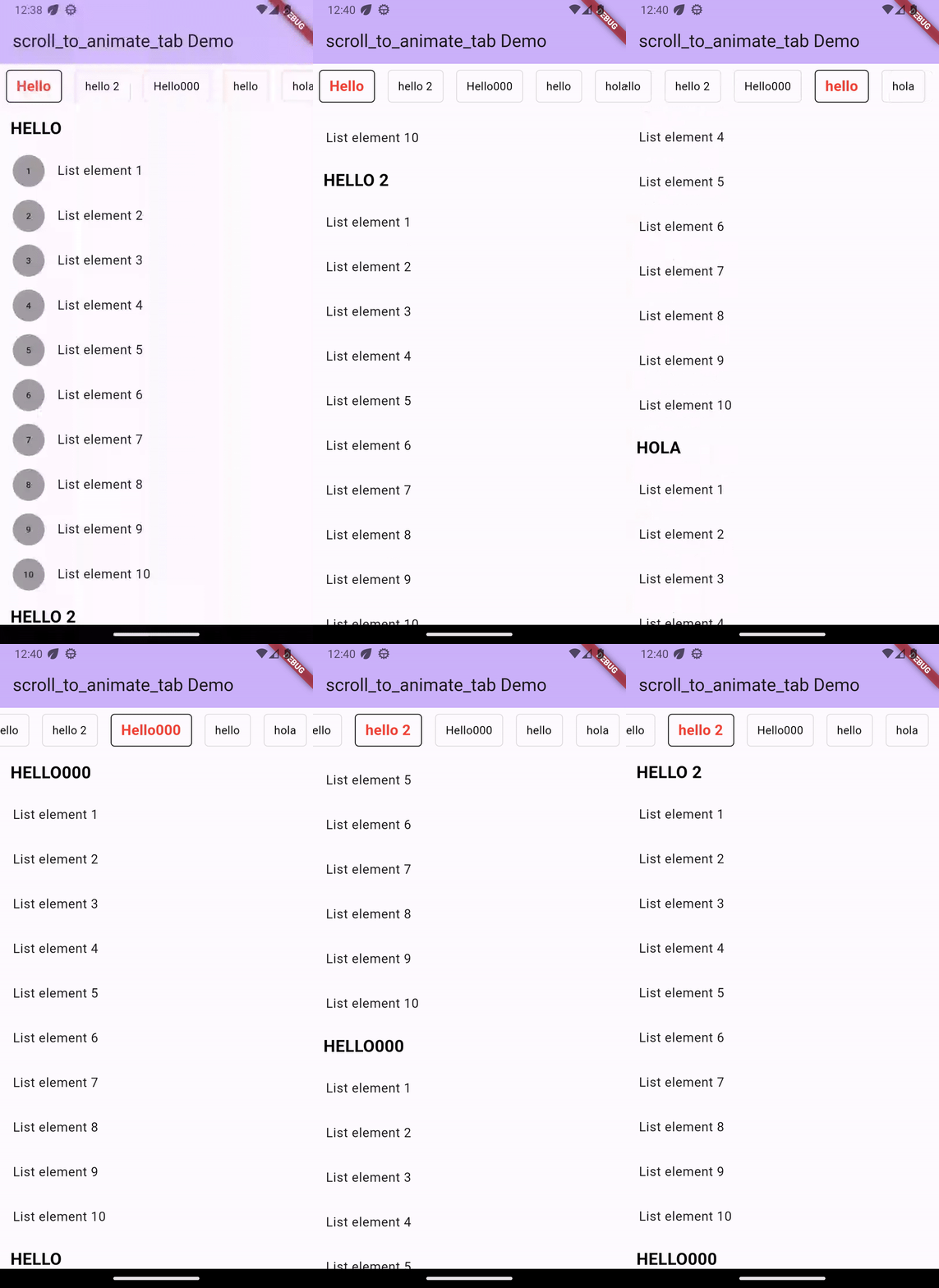
A Flutter widget that is customizable and syncs the ScrollView with the tabs. Create distinct tabs that are coordinated with the internal ScrollView. The tabs come after the index of the scroll view.
Demo
Installation
Add dependency for package on your pubspec.yaml:
    dependencies:
	    scroll_to_animate_tab: latest
or
flutter pub add scroll_to_animate_tab
API
ScrollToAnimateTab
| Parameter | Definition |
|---|---|
List<ScrollableList> tabs |
List of tabs to be rendered |
double tabHeight |
Height of the tab at the top of the view |
Duration? tabAnimationDuration |
[Optional] Duration of tab change animation |
Duration? bodyAnimationDuration |
[Optional] Duration of tab change animation |
Curve? tabAnimationCurve |
[Optional] Animation curve used when animating tab change |
Curve? bodyAnimationCurve |
[Optional] Animation curve used when changing index of inner [ScrollView]s |
Color? backgroundColor |
[Optional] This property will help you to change the background color of tab bar |
TabDecoration? activeTabDecoration |
[Optional] Change active tab decoration |
TabDecoration? inActiveTabDecoration |
[Optional] Change inactive tab decoration |
TabDecoration
| Parameter | Definition |
|---|---|
| TextStyle textStyle | TextStyle for tab label |
| Decoration? decoration | decoration for tabs |
ScrollableList
| Parameter | Definition |
|---|---|
| String label | A String for tab label and as headline of [ScrollableList.body] |
| Widget? bodyLabelDecoration | A widget label for decorate body widget. by default its a Text widget as context [ScrollableList.label] with color: Colors.black,fontWeight: FontWeight.bold,fontSize: 21 |
| Widget body | A single widget in the scrollable tab list. You can use [Column] or any single scrollable widget. If you want to use [ScrollView] ([ListView]) then we suggest make sure that [body] is created with [ScrollView.shrinkWrap] = true and [ScrollView.physics] = [NeverScrollableScrollPhysics]. |
inside this [TabDecoration], it gives us textStyle property which is required that helps us to
change tab label style and other is optional named decoration property which helps us to decorate
our tab.
How to use
Basic Example ->
ScrollToAnimateTab(
    activeTabDecoration: TabDecoration(
        textStyle: const TextStyle(
          color: Colors.red, fontWeight: FontWeight.bold, fontSize: 18),
        decoration: BoxDecoration(
            border: Border.all(color: Colors.black),
            borderRadius: const BorderRadius.all(Radius.circular(5))
        )
    ),
    inActiveTabDecoration: TabDecoration(
        textStyle: const TextStyle(color: Colors.black),
        decoration: BoxDecoration(
            border: Border.all(color: Colors.black12),
            borderRadius: const BorderRadius.all(Radius.circular(5))
        )
    ),
    tabs: [
        ScrollableList(
            label: "Hello",
            body: ListView.builder(
                shrinkWrap: true,
                physics: const NeverScrollableScrollPhysics(),
                itemCount: 10,
                itemBuilder: (_, index) => ListTile(
                title: Text('List element ${index + 1}'),
                ),
            )
        ),
        ScrollableList(
            label: "hello 2",
            body: Column(
                children: List.generate(
                    10,
                    (index) => ListTile(
                    title: Text('List element ${index + 1}'),
            )),
            )
        ),
  ]
)

Safiul islam ↗
उपयोग की गई निर्भरताएँ
निर्भरता सूची 5 आइटम
- flutter
{"sdk":"flutter"} - scrollable_positioned_list
^0.3.8 - flutter_testडेवलपमेंट
{"sdk":"flutter"} - mocktailडेवलपमेंट
^0.3.0 - very_good_analysisडेवलपमेंट
^5.0.0
अपने प्रोजेक्ट के लिए रिपॉज़िटरी कैसे चुनें?
उपयोग के अनुसार छाँटें, गतिविधि की तुलना करें और अपनाने से पहले मूल प्रोजेक्ट की आवश्यकताएँ जाँचें।
- नाम, लेखक या विवरण से खोजें और तकनीकी विषय से परिणाम सीमित करें।
- स्टार, फ़ोर्क और हाल के पुश की तुलना करें। स्टार रुचि दर्शाते हैं, गुणवत्ता की गारंटी नहीं।
- उपयोग से पहले GitHub पर README, लाइसेंस और Issues जाँचें।
स्रोत और रखरखाव
“A repository is the most basic element of GitHub.”
GitHub Docs — About repositories ↗