
v10.0.0
bloc_test
एक परीक्षण लाइब्रेरी जो bloc के परीक्षण करना आसान बनाती है। bloc अवस्था प्रबंधन पैकेज के साथ उपयोग करने के लिए बनाया गया है।
668लाइक 12.2 लाख30-दिन डाउनलोड160Pub अंक
AndroidiOSWebmacOSWindowsLinux
सरल लेकिन शक्तिशाली, ओपन-सोर्स SpaceX लॉन्च ट्रैकर।

एक परीक्षण लाइब्रेरी जो bloc के परीक्षण करना आसान बनाती है। bloc अवस्था प्रबंधन पैकेज के साथ उपयोग करने के लिए बनाया गया है।
ब्लॉक (व्यावसायिक लॉजिक कंपोनेंट) डिज़ाइन पैटर्न को लागू करने में आसानी से उपयोग करने वाले Flutter विजेट। ब्लॉक राज्य प्रबंधन पैकेज के साथ उपयोग करने के लिए बनाया गया है।
bloc राज्य प्रबंधन लाइब्रेरी का एक विस्तार जो स्वचालित रूप से ब्लॉक राज्यों को स्थायी रूप से संग्रहीत और पुनर्स्थापित करता है।
 v1.1.1
होम स्क्रीन पर शॉर्टकट बनाने के लिए फ्लटर प्लगइन, जिसे iOS पर क्विक एक्शन और एंड्रॉइड पर ऐप शॉर्टकट के रूप में भी जाना जाता है।
मॉकिटो के प्रभाव में एक मॉक फ्रेमवर्क जिसमें फेक, मॉक, व्यवहार सत्यापन और स्टबिंग के लिए एपीआई हैं।
 v2.0.12
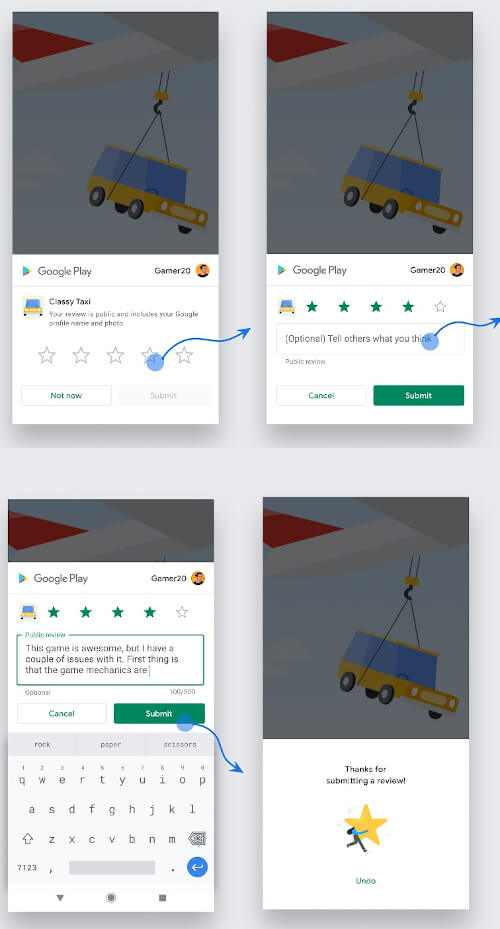
Android, iOS और MacOS पर इन-एप रिव्यू/सिस्टम रेटिंग पॉप-अप दिखाने के लिए Flutter प्लगइन। यह उपयोगकर्ताओं को आपके ऐप को रेट करने में आसानी प्रदान करता है।
Dart और Flutter प्रोजेक्ट्स के लिए एक विचारधारा-आधारित, समुदाय-चलित लिंट नियमों का सेट। pedantic की तरह लेकिन अधिक कठोर
Flutter के लिए i18n आसान। flutter_i18n के साथ, आप केवल एक सरल .json, .xml, .yaml या .toml फ़ाइल का उपयोग करके अपने ऐप को अंतरराष्ट्रीय बना सकते हैं!
प्रत्येक प्लेटफॉर्म के डिफ़ॉल्ट कैलेंडर में इवेंट जोड़ने के लिए एक वास्तव में सरल Flutter प्लगइन।
एक फ्लटर प्लगइन प्रोजेक्ट जो च्रोम कस्टम टैब्स और SFSafariViewController के साथ वेब पेज खोलता है।
आपके ऐप में कस्टम सर्च अनुभव बनाने का तेज़ और आसान तरीका
 v0.10.1
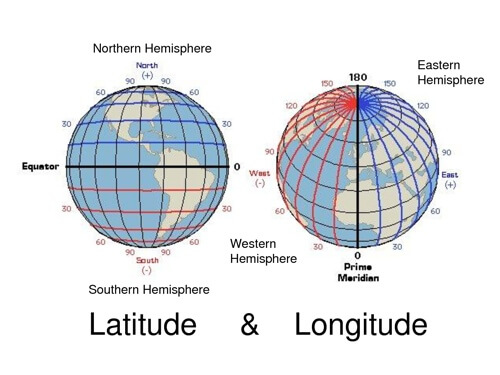
सामान्य अक्षांश और देशांतर की गणना के लिए हल्का लाइब्रेरी
{"sdk":"flutter"}^2.1.0^2.0.0^3.1.0^0.3.1^1.2.1^4.0.0^2.1.0^2.0.3^7.0.1^0.30.0^8.2.0^0.6.2^0.2.0^0.22.0^1.1.6^0.15.0^2.1.0^7.0.1^2.0.2^0.8.0^1.6.0^1.0.3^0.6.0+6^0.2.5^2.0.1^2.0.0^2.1.4^1.0.0^0.1.3{"sdk":"flutter"}^8.0.2^0.9.0^1.2.0^5.0.10यह अंग्रेज़ी मूल स्नैपशॉट है। नवीनतम सामग्री GitHub पर देखें।
https://raw.githubusercontent.com/jesusrp98/spacex-go/master/screenshots/icon.png
https://img.shields.io/github/license/jesusrp98/spacex-go.svg?style=for-the-badge https://img.shields.io/github/stars/jesusrp98/spacex-go.svg?style=for-the-badge https://img.shields.io/badge/Donate-PayPal-blue.svg?style=for-the-badge https://img.shields.io/badge/Support-Patreon-orange.svg?style=for-the-badge https://img.shields.io/badge/Google-PlayStore-green.svg?style=for-the-badge
The purpose of this project is to develop the ultimate SpaceX experience in a variety of platforms. A single experience, from a single codebase.
From the start, SpaceX GO! has been developed to be light-weight, fast and easy to use. It takes all the data from the open-source r/SpaceX REST API, which can be found here.
This project has been built using the Flutter framework, which allows to build an app for mobile, desktop & web, from a single codebase.
https://raw.githubusercontent.com/jesusrp98/spacex-go/master/screenshots/0.jpg https://raw.githubusercontent.com/jesusrp98/spacex-go/master/screenshots/1.jpg https://raw.githubusercontent.com/jesusrp98/spacex-go/master/screenshots/2.jpg
First, clone the repository with the 'clone' command, or just download the zip.
$ git clone git@github.com:jesusrp98/spacex-go.git
Then, download either Android Studio or Visual Studio Code, with their respective Flutter editor plugins. For more information about Flutter installation procedure, check the official install guide.
Install dependencies from pubspec.yaml by running flutter packages get from the project root (see using packages documentation for details and how to do this in the editor).
There you go, you can now open & edit the project. Enjoy!
If you want to take the time to make this project better, please read the contributing guides first. Then, you can open an new issue, of a pull request.
This project is licensed under the GNU GPL v3 License - see the LICENSE.md file for details.