
 v3.0.0
country_currency_pickers
देश, कोड, झंडे, मुद्रा और उन्हें चुनने के कई तरीके आपकी सेवा में हैं... एक विजेट के दूर...
39लाइक 1.3 हज़ार30-दिन डाउनलोड150Pub अंक
AndroidiOSWebmacOSWindowsLinux
देश, कोड, झंडे और उन्हें चुनने के कई तरीके आपके सेवा में... एक विजेट के दूर...

{"sdk":"flutter"}{"sdk":"flutter"}यह अंग्रेज़ी मूल स्नैपशॉट है। नवीनतम सामग्री GitHub पर देखें।
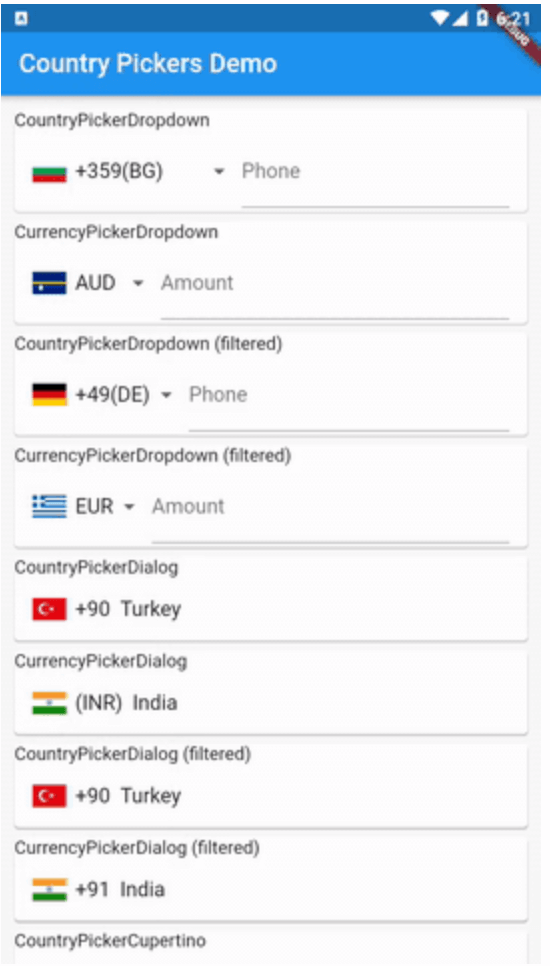
Countries, codes, flags, currency and several way of picking them at your service...one widget away...
https://raw.githubusercontent.com/learnpainless/country_currency_pickers/HEAD/art/cp.gif
 CountryPickerDropdown(
            initialValue: 'tr',
            itemBuilder: _buildDropdownItem,
            onValuePicked: (Country country) {
              print("${country.name}");
            },
          ),
 Widget _buildDropdownItem(Country country) => Container(
        child: Row(
          children: <Widget>[
            CountryPickerUtils.getDefaultFlagImage(country),
            SizedBox(
              width: 8.0,
            ),
            Text("+${country.phoneCode}(${country.isoCode})"),
          ],
        ),
      );
 CurrencyPickerDropdown(
            initialValue: 'INR',
            itemBuilder: _buildCurrencyDropdownItem,
            onValuePicked: (Country country) {
              print("${country.name}");
            },
          ),
 Widget _buildCurrencyDropdownItem(Country country) => Container(
        child: Row(
          children: <Widget>[
            CountryPickerUtils.getDefaultFlagImage(country),
            SizedBox(
              width: 8.0,
            ),
            Text("${country.currencyCode}"),
          ],
        ),
      );
void _openCountryPickerDialog() => showDialog(
        context: context,
        builder: (context) => Theme(
            data: Theme.of(context).copyWith(primaryColor: Colors.pink),
            child: CountryPickerDialog(
                titlePadding: EdgeInsets.all(8.0),
                searchCursorColor: Colors.pinkAccent,
                searchInputDecoration: InputDecoration(hintText: 'Search...'),
                isSearchable: true,
                title: Text('Select your phone code'),
                onValuePicked: (Country country) =>
                    setState(() => _selectedDialogCountry = country),
                itemBuilder: _buildDialogItem)),
      );
void _openCurrencyPickerDialog() => showDialog(
        context: context,
        builder: (context) => Theme(
            data: Theme.of(context).copyWith(primaryColor: Colors.pink),
            child: CurrencyPickerDialog(
                titlePadding: EdgeInsets.all(8.0),
                searchCursorColor: Colors.pinkAccent,
                searchInputDecoration: InputDecoration(hintText: 'Search...'),
                isSearchable: true,
                title: Text('Select your Currency'),
                onValuePicked: (Country country) =>
                    setState(() => _selectedDialogCountry = country),
                itemBuilder: _buildCurrencyDialogItem)),
      );
 void _openCupertinoCountryPicker() => showCupertinoModalPopup<void>(
      context: context,
      builder: (BuildContext context) {
        return CountryPickerCupertino(
          pickerSheetHeight: 300.0,
          onValuePicked: (Country country) =>
              setState(() => _selectedCupertinoCountry = country),
        );
      });
 void _openCupertinoCurrencyPicker() => showCupertinoModalPopup<void>(
      context: context,
      builder: (BuildContext context) {
        return CurrencyPickerCupertino(
          pickerSheetHeight: 300.0,
          onValuePicked: (Country country) =>
              setState(() => _selectedCupertinoCountry = country),
        );
      });
Forked from country_pickers repo. Thanks goes to country-flags repo for the flag image assets. Learn Pain Less | Code Academy (learn to code)