
 v0.1.1
cool_nav
वास्तव में अद्भुत और आसान उपयोग के नीचे नेविगेशन बार।
54लाइक 8830-दिन डाउनलोड150Pub अंक
AndroidiOSWebmacOSWindowsLinux
वास्तव में अद्भुत और आसान उपयोग के नीचे नेविगेशन बार।
यह अंग्रेज़ी मूल स्नैपशॉट है। नवीनतम सामग्री GitHub पर देखें।


A collection of really awesome, easy to use BottomNavigationBars
Add this to your package's pubspec.yaml file:
---
dependencies:
  cool_nav: ^0.1.1
Now in your Dart code, you can use:
import 'package:cool_nav/cool_nav.dart';

Based on design made by Sanchita Agarwal.
An easy to use and customizable Bottom Navigation Bar. You can customize the colors as well provide a custom Gradient for the spotlight.
Usage
Scaffold(
    // ...
    bottomNavigationBar: SpotlightBottomNavigationBar(
        items: [
          SpotlightBottomNavigationBarItem(icon: Icons.smartphone),
          SpotlightBottomNavigationBarItem(icon: Icons.laptop_mac),
          SpotlightBottomNavigationBarItem(icon: Icons.desktop_mac),
        ],
        currentIndex: currentIndex,
        selectedItemColor: Colors.cyan,
        onTap: _onTap,
    ),
)
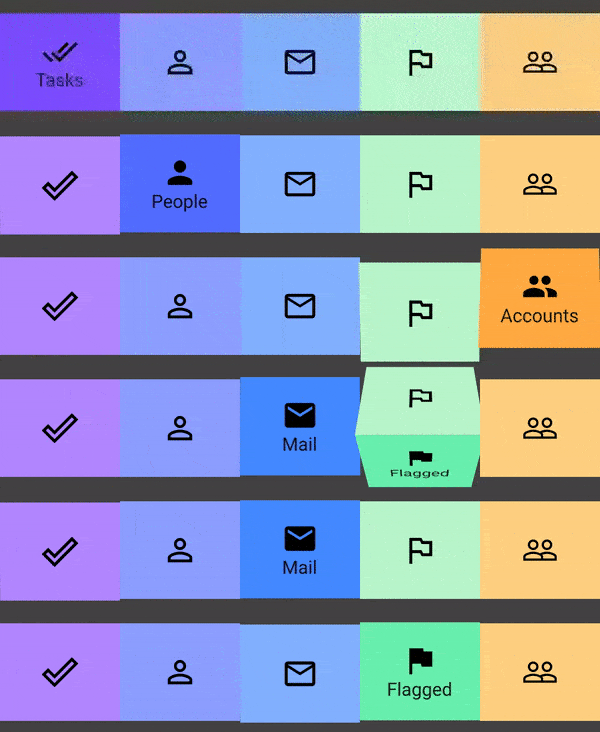
An easy to use and customizable Bottom Navigation Bar. You can customize the selected and unselected Icons and background Colors for the tiles.
Usage
Scaffold(
    // ...
    bottomNavigationBar: FlipBoxNavigationBar(
          currentIndex: currentIndex,
          verticalPadding: 20.0,
          items: <FlipBoxNavigationBarItem>[
            FlipBoxNavigationBarItem(
              name: 'Tasks',
              selectedIcon: Icons.done_all,
              selectedBackgroundColor: Colors.deepPurpleAccent[200],
              unselectedBackgroundColor: Colors.deepPurpleAccent[100],
            ),
            FlipBoxNavigationBarItem(
              name: 'People',
              selectedIcon: Icons.person,
              unselectedIcon: Icons.person_outline,
              selectedBackgroundColor: Colors.indigoAccent[200],
              unselectedBackgroundColor: Colors.indigoAccent[100],
            ),
            FlipBoxNavigationBarItem(
              name: 'Mail',
              selectedIcon: Icons.mail,
              unselectedIcon: Icons.mail_outline,
              selectedBackgroundColor: Colors.blueAccent[200],
              unselectedBackgroundColor: Colors.blueAccent[100],
            ),
          ]
    ),
)
Refer here for an example.
More Awesome Navigation Bars will be added in the future.
View the example folder to see more examples.

निर्भरता सूची 2 आइटम
{"sdk":"flutter"}{"sdk":"flutter"}उपयोग के अनुसार छाँटें, गतिविधि की तुलना करें और अपनाने से पहले मूल प्रोजेक्ट की आवश्यकताएँ जाँचें।
“A repository is the most basic element of GitHub.”
GitHub Docs — About repositories ↗