
AwesomeButton
यह फ्लटर के लिए एक पूर्व-निर्मित बटन है जिसमें अद्भुत दिखावट है।

- स्टार
- 8
- फ़ोर्क
- 2
- अंतिम पुश (UTC)
- 21 अग॰ 2019
- प्रोजेक्ट स्थिति
- सक्रिय
मूल README
यह अंग्रेज़ी मूल स्नैपशॉट है। नवीनतम सामग्री GitHub पर देखें।
AwesomeButton
This is a pre-built button for flutter with an awesome look.
Installation
Add the awesome_button to your dependencies in your pubspec.yaml.
awesome_button: ^1.0.2
Usage
Import the AwesomeButton.dart using this line below.
import 'package:awesome_button/awesome_button.dart';
Add the AwesomeButton widget to your widget tree and provide your parameter to it, like examples below.
Example
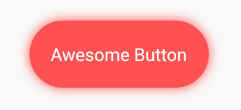
AwesomeButton(
  blurRadius: 10.0,
  splashColor: Color.fromRGBO(255, 255, 255, .4),
  borderRadius: BorderRadius.circular(37.5),
  height: 75.0,
  width: 200.0,
  onTap: () => print("tapped"),
  color: Colors.redAccent,
  child: Text(
    "Awesome Button",
    style: TextStyle(
      color: Colors.white,
      fontSize: 20.0,
    ),
  ),
),

AwesomeButton(
  blurRadius: 10.0,
  splashColor: Color.fromRGBO(255, 255, 255, .4),
  borderRadius: BorderRadius.circular(50.0),
  height: 100.0,
  width: 100.0,
  onTap: () => print("tapped"),
  color: Colors.greenAccent,
  child: Icon(
    Icons.account_circle,
    color: Colors.white,
    size: 50.0,
  ),
),
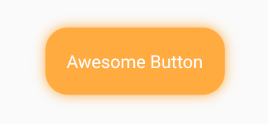
AwesomeButton(
  blurRadius: 10.0,
  splashColor: Color.fromRGBO(255, 255, 255, .4),
  borderRadius: BorderRadius.circular(25.0),
  height: 75.0,
  width: 200.0,
  onTap: () => print("tapped"),
  color: Colors.orangeAccent,
  child: Text(
    "Awesome Button",
    style: TextStyle(
      color: Colors.white,
      fontSize: 20.0,
    ),
   ),
),

GitHub लेखक
Millian ↗
भाषाएँDart
अपने प्रोजेक्ट के लिए रिपॉज़िटरी कैसे चुनें?
उपयोग के अनुसार छाँटें, गतिविधि की तुलना करें और अपनाने से पहले मूल प्रोजेक्ट की आवश्यकताएँ जाँचें।
- नाम, लेखक या विवरण से खोजें और तकनीकी विषय से परिणाम सीमित करें।
- स्टार, फ़ोर्क और हाल के पुश की तुलना करें। स्टार रुचि दर्शाते हैं, गुणवत्ता की गारंटी नहीं।
- उपयोग से पहले GitHub पर README, लाइसेंस और Issues जाँचें।
स्रोत और रखरखाव
“A repository is the most basic element of GitHub.”
GitHub Docs — About repositories ↗