
 v1.0.1
carousel_nerdzlab
कस्टम PageView के साथ किनारे से किनारे तत्व और केंद्रित संरेखण
0लाइक 4830-दिन डाउनलोड150Pub अंक
AndroidiOSWebmacOSWindowsLinux
कस्टम PageView के साथ किनारे से किनारे तत्व और केंद्रित संरेखण
यह अंग्रेज़ी मूल स्नैपशॉट है। नवीनतम सामग्री GitHub पर देखें।
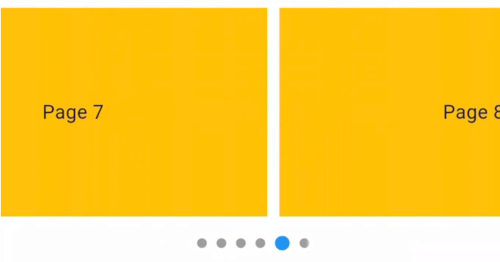
This package provides a custom implementation of the CenteredPageView widget that behaves like the default PageView, but with padEnds: false while centered elements, and an optional dot indicator.
Package CenteredPageView. Items snap to a centered position.
Default PageView. Elements align based on scroll position but are not centered.
CenteredPageView widget that centers items while retaining the default properties of the PageView.CenteredPageView.Here's how to implement CenteredPageView in your Flutter app:
CenteredPageView.builder(
  itemCount: 9,
  controller: PageController(viewportFraction: 0.8),
  showIndicator: true, // Set to 'false' if you do not want to display the dot indicator
  indicatorStyle: const IndicatorStyle(
      indicatorWidth: 100, unselectedSize: Size(8, 8)),
  itemBuilder: (context, index) => Container(
      width: MediaQuery.of(context).size.width,
      margin: const EdgeInsets.symmetric(horizontal: 5.0),
      padding: const EdgeInsets.symmetric(horizontal: 16),
      decoration: const BoxDecoration(color: Colors.amber),
      child: Align(
        child: Text(
          'Page $index',
          style: const TextStyle(fontSize: 16.0),
        ),
      )),
),
Customizing the Dot Indicator
showIndicator property is a boolean that controls the visibility of the dot indicator.indicatorStyle property allows you to customize the appearance of the dot indicator.
निर्भरता सूची 3 आइटम
{"sdk":"flutter"}{"sdk":"flutter"}^4.0.0उपयोग के अनुसार छाँटें, गतिविधि की तुलना करें और अपनाने से पहले मूल प्रोजेक्ट की आवश्यकताएँ जाँचें।
“A repository is the most basic element of GitHub.”
GitHub Docs — About repositories ↗