

v1.0.1
dashed_container
Flutter के लिए एक डैश्ड कंटेनर प्लगइन, आपके विजेट्स के लिए डैश्ड लाइन को आसानी से लागू करें।
15लाइक 7930-दिन डाउनलोड25Pub अंक
प्लेटफ़ॉर्म डेटा नहीं
Flutter के लिए एक डैश्ड कंटेनर प्लगइन, आपके विजेट्स के लिए आसानी से डैश्ड लाइन का उपयोग करें

यह अंग्रेज़ी मूल स्नैपशॉट है। नवीनतम सामग्री GitHub पर देखें।
A Dashed Container plugin for Flutter, easy to implement dashed line for your widgets
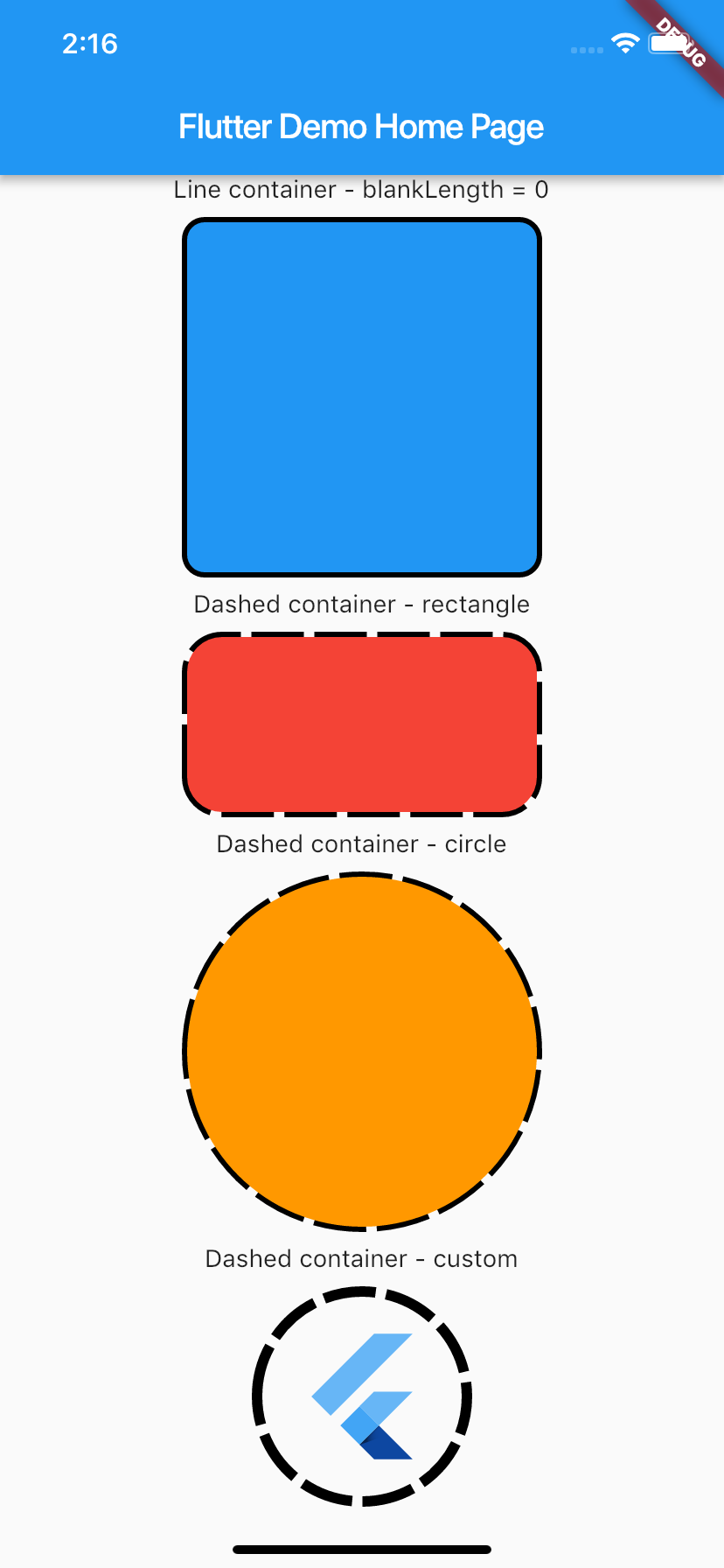
To use plugin, just import package import 'package:dashed_container/dashed_container.dart';
You can check example directory to know how to use it like the demo image.
    import 'package:flutter/material.dart';
    import 'package:dashed_container/dashed_container.dart';

    void main() => runApp(MyApp());

    class MyApp extends StatelessWidget {
      @override
      Widget build(BuildContext context) {
        return MaterialApp(
          title: 'Flutter Demo',
          theme: ThemeData(
            primarySwatch: Colors.blue,
          ),
          home: MyHomePage(title: 'Flutter Demo Home Page'),
        );
      }
    }

    class MyHomePage extends StatefulWidget {
      MyHomePage({Key key, this.title}) : super(key: key);

      final String title;

      @override
      _MyHomePageState createState() => _MyHomePageState();
    }

    class _MyHomePageState extends State<MyHomePage> {
      @override
      Widget build(BuildContext context) {
        return Scaffold(
          appBar: AppBar(title: Text(widget.title)),
          body: SingleChildScrollView(
            child: Center(
              child: Column(
                mainAxisSize: MainAxisSize.max,
                crossAxisAlignment: CrossAxisAlignment.center,
                mainAxisAlignment: MainAxisAlignment.center,
                children: <Widget>[
                  Text('Line container - blankLength = 0'),
                  _buildSpace(),
                  DashedContainer(
                    child: Container(
                      height: 200.0,
                      width: 200.0,
                      decoration: BoxDecoration(color: Colors.blue, borderRadius: BorderRadius.circular(10.0)),
                    ),
                    dashColor: Colors.black,
                    borderRadius: 10.0,
                    dashedLength: 30.0,
                    blankLength: 0.0,
                    strokeWidth: 6.0,
                  ),
                  _buildSpace(),
                  Text('Dashed container - rectangle'),
                  _buildSpace(),
                  DashedContainer(
                    child: Container(
                      height: 100.0,
                      width: 200.0,
                      decoration: BoxDecoration(color: Colors.red, borderRadius: BorderRadius.circular(20.0)),
                    ),
                    dashColor: Colors.black,
                    borderRadius: 20.0,
                    dashedLength: 30.0,
                    blankLength: 6.0,
                    strokeWidth: 6.0,
                  ),
                  _buildSpace(),
                  Text('Dashed container - circle'),
                  _buildSpace(),
                  DashedContainer(
                    child: Container(
                      height: 200.0,
                      width: 200.0,
                      decoration: BoxDecoration(color: Colors.orange, shape: BoxShape.circle),
                    ),
                    dashColor: Colors.black,
                    boxShape: BoxShape.circle,
                    dashedLength: 30.0,
                    blankLength: 6.0,
                    strokeWidth: 6.0,
                  ),
                  _buildSpace(),
                  Text('Dashed container - custom'),
                  _buildSpace(),
                  DashedContainer(
                    child: Padding(
                      padding: const EdgeInsets.all(20.0),
                      child: FlutterLogo(
                        size: 80,
                      ),
                    ),
                    dashColor: Colors.black,
                    boxShape: BoxShape.circle,
                    dashedLength: 30.0,
                    blankLength: 6.0,
                    strokeWidth: 6.0,
                  ),
                  _buildSpace(),
                ],
              ),
            ),
          ),
        );
      }

      Widget _buildSpace() {
        return SizedBox(height: 10.0);
      }
    }
निर्भरता सूची 2 आइटम
{"sdk":"flutter"}{"sdk":"flutter"}उपयोग के अनुसार छाँटें, गतिविधि की तुलना करें और अपनाने से पहले मूल प्रोजेक्ट की आवश्यकताएँ जाँचें।
“A repository is the most basic element of GitHub.”
GitHub Docs — About repositories ↗