
flutter_statusbarcolor
एक पैकेज आपकी फ्लटर ऐप के स्टेटसबार या नेविगेशनबार के रंग को कार्यक्रमानुसार बदलने में मदद कर सकता है।

- स्टार
- 11
- फ़ोर्क
- 43
- अंतिम पुश (UTC)
- 13 अक्टू॰ 2024
- प्रोजेक्ट स्थिति
- सक्रिय
मूल README
यह अंग्रेज़ी मूल स्नैपशॉट है। नवीनतम सामग्री GitHub पर देखें।
flutter_statusbarcolor_ns

The package now supports to android v2 embedding, thanks to vixez
A package can help you to change your flutter app's statusbar's color or navigationbar's color programmatically.
This is a fork of the original package flutter_statusbarcolor migrated to support null-safety.
Getting Started
// change the status bar color to material color [green-400]
await FlutterStatusbarcolor.setStatusBarColor(Colors.green[400]);
if (useWhiteForeground(Colors.green[400])) {
  FlutterStatusbarcolor.setStatusBarWhiteForeground(true);
} else {
  FlutterStatusbarcolor.setStatusBarWhiteForeground(false);
}

// change the navigation bar color to material color [orange-200]
await FlutterStatusbarcolor.setNavigationBarColor(Colors.orange[200]);
if (useWhiteForeground(Colors.orange[200]) {
  FlutterStatusbarcolor.setNavigationBarWhiteForeground(true);
} else {
  FlutterStatusbarcolor.setNavigationBarWhiteForeground(false);
}

// get statusbar color and navigationbar color
Color statusbarColor = await FlutterStatusbarcolor.getStatusBarColor();
Color navigationbarColor = await FlutterStatusbarcolor.getNavigationBarColor();
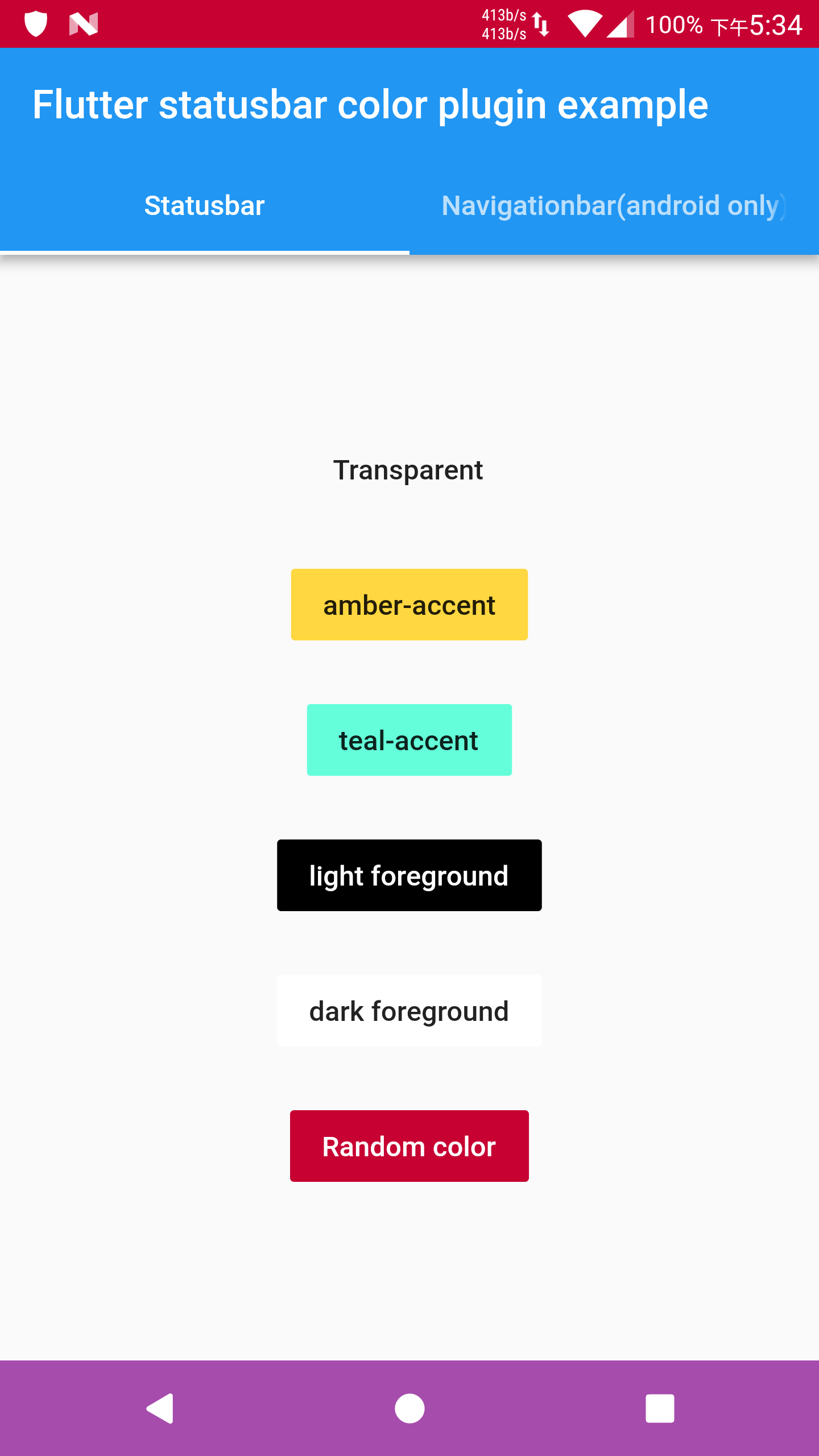
Details in example/ folder.
Api level minimum requirement
-
Android
- getStatusBarColor (5.0)
- setStatusBarColor (5.0)
- setStatusBarWhiteForeground (6.0)
- getNavigationBarColor (5.0)
- setNavigationBarColor (5.0)
- setNavigationBarWhiteForeground (8.0)
-
iOS
- getStatusBarColor (7+)
- setStatusBarColor (7+)
- setStatusBarWhiteForeground (7+)
Note that
- If you find the foreground brightness reverted after changing the app lifecycle, please use flutter's WidgetsBindingObserver mixin.
- If iOS build does not work, please send issues or pull requests.

GitHub लेखक
Sameer Kashyap ↗
भाषाएँDartKotlinObjective-CRubySwift
श्रेणियाँ
उपयोग की गई निर्भरताएँ
निर्भरता सूची 1 आइटम
- flutter
{"sdk":"flutter"}
अपने प्रोजेक्ट के लिए रिपॉज़िटरी कैसे चुनें?
उपयोग के अनुसार छाँटें, गतिविधि की तुलना करें और अपनाने से पहले मूल प्रोजेक्ट की आवश्यकताएँ जाँचें।
- नाम, लेखक या विवरण से खोजें और तकनीकी विषय से परिणाम सीमित करें।
- स्टार, फ़ोर्क और हाल के पुश की तुलना करें। स्टार रुचि दर्शाते हैं, गुणवत्ता की गारंटी नहीं।
- उपयोग से पहले GitHub पर README, लाइसेंस और Issues जाँचें।
स्रोत और रखरखाव
“A repository is the most basic element of GitHub.”
GitHub Docs — About repositories ↗