
 v0.0.7
fade_scroll_app_bar
आप एक बड़ा appbar बना सकते हैं और स्वाइप करके एक सुचारू फेड प्रभाव बना सकते हैं।
40लाइक 46230-दिन डाउनलोड130Pub अंक
AndroidiOSWebmacOSWindowsLinux
sametcilingir/fadescrollappbar open-source repository details.

{"sdk":"flutter"}{"sdk":"flutter"}^1.0.0यह अंग्रेज़ी मूल स्नैपशॉट है। नवीनतम सामग्री GitHub पर देखें।
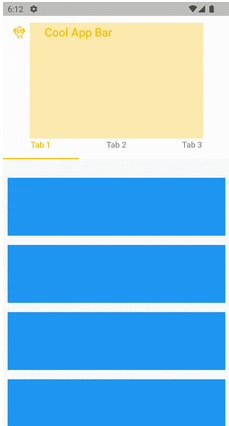
With this package, you can create a large appbar and make a smooth fade effect by swiping.
App Screenshot 0 App Screenshot 1 App Screenshot 2
First you should create ScrollController.
final ScrollController _scrollController = ScrollController();
And adding in it.
FadeScrollAppBar(
        scrollController: _scrollController,
        appBarLeading: Icon(Icons.flutter_dash_outlined),
        appBarTitle: Text('Cool App Bar'),
        appBarForegroundColor: Colors.amber,
        pinned: true,
        fadeOffset: 120,
        expandedHeight: 250,
        backgroundColor: Colors.white,
        fadeWidget: Column(
          mainAxisAlignment: MainAxisAlignment.center,
          crossAxisAlignment: CrossAxisAlignment.start,
          children: [
            Text("Really Good App Bar",
                style: Theme.of(context).textTheme.headline2?.copyWith(
                      color: Colors.black,
                    )),
          ],
        ),
        bottomWidgetHeight: 40,
        bottomWidget: Row(
          mainAxisAlignment: MainAxisAlignment.center,
          children: [
            Chip(
              label: Text("Great"),
              backgroundColor: Colors.amber,
              side: BorderSide(
                color: Colors.white,
                width: 1,
              ),
            ),
            SizedBox(width: 10),
            Chip(
              label: Text("App Bar"),
              backgroundColor: Colors.amber,
              side: BorderSide(
                color: Colors.white,
                width: 1,
              ),
            ),
          ],
        ),
        child: ListView.builder(
          itemCount: 100,
          itemBuilder: (BuildContext context, int index) {
            return Padding(
              padding: const EdgeInsets.all(8.0),
              child: Container(
                height: 100,
                width: 300,
                color: Colors.blue,
              ),
            );
          },
        ),
      ),