
 v1.1.1
cropperx
एक फ्लटर में बनाया गया छवि क्रॉपर पैकेज। छवियों को क्रॉप और घुमाने के लिए उपयोग किया जा सकता है।
90लाइक 7.1 हज़ार30-दिन डाउनलोड160Pub अंक
AndroidiOSWebmacOSWindowsLinux
speedkodi/flutter_cropperx open-source repository details.

{"sdk":"flutter"}{"sdk":"flutter"}यह अंग्रेज़ी मूल स्नैपशॉट है। नवीनतम सामग्री GitHub पर देखें।
A cropper package made fully in Flutter.
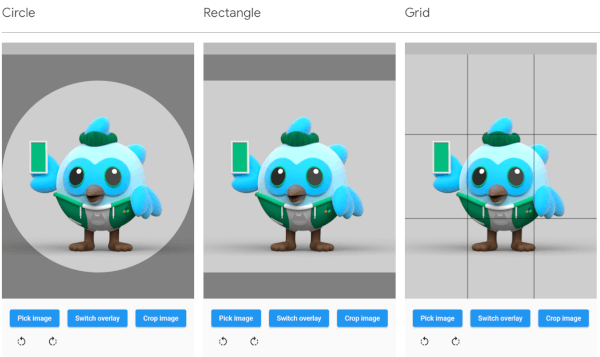
| Circle | Rectangle | Grid |
|---|---|---|
| Screenshot circle | Screenshot rectangle | Screenshot grid |
The overlay can be defined by adding an overlay type through the overlayType parameter. The following types are currently supported:
The image rotation can be defined through the rotationTurns parameter. The default value is 0, corresponding to 0 degrees of rotation. Making the value larger by 1 will rotate the image 90 degrees clockwise, making it smaller will rotate the image 90 degrees counterclockwise. 0 to 4 is not a limit, so going above or below these values will keep rotating the image.
// Import package
import 'package:cropperx/cropper.dart';

// Define a key
final _cropperKey = GlobalKey(debugLabel: 'cropperKey');

// Add the Cropper widget to your tree, using the above key and adding the image to crop
Cropper(
    cropperKey: _cropperKey, // Use your key here
    image: Image.network(
        'https://i.pinimg.com/originals/6b/4d/18/6b4d18c0b756ab20c3591490dfc10090.jpg',
    ),
)

// Get the cropped image as bytes
final imageBytes = await Cropper.crop(
    cropperKey: _cropperKey, // Reference it through the key
)