
 v1.1.1
rich_readmore
एक विजेट जो प्रदत्त सेटिंग्स के आधार पर अधिक या कम दिखाने का विकल्प सहित पाठ प्रदर्शित करता है।
45लाइक 1.7 हज़ार30-दिन डाउनलोड160Pub अंक
AndroidiOSWebmacOSWindowsLinux
एक फ्लटर प्लगइन जो धाराप्रवाह टेक्स्ट के विस्तार और संकुचन की अनुमति देता है

{"sdk":"flutter"}{"sdk":"flutter"}यह अंग्रेज़ी मूल स्नैपशॉट है। नवीनतम सामग्री GitHub पर देखें।
rich_readmore workflow codecov MIT License
A widget that displays text with an option to show more or show less based on the provided settings.
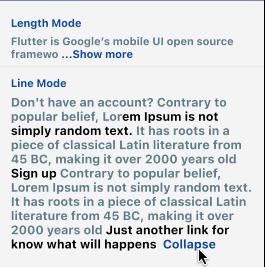
The RichReadMoreText widget allows you to trim text either based on the character length or the number of lines.
When the text is longer than the specified trim length or exceeds the maximum number of lines, it provides a toggle option to show more or show less of the text.
It has two options for settings, the LineModeSettings or LengthModeSettings for trimming using the behavior that you want.
If you want to pass a string directly instead of a TextSpan, you can just be using the the RichReadMoreText.fromString(...). There are some examples for that below.
https://raw.githubusercontent.com/thierryoliveira/rich_readmore/HEAD/read-more-text-view-flutter.gif
import:
import 'package:rich_readmore/rich_readmore.dart';
For TextSpan data:
 RichReadMoreText(
   textSpan,
   settings: LineModeSettings(
     trimLines: 3,
     trimCollapsedText: 'Expand',
     trimExpandedText: ' Collapse ',
     onPressReadMore: () {
       /// specific method to be called on press to show more
     },
     onPressReadLess: () {
       /// specific method to be called on press to show less
     },
   ),
 ),
Or for String data:
 RichReadMoreText.fromString(
   text: 'Lorem ipsum dolor sit amet, consectetur adipiscing elit.',
   textStyle: TextStyle(color: Colors.purpleAccent),
   settings: LengthModeSettings(
     trimLength: 20,
     trimCollapsedText: 'Expand',
     trimExpandedText: ' Collapse ',
     onPressReadMore: () {
       /// specific method to be called on press to show more
     },
     onPressReadLess: () {
       /// specific method to be called on press to show less
     },
     lessStyle: TextStyle(color: Colors.blue),
     moreStyle: TextStyle(color: Colors.blue),
   ),
 ),