
 v2.0.3
one_clock
Flutter 아날로그 및 디지털 시계 플러그인. 이 플러그인을 사용하여 Flutter 애플리케이션용 아름다운 아날로그 및 디지털 시계를 그릴 수 있습니다
55좋아요 78530일 다운로드140Pub 점수
AndroidiOSWebmacOSWindowsLinux
아날로그 및 디지털 시계용 패키지

{"sdk":"flutter"}^0.20.2아래는 영문 원문 스냅샷입니다. 최신 내용은 GitHub에서 확인하세요.
Clean and fully customizable clock widget.
Note: This package is inspired from the analog_clock package which is for showing analog clock only. You can check that package here analog_clock folder.
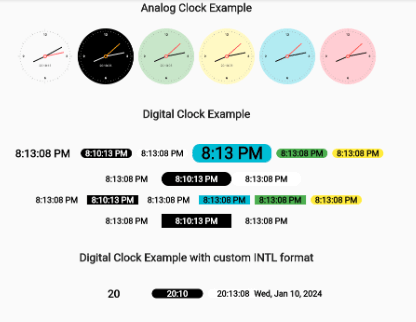
Analog/Digital Clock Screenshot
In your pubspec.yaml file within your Flutter Project:
dependencies:
  one_clock: ^2.0.2
import 'package:one_clock/one_clock.dart';


 AnalogClock(
	decoration: BoxDecoration(
	    border: Border.all(width: 2.0, color: Colors.black),
	    color: Colors.transparent,
	    shape: BoxShape.circle),
	width: 150.0,
	isLive: true,
	hourHandColor: Colors.black,
	minuteHandColor: Colors.black,
	showSecondHand: false,
	numberColor: Colors.black87,
	showNumbers: true,
	showAllNumbers: false,
	textScaleFactor: 1.4,
	showTicks: false,
	showDigitalClock: false,
	datetime: DateTime(2019, 1, 1, 9, 12, 15),
	);

DigitalClock(
	showSeconds: false,
	isLive:false,
	digitalClockColor: Colors.black,
	decoration: const BoxDecoration(
		color: Colors.yellow,
		shape: BoxShape.rectangle,
		borderRadius: BorderRadius.all(Radius.circular(15))),
		datetime: DateTime.now())
Flutter Analog Clock Parameters