
 v0.0.6
inquiry
Flutter용 Inquiry 패키지는 추적 가능한 사용자 데이터를 포함한 맞춤형 설문 조사를 쉽게 만들 수 있도록 도와줍니다. 수집된 데이터를 로컬 또는 원격으로 쉽게 저장할 수 있습니다.
11좋아요 1230일 다운로드140Pub 점수
AndroidiOSWebmacOSWindowsLinux
조회를 생성하기 위한 플러터 패키지

{"sdk":"flutter"}^4.2.3^3.4.2{"sdk":"flutter"}^3.0.1아래는 영문 원문 스냅샷입니다. 최신 내용은 GitHub에서 확인하세요.
https://img.shields.io/github/stars/Ch4rl3B/inquiry?logo=github https://img.shields.io/github/license/Ch4rl3B/inquiry?logo=github https://img.shields.io/badge/latest-0.0.5-blue.svg https://img.shields.io/badge/flutter-v3.3.0-blue.svg https://img.shields.io/badge/dart-v2.18.0-blue.svg
Customizable Questionnaire for Flutter.
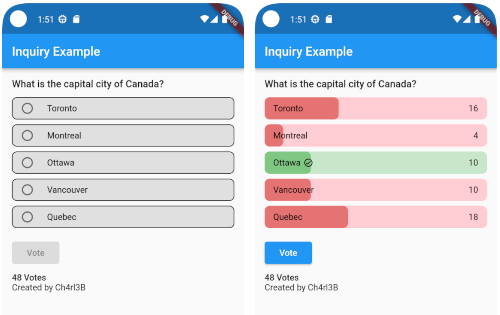
This package allows to create questionnaire (similar to poll but with a valid value option) that is customizable by the developer. It can be used to create very fancy quiz that you can adapt to your app design and will run in all platforms.
The idea of this package was based in Flutter Polls
animated demo animated demo
In the pubspec.yaml of your flutter project, add the following dependency:
dependencies:
  ...
  inquiry: latest_version
Import it:
import 'package:inquiry/inquiry.dart';
You can create a simple inquiry with
Inquiry(
  inquiryId: 'inquiry',
  options: List.generate(
    5, (index) {
      return InquiryOption(
        id: index,
        title: Text(
          'Option $index',
        ),
        votes: 0,
        rightAnswer: index == 2,
      );
    },
  ),
  titleWidget: Text(
    "Title of the Inquiry",
    style: const TextStyle(
      fontWeight: FontWeight.w500,
      fontSize: 16,
    ),
  ),
  onVoted: (option, amount) {
    print("Voted option: ${option.title}. "
        "The option is ${option.rightAnswer ? 'correct' : 'incorrect'}");
    return Future.value(true);
  },
);
You can customize the look and feel with InquiryStyle
  InquiryStyle(
    optionsBorderRadius: BorderRadius.circular(8),
    votedInquiryPercentRadius: const Radius.circular(8),
    optionsBorder: Border.all(color: Colors.black),
    rightAnswerBorder: Border.all(color: Colors.green),
    optionsBackgroundColor: Colors.grey.shade300,
    wrongBackgroundColor: Colors.red.shade100,
    rightBackgroundColor: Colors.green.shade100,
    optionsSplashColor: Colors.blue,
    votedWrongProgressColor: Colors.red.shade300,
    votedRightProgressColor: Colors.green.shade300,
    voteInProgressColor: Colors.blue,
    voteButtonStyle: ElevatedButton.styleFrom(
      backgroundColor: Colors.blue,
      foregroundColor: Colors.white,
      padding:
      const EdgeInsets.symmetric(horizontal: 24, vertical: 8),
    ),
    crossAxisAlignment: CrossAxisAlignment.start,
  )
for more information look at the example
You can contribute to the package any time, just create a Pull Request. All contributions are welcome 👍🏼