
 v1.0.1
new_version_plus
사용자가 Flutter 앱의 최신 버전을 가지고 있는지 확인하세요.
195좋아요 4.7만30일 다운로드140Pub 점수
AndroidiOSmacOSWindowsLinux
사용자가 Flutter 앱의 최신 버전을 가지고 있는지 확인하세요.
아래는 영문 원문 스냅샷입니다. 최신 내용은 GitHub에서 확인하세요.
If you find this plugin useful, please consider supporting me:

Note Original repository: https://pub.dev/packages/new_version
The problem with the original repository is that it will no longer be maintained by the creator, for this reason this repository was created in order to maintain updated code and make respective improvements as long as it is required.
A Flutter plugin that makes it possible to:
See more at the Dart Packages page.
Add new_version_plus as a dependency in your pubspec.yaml file.
dependencies:
  new_version_plus: ^0.0.9
In main.dart (or wherever your app is initialized), create an instance of NewVersionPlus.
final newVersionPlus = NewVersionPlus();
The plugin will automatically use your Flutter package identifier to check the app store. If your app has a different identifier in the Google Play Store or Apple App Store, you can overwrite this by providing values for androidId and/or iOSId.
For iOS: If your app is only available outside the U.S. App Store, you will need to set iOSAppStoreCountry to the two-letter country code of the store you want to search. See http://en.wikipedia.org/wiki/ISO_3166-1_alpha-2 for a list of ISO Country Codes.
You can then use the plugin in two ways.
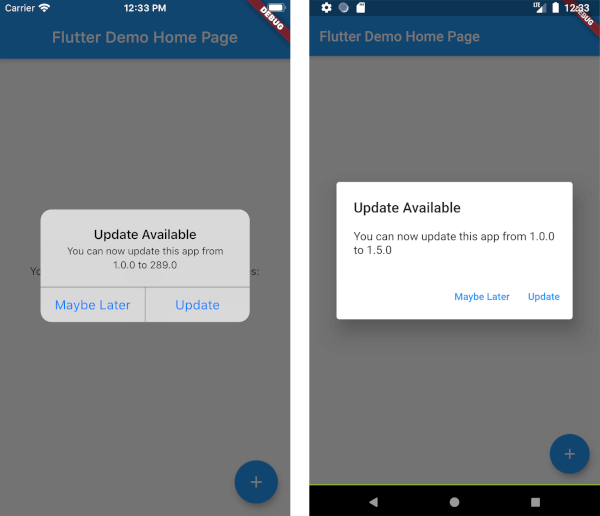
Calling showAlertIfNecessary with your app's BuildContext will check if the app can be updated, and will automatically display a platform-specific alert that the user can use to go to the app store.
newVersionPlus.showAlertIfNecessary(context: context);
If you want to create a custom alert or use the app version information differently, call getVersionStatus. This will return a Future<VersionStatus> with information about the local and app store versions of the app.
final status = await newVersionPlus.getVersionStatus();
status.canUpdate // (true)
status.localVersion // (1.2.1)
status.storeVersion // (1.2.3)
status.appStoreLink // (https://itunes.apple.com/us/app/google/id284815942?mt=8)
If you want to present a customized dialog, you can pass your VersionStatus to showUpdateDialog().
newVersionPlus.showUpdateDialog(
  context: context,
  versionStatus: status,
  dialogTitle: 'Custom dialog title',
  dialogText: 'Custom dialog text',
  updateButtonText: 'Custom update button text',
  dismissButtonText: 'Custom dismiss button text',
  dismissAction: () => functionToRunAfterDialogDismissed(),
)
The option was added so that in the android app you can modify the code of your country, with the variable: androidPlayStoreCountry

의존성 목록 6 개
{"sdk":"flutter"}^9.0.0^1.6.0^6.3.2{"sdk":"flutter"}^5.0.0사용 목적에 따라 검색하고 개발 활동을 비교한 뒤 원본 저장소에서 요구 사항을 확인하세요.
“A repository is the most basic element of GitHub.”
GitHub Docs — About repositories ↗