v5.11.1
dio
강력한 HTTP 네트워킹 패키지로, 인터셉터, 요청 중단 및 취소, 사용자 정의 어댑터, 변환기 등을 지원합니다.
8.4천좋아요 532만30일 다운로드160Pub 점수
AndroidiOSWebmacOSWindowsLinux
HTTP, BitTorrent, 마그넷, ed2k용 빠르고 현대적인 다운로드 매니저입니다. 크로스 플랫폼이며, Golang과 Flutter로 구축되었습니다.

아래는 영문 원문 스냅샷입니다. 최신 내용은 GitHub에서 확인하세요.







English | 中文 | 日本語 | 正體中文 | Tiếng Việt
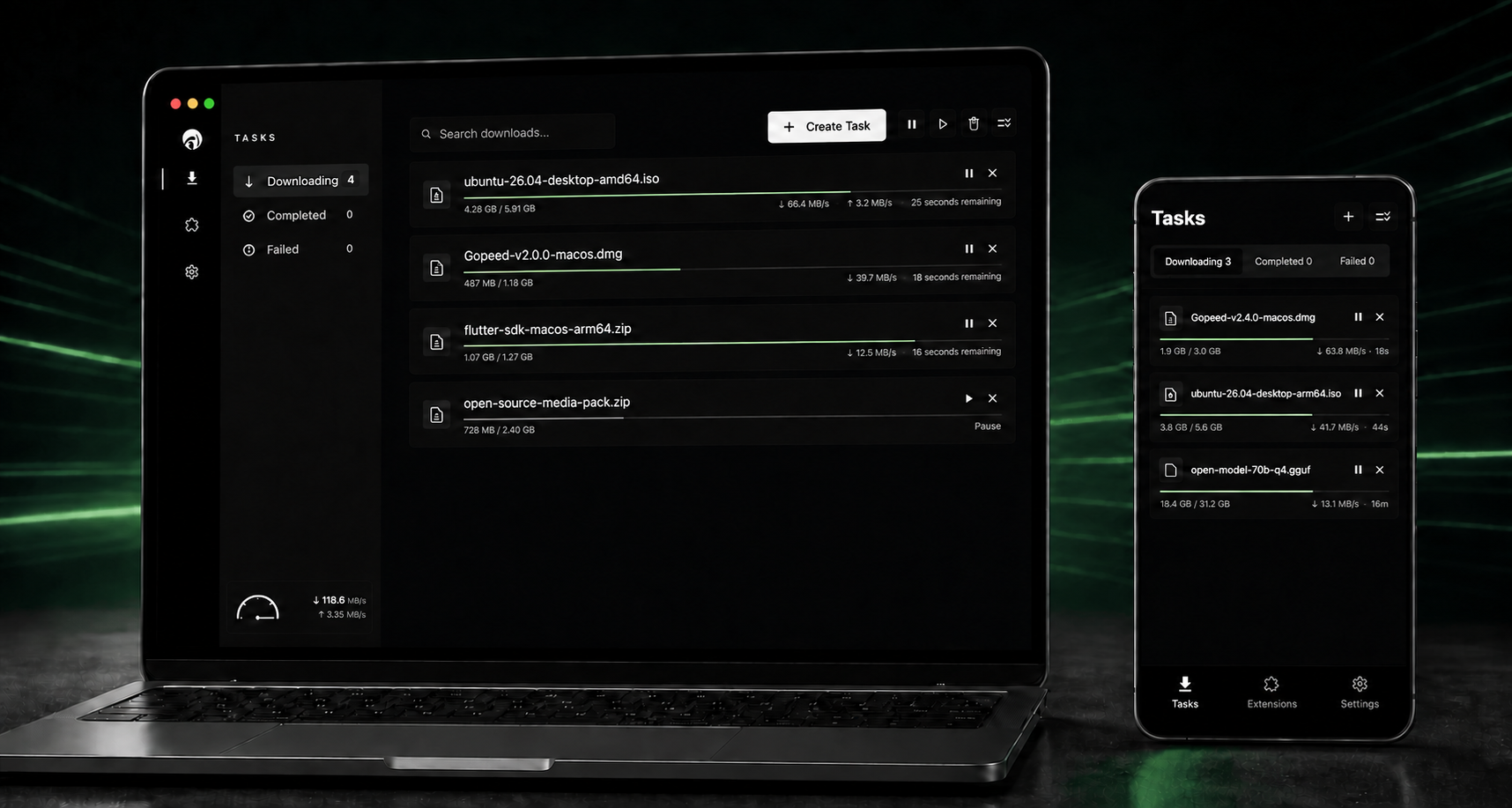
Gopeed (short for Go Speed) is a fast, modern, free, and open-source download manager built with Go and Flutter. It supports HTTP, HTTPS, BitTorrent, magnet links, and ed2k on desktop, mobile, and the web.
Beyond core download management, Gopeed offers browser integration, JavaScript extensions, a REST API, a CLI, and a self-hosted web UI for customization and automation.
Visit ✈ Official Website
Connect Gopeed to an AI agent and manage downloads with natural language. For example, you can say:
Download the latest Gopeed client for Windows.
| Tool | Description |
|---|---|
resolve_task |
Resolve a download URL or URI and return its resource metadata and files before creating a task. |
create_task |
Create and start a task from a resolved resource ID or a direct download request. |
list_tasks |
List tasks, optionally filtering them by ID or status. |
get_task |
Get the request, resource, options, and current progress for one task. |
get_task_status |
Get lightweight runtime status and per-file progress for one task. |
get_task_stats |
Get protocol-specific statistics, including HTTP connections or BitTorrent peers and seeding data. |
pause_task |
Pause a task. |
continue_task |
Continue a paused or failed task. |
delete_task |
Delete a task, optionally deleting its downloaded files. |
Gopeed 2.0.0 is currently in public beta, introducing a redesigned interface, a native communication architecture that connects desktop and mobile clients directly to the Go core through FFI, a more consistent cross-platform experience, improved task management, more flexible API support, and MCP-based AI agent integration. Some features may still be incomplete or unstable, so please try it and report any issues you encounter.
Once the features and stability meet our release standards, we will publish the official Gopeed 2.0.0 release. Beta users will be able to upgrade directly to the final release, while existing stable users will not be automatically moved onto the beta channel.
Install the CLI with go install:
go install github.com/GopeedLab/gopeed/cmd/gopeed@latest
Use the Gopeed browser extension to send downloads from Chrome, Edge, Firefox, and other compatible browsers directly to Gopeed: GopeedLab/browser-extension
Follow Gopeed's official WeChat account for updates and news.

If Gopeed is useful to you, please consider supporting its development. Thank you!
Gopeed consists of a Flutter front end and a Go back end. They communicate over HTTP, using Unix sockets on Unix-like systems and TCP on Windows.
The front-end source is located in the
ui/flutterdirectory.
git clone git@github.com:GopeedLab/gopeed.git
See CONTRIBUTING.md.
Set up Flutter desktop development using the official Flutter desktop guide, and make sure a working C toolchain is available for cgo. Then run the commands for your platform.
Commands:
go build -tags nosqlite -ldflags="-w -s" -buildmode=c-shared -o ui/flutter/windows/libgopeed.dll github.com/GopeedLab/gopeed/bind/desktop
cd ui/flutter
flutter build windows
go build -tags nosqlite -ldflags="-w -s" -buildmode=c-shared -o ui/flutter/macos/Frameworks/libgopeed.dylib github.com/GopeedLab/gopeed/bind/desktop
cd ui/flutter
flutter build macos
go build -tags nosqlite -ldflags="-w -s" -buildmode=c-shared -o ui/flutter/linux/bundle/lib/libgopeed.so github.com/GopeedLab/gopeed/bind/desktop
cd ui/flutter
flutter build linux
Mobile builds also require a working cgo toolchain. Install and initialize gomobile:
go install golang.org/x/mobile/cmd/gomobile@latest
go get golang.org/x/mobile/bind
gomobile init
Commands:
gomobile bind -tags nosqlite -ldflags="-w -s -checklinkname=0" -o ui/flutter/android/app/libs/libgopeed.aar -target=android -androidapi 21 -javapkg="com.gopeed" github.com/GopeedLab/gopeed/bind/mobile
cd ui/flutter
flutter build apk
gomobile bind -tags nosqlite -ldflags="-w -s" -o ui/flutter/ios/Frameworks/Libgopeed.xcframework -target=ios github.com/GopeedLab/gopeed/bind/mobile
cd ui/flutter
flutter build ios --no-codesign
Build the web app and server:
cd ui/flutter
flutter build web
cd ../../
rm -rf cmd/web/dist
cp -r ui/flutter/build/web cmd/web/dist
go build -tags nosqlite,web -ldflags="-s -w" -o bin/ github.com/GopeedLab/gopeed/cmd/web

강력한 HTTP 네트워킹 패키지로, 인터셉터, 요청 중단 및 취소, 사용자 정의 어댑터, 변환기 등을 지원합니다.
GetX를 사용하면 컨텍스트 없이 화면, 스크린바, 대화상자를 열고 상태를 쉽게 관리하며 종속성을 주입할 수 있습니다.
애플 스타일 아이콘을 기반으로 한 Cupertino 위젯용 기본 아이콘 자산
좋은 코딩 관행을 장려하기 위한 Flutter 앱, 패키지 및 플러그인에 대한 추천 린트.
Flutter용 SVG 렌더링 및 위젯 라이브러리로, 확장 가능한 벡터 그래픽 1.1 파일의 그리기 및 표시를 가능하게 합니다.
호스트 플랫폼 파일 시스템에서 자주 사용되는 위치(예: 임시 및 앱 데이터 디렉터리)를 가져오는 Flutter 플러그인입니다.
URL을 실행하기 위한 Flutter 플러그인입니다. 웹, 전화, SMS 및 이메일 스키마를 지원합니다.
순수한 Dart로 작성된 가볍고 빠른 키-값 데이터베이스. AES-256를 사용하여 강력하게 암호화됨.
내장 웹뷰를 추가하고 헤드리스 웹뷰를 사용하며 앱 내 브라우저 창을 열 수 있는 플러터 플러그인입니다.
플러터 애플리케이션용으로 로컬 알림을 표시하고 스케줄링할 수 있는 크로스 플랫폼 플러그인으로, 각 플랫폼에 맞게 사용자 정의할 수 있습니다.
Flutter용 권한 플러그인입니다. 이 플러그인은 iOS 및 Android를 포함한 크로스 플랫폼에서 권한 요청 및 확인을 위한 API를 제공합니다.
Flutter 앱의 런처 아이콘을 업데이트하는 작업을 단순화해주는 패키지입니다.
사용 목적에 따라 검색하고 개발 활동을 비교한 뒤 원본 저장소에서 요구 사항을 확인하세요.
“A repository is the most basic element of GitHub.”
GitHub Docs — About repositories ↗