
 v2.0.1
progressive_image
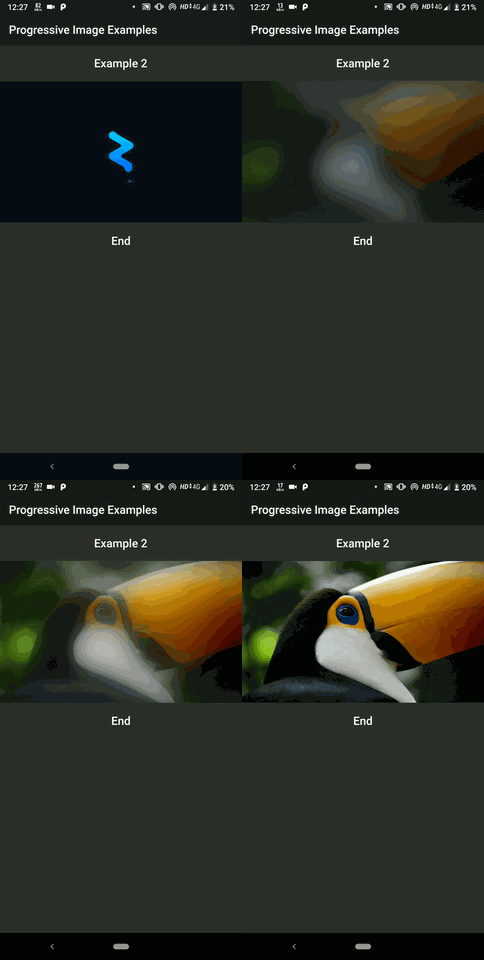
낮은 품질의 이미지 플레이스홀더를 사용하여 점진적으로 큰 이미지를 로드하는 Flutter 위젯입니다.
390좋아요 1.1천30일 다운로드150Pub 점수
AndroidiOSWebmacOSWindowsLinux
저품질 이미지 플레이스홀더를 사용하여 큰 이미지를 점진적으로 로드하는 Flutter 위젯입니다.
아래는 영문 원문 스냅샷입니다. 최신 내용은 GitHub에서 확인하세요.
A flutter widget which progressively loads large images using Low Quality Image Placeholders.


v2.0.0Following steps will help you add this library as a dependency in your flutter project.
pubspec.yaml file in the root of your projectdependencies:
progressive_image: ^2.0.0
$ flutter packages get
import 'package:progressive_image/progressive_image.dart';
For a more detailed look at how to use this library, there is a sweet project in the example directory and various examples can be found here
A simple example usage of the ProgressiveImage widget is shown below:
import 'package:flutter/material.dart';
import 'package:progressive_image/progressive_image.dart';

void main() => runApp(MyApp());

class MyApp extends StatelessWidget {
  // This widget is the root of your application.
  @override
  Widget build(BuildContext context) {
    return MaterialApp(
      home: Scaffold(
        appBar: AppBar(title: Text('Progressive Image Example')),
        body: ProgressiveImageExample(),
      ),
    );
  }
}

class ProgressiveImageExample extends StatelessWidget {
    @override
    Widget build(BuildContext context) {
        return Container(
            child: ProgressiveImage(
                placeholder: AssetImage('assets/placeholder.jpg'),
                // size: 1.87KB
                thumbnail: NetworkImage('https://i.imgur.com/7XL923M.jpg'),
                // size: 1.29MB
                image: NetworkImage('https://i.imgur.com/xVS07vQ.jpg'),
                height: 300,
                width: 500,
            ),
        );
    }
}

의존성 목록 2 개
{"sdk":"flutter"}{"sdk":"flutter"}사용 목적에 따라 검색하고 개발 활동을 비교한 뒤 원본 저장소에서 요구 사항을 확인하세요.
“A repository is the most basic element of GitHub.”
GitHub Docs — About repositories ↗