

v1.0.5
quiz_view
자신만의 퀴즈를 호스팅하고 사용자 인터페이스, 테마, 기능, 질문, 정답 및 답변 클릭 시 실행되는 함수를 사용자 지정할 수 있는 새로운 플러터 패키지입니다.
24좋아요 2930일 다운로드30Pub 점수
플랫폼 정보 없음
퀴즈 뷰용 Flutter 패키지입니다.

아래는 영문 원문 스냅샷입니다. 최신 내용은 GitHub에서 확인하세요.
A new Flutter package project that helps create quizes and surveys. It has a quiz_view customizable widget.
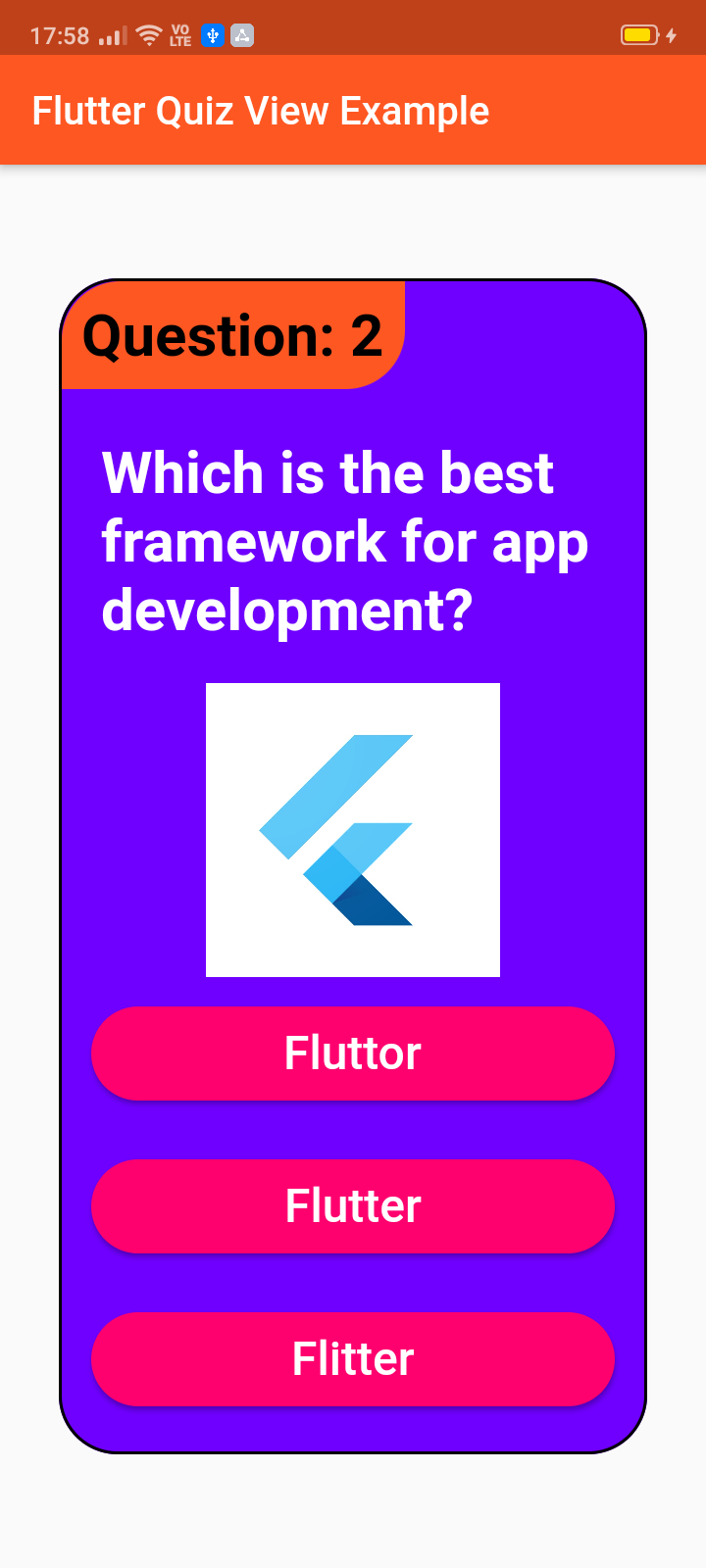

To use this package :
  dependencies:
    flutter:
      sdk: flutter
    quiz_view:
QuizView(
  image: Container(
    width: 150,
    height: 150,
    child: Image.network(
        "https://yt3.ggpht.com/a/AATXAJyPMywRmD62sfK-1CXjwF0YkvrvnmaaHzs4uw=s900-c-k-c0xffffffff-no-rj-mo"),
  ),
  showCorrect: true,
  tagBackgroundColor: Colors.deepOrange,
  tagColor: Colors.black,
  questionTag: "Question: 2",
  answerColor: Colors.white,
  answerBackgroundColor: Color.fromARGB(255, 255, 0, 111),
  questionColor: Colors.white,
  backgroundColor: Color.fromARGB(255, 111, 0, 255),
  width: 300,
  height: 600,
  question: "Which is the best framework for app development?",
  rightAnswer: "Flutter",
  wrongAnswers: ["Fluttor", "Flitter"],
  onRightAnswer: () => print("Right"),
  onWrongAnswer: () => print("Wrong"),
)
Copyright 2020 Jay Mehta

Licensed under the Apache License, Version 2.0 (the "License");
you may not use this file except in compliance with the License.
You may obtain a copy of the License at

    http://www.apache.org/licenses/LICENSE-2.0

Unless required by applicable law or agreed to in writing, software
distributed under the License is distributed on an "AS IS" BASIS,
WITHOUT WARRANTIES OR CONDITIONS OF ANY KIND, either express or implied.
See the License for the specific language governing permissions and
limitations under the License.
This project is a starting point for a Dart package, a library module containing code that can be shared easily across multiple Flutter or Dart projects.
For help getting started with Flutter, view our online documentation, which offers tutorials, samples, guidance on mobile development, and a full API reference.
As time based...
import 'package:flutter/material.dart';
import 'package:quiz_view/quiz_view.dart';

void main() {
  runApp(MyApp());
}

class MyApp extends StatelessWidget {
  @override
  Widget build(BuildContext context) {
    return MaterialApp(
      title: 'Flutter Quiz View Example',
      debugShowCheckedModeBanner: false,
      theme: ThemeData(
        primarySwatch: Colors.deepOrange,
        visualDensity: VisualDensity.adaptivePlatformDensity,
      ),
      home: MyHomePage(title: 'Flutter Quiz View Example'),
    );
  }
}

class MyHomePage extends StatefulWidget {
  MyHomePage({Key key, this.title}) : super(key: key);

  final String title;

  @override
  _MyHomePageState createState() => _MyHomePageState();
}

class _MyHomePageState extends State<MyHomePage> {
  @override
  Widget build(BuildContext context) {
    return Scaffold(
      appBar: AppBar(
        title: Text(widget.title),
      ),
      body: Center(
          child: QuizView(
        image: Container(
          width: 150,
          height: 150,
          child: Image.network(
              "https://yt3.ggpht.com/a/AATXAJyPMywRmD62sfK-1CXjwF0YkvrvnmaaHzs4uw=s900-c-k-c0xffffffff-no-rj-mo"),
        ),
        showCorrect: true,
        tagBackgroundColor: Colors.deepOrange,
        tagColor: Colors.black,
        questionTag: "Question: 2",
        answerColor: Colors.white,
        answerBackgroundColor: Color.fromARGB(255, 255, 0, 111),
        questionColor: Colors.white,
        backgroundColor: Color.fromARGB(255, 111, 0, 255),
        width: 300,
        height: 600,
        question: "Which is the best framework for app development?",
        rightAnswer: "Flutter",
        wrongAnswers: ["Fluttor", "Flitter"],
        onRightAnswer: () => print("Right"),
        onWrongAnswer: () => print("Wrong"),
      )),
    );
  }
}
의존성 목록 2 개
{"sdk":"flutter"}{"sdk":"flutter"}사용 목적에 따라 검색하고 개발 활동을 비교한 뒤 원본 저장소에서 요구 사항을 확인하세요.
“A repository is the most basic element of GitHub.”
GitHub Docs — About repositories ↗