
v2.18.2
google_maps_flutter
iOS 및 Android 애플리케이션에 Google Maps를 통합하기 위한 Flutter 플러그인입니다.
4.6천좋아요 93.3만30일 다운로드150Pub 점수
AndroidiOSWeb
재림 보조기 및 시뮬레이터 아이디어는 드론이나 수작업으로 지구의 훼손된 지역을 재림하는 데 도움이 되는 앱을 만드는 것입니다。

iOS 및 Android 애플리케이션에 Google Maps를 통합하기 위한 Flutter 플러그인입니다.
 v35.1.37
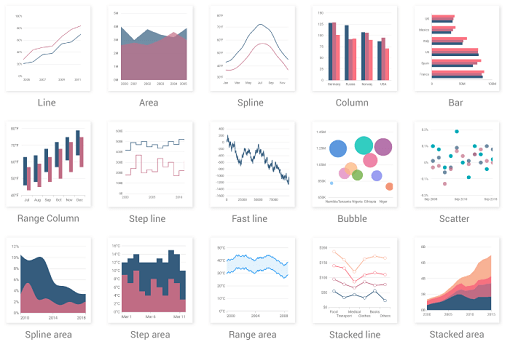
카르테시안 및 원형 차트와 같은 데이터 시각화 위젯을 포함하는 플러터 차트 라이브러리로 실시간, 상호작용 가능하고 고성능이며 애니메이션 효과가 있는 차트를 생성할 수 있습니다.
Dart VM 및 Flutter용 NoSQL 지속 임베디드 파일 시스템 문서 기반 데이터베이스로 암호화 지원
API 발견 서비스를 통해 설명된 Google API에 액세스하기 위한 자동 생성 클라이언트 라이브러리.
Flutter 스크린샷 패키지(런타임). 어떤 위젯도 이미지로 캡처합니다.
Dart용 플러그인 가능하고 모킹 가능한 플랫폼 정보 추상화입니다.
Android용 다운로드 디렉터리를 가져오는 Flutter 플러그인입니다.
Flutter용 SSH 및 SFTP 클라이언트입니다. iOS 라이브러리 NMSSH와 Android 라이브러리 JSch를 래핑합니다.
아래는 영문 원문 스냅샷입니다. 최신 내용은 GitHub에서 확인하세요.
License github-languages-image github-language-count-image Issues forks github-repo-size-image
The Reforestation Assistant & Simulator is an app that helps in reforestation of degraded areas by drones or manual human effort. The project consists of an Android App where users can plan the reforesting missions, by defining areas of seeding, specific seed/tree location, drone landing points, fly zones and other helpful metrics. All the gathered information is then dynamically displayed on the Liquid Galaxy cluster using KMLs and also on the app giving users an immersive overview of the reforestation mission.
This is being started as a Google Summer of Code 2021 project and has been continued in Google Summer of Code 2022 with the Liquid Galaxy Organization alongside the Dronecoria team.
Download the apk file from this repository or the Google Play Store
Follow the instructions for installation on your Android device.
Obs.: If prompted with the message of Host is not reachable, it means the LG master can't be accessed. So check out if you are in the same network of the Liquid Galaxy and that the master can be accessed via SSH.
https://raw.githubusercontent.com/LiquidGalaxyLAB/reforestation-assistant-simulator/HEAD/resources/images/screenshot13.pngDocumentation on how to set up Flutter SDK and its environment can be found here.
The full code is located in this GitHub repository. To clone the project via terminal use:
git clone https://github.com/LiquidGalaxyLAB/reforestation-assistant.git
RAS uses Google Maps Android API as the map service. To use Google Maps you required an API KEY. To get this key you need to:
With the key in hands, the next step is placing the key inside the app. Go to android/app/main and edit the AndroidManifest.xml.
Replace the PLACE_HERE_YOUR_API_KEY with the key you just created.
<application
        android:label="RAS"
        android:icon="@mipmap/ic_launcher">
        <meta-data android:name="com.google.android.geo.API_KEY"
            android:value="PLACE_HERE_YOUR_API_KEY"/>
Open a terminal and navigate to the project root directory. First you need to install the packages by running:
flutter pub get
After successfully installing all the packages, make sure you have a device connected, either a real mobile phone or an emulator. You can run flutter doctor to check out the connected devices and if all the environment is correct.
flutter doctor
With everything ready to go, it is time to run the project. Since dart is moving up versions to offer null safety, some packages that are being used still haven’t migrated to the new null safety policies, so we need to run the project with the following command:
flutter run --no-sound-null-safety
If you followed all the steps till now you have your app up and running. The next step is to click on the gear icon, where the settings of the Liquid Galaxy and Google Drive are.
To connect with your Liquid Galaxy, type de IP Address, separating the numbers using dot and the password of the cluster. Hit connect so the ip and password will be saved on the device and you’ll be prompted if the connection could be established or not.
The next step is logging with a Google Account so all the information can be saved there. Hit the Connect to drive button and add your credentials. If everything went well you will be prompted.
There you go! You are now ready to enjoy the app and make the modifications you want.
The app comes with some mock data to serve as demonstration, so you can start exploring different types of reforestation projects and seeds.
Fill up issues, bugs or feature requests in our issue tracker. Please be very descriptive and clear so it is easier to help you.
If you want to contribute to this project you can open a pull request at time you like.
This software is under the MIT License
Copyright 2021-2022 Karine Aparecida Pistili Rodrigues