
animated_search_bar
애니메이션을 사용하여 간단하고 아름다운 검색창을 만드는 Flutter 플러그인입니다

- 스타
- 12
- 포크
- 9
- 최근 푸시(UTC)
- 2025. 1. 5.
- 프로젝트 상태
- 활성
원본 README
아래는 영문 원문 스냅샷입니다. 최신 내용은 GitHub에서 확인하세요.
AnimatedSearchBar 


A Beautiful and Simple SearchBar widget with animation transition. It can be fully customized with label, labelStyle,
searchDecoration, etc. It also maintains onChange state.
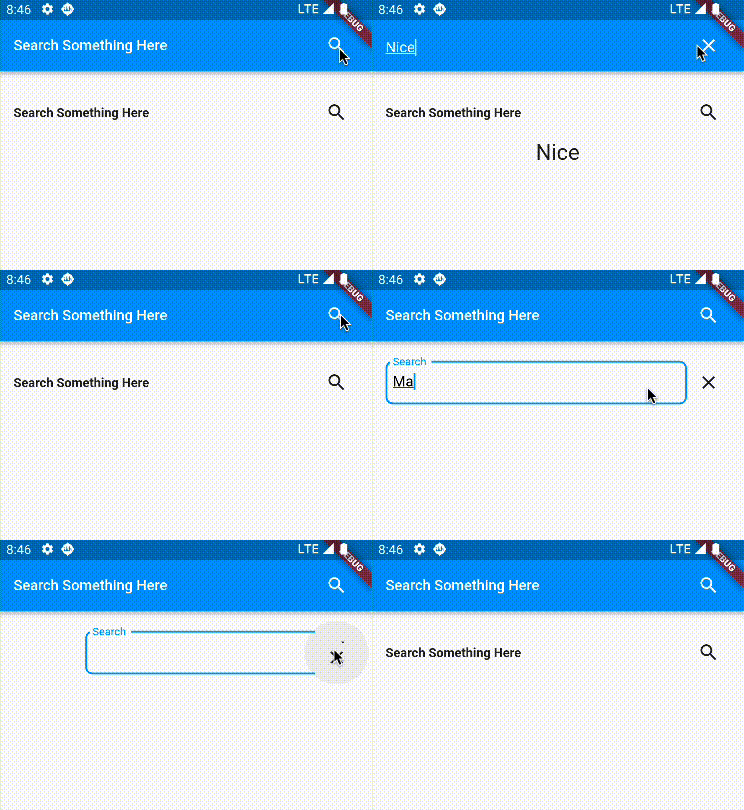
Getting Started
In the pubspec.yaml of your flutter project, add the following dependency:
... animated_search_bar: "^latest_version"
Usage Examples
import 'package:animated_search_bar/animated_search_bar.dart';


String searchText="";

AnimatedSearchBar(
  label: "Search Something Here",
  onChanged: (value) {
    debugPrint("value on Change");
    setState(() {
      searchText = value;
    });
  },
),
Available Parameters
| Param | isRequired |
|---|---|
| String label | No |
| Function(String) onChanged | No |
| TextStyle labelStyle | No |
| Alignment labelAlignment | No |
| TextAlign labelTextAlign | No |
| InputDecoration searchDecoration | No |
| int animationDuration in milliseconds | No |
| TextStyle searchStyle | No |
| Color cursorColor | No |
| Duration duration , debouncer duration default 300ms | No |
| double height , default 60 | No |
| Widget closeIcon , default const Icon(Icons.close, key: ValueKey("close")) | No |
| Widget searchIcon , default const Icon(Icons.search, key: ValueKey("search")) | No |
| TextEditingController controller | No |
| Function(String) onFieldSubmitted | No |
| TextInputAction textInputAction default TextInputAction.search | No |
| bool autoFocus *default false | No |
Buy me coffee if you love my works ☕️


GitHub 작성자
Mudassir ↗
언어DartRubySwiftKotlinObjective-C
사용 중인 의존성
의존성 목록 2 개
- flutter
{"sdk":"flutter"} - flutter_test개발 의존성
{"sdk":"flutter"}
프로젝트에 맞는 저장소를 선택하려면?
사용 목적에 따라 검색하고 개발 활동을 비교한 뒤 원본 저장소에서 요구 사항을 확인하세요.
- 이름, 작성자 또는 설명으로 검색하고 기술 주제로 범위를 좁힙니다.
- 스타, 포크, 최근 푸시를 함께 비교하세요. 스타는 관심의 지표이며 품질을 보장하지 않습니다.
- 사용하기 전에 GitHub에서 README, 라이선스, Issues를 확인하세요.
출처 및 관리
“A repository is the most basic element of GitHub.”
GitHub Docs — About repositories ↗