
 v0.0.16
image_cropping
이 패키지는 비율과 자유 스케일로 이미지를 자르는 데 도움을 줍니다.
93좋아요 46330일 다운로드145Pub 점수
AndroidiOSWebmacOSWindowsLinux
이 Flutter 플러그인을 사용하여 이미지 자르기 및 회전하기

아래는 영문 원문 스냅샷입니다. 최신 내용은 GitHub에서 확인하세요.
image_cropping version MIT License https://img.shields.io/badge/platform-android-blue https://img.shields.io/badge/platform-iOS-blue https://img.shields.io/badge/platform-Linux-blue https://img.shields.io/badge/platform-Mac-blue https://img.shields.io/badge/platform-web-blue https://img.shields.io/badge/platform-Windows-blue MIT License
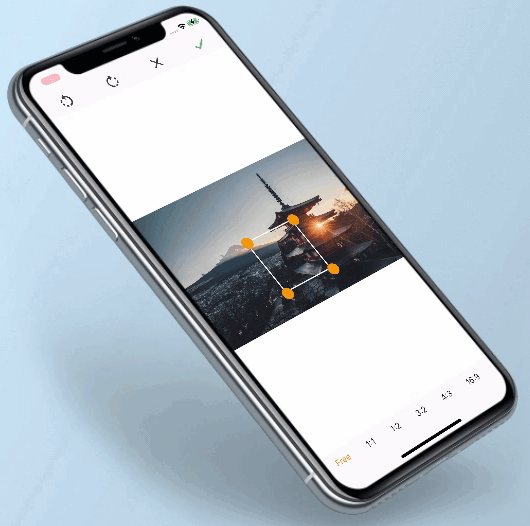
This plugin supports cropping and rotating images for multiplatform. It Allow inclusion of background, Rotation of image, changing ratio of selection as per requirements.
Image Plugin
Image Plugin
Image Plugin
If you are targeting web, don't forget to add worker.js in your project's root directory.
You can also add worker.js.deps and worker.js.map but they are optional and only used for development.
These 3 files are generated when running the following command in the example folder:
dart compile js -O1 -o web/worker.js lib/worker.dart
For more details on the command, check this link. It converts the dart code to JS, which will then be run in a web worker.
final croppedBytes = await ImageCropping.cropImage(
    context: context,
    imageBytes: bytes,
    onImageStartLoading: () {
        showLoader();
    },
    onImageEndLoading: () {
        hideLoader();
    },
    onImageDoneListener: (data) {
        // You can also use a listener instead of awaiting the function
        setState(() {
          imageBytes = data;
        });
    },
    selectedImageRatio: ImageRatio.RATIO_1_1,
    visibleOtherAspectRatios: true,
    squareBorderWidth: 2,
    squareCircleColor: Colors.black,
    defaultTextColor: Colors.orange,
    selectedTextColor: Colors.black,
    colorForWhiteSpace: Colors.grey,
    encodingQuality: 80,
    outputImageFormat: OutputImageFormat.jpg,
    workerPath: 'crop_worker.js',
);
Context is use to push new screen for image cropping.
Image bytes is use to draw image in device and if image not fits in device screen then we manage background color(if you have passed colorForWhiteSpace or else White background) in image cropping screen.
This is a callback. you have to override and show dialog or etc when image cropping is in loading state.
This is a callback. you have to override and hide dialog or etc when image cropping is ready to show result in cropping screen.
This is a callback. you have to override and you will get Uint8List as result.
This property contains ImageRatio value. You can set the initialized aspect ratio when starting the cropper by passing a value of ImageRatio. default value is ImageRatio.FREE
This property contains boolean value. If this properties is true then it shows all other aspect ratios in cropping screen. default value is true.
This property contains double value. You can change square border width by passing this value.
This property contains Color value. You can change square circle color by passing this value.
This property contains Color value. By passing this property you can set aspect ratios color which are unselected.
This property contains Color value. By passing this property you can set aspect ratios color which is selected.
This property contains Color value. By passing this property you can set background color, if screen contains blank space.
Set the encodingQuality of the cropped image. Defaults to 100 (max). High quality involves bigger image file size.
Output format of cropped image, can be PNG or JPG, default is JPG.
You may want to change the worker.js name, especially if you use other web workers and you already have a worker.js file. Defaults to 'worker.js'.
For flutter web, copy worker.js from example folder to the project, else it will not work. The result returns in Uint8List. so it can be lost later, you are responsible for storing it somewhere permanent (if needed).
Contribution towards our repository is always welcome, we request contributors to create a pull request to the develop branch only.
It would be great for us if the reporter can share the below things to understand the root cause of the issue.
Image Cropper is MIT-licensed.
We’d be really happy if you send us links to your projects where you use our component. Just send an email to sales@mindinventory.com And do let us know if you have any questions or suggestion regarding our work.