


 v0.0.1
sliver_bar_chart
Flutter 슬리버에서 막대 차트를 지원하는 패키지입니다. 이 패키지를 사용하면 슬리버에 막대 차트를 추가하고 슬리버 스크롤 시 막대 차트를 헤더로 설정할 수 있습니다.
27좋아요 2130일 다운로드150Pub 점수
AndroidiOSWebmacOSWindowsLinux
Flutter Sliver에서 막대 차트를 지원하는 패키지입니다. 이 패키지를 사용하면 Sliver에 막대 차트를 추가하고 스크롤 시 막대 차트를 헤더로 설정할 수 있습니다.

아래는 영문 원문 스냅샷입니다. 최신 내용은 GitHub에서 확인하세요.








It is Sliver component. Bar chart work with sliver animation on expand and collapse. It is an independent component that allows you to set data for the chart with the configuration of Sliver.
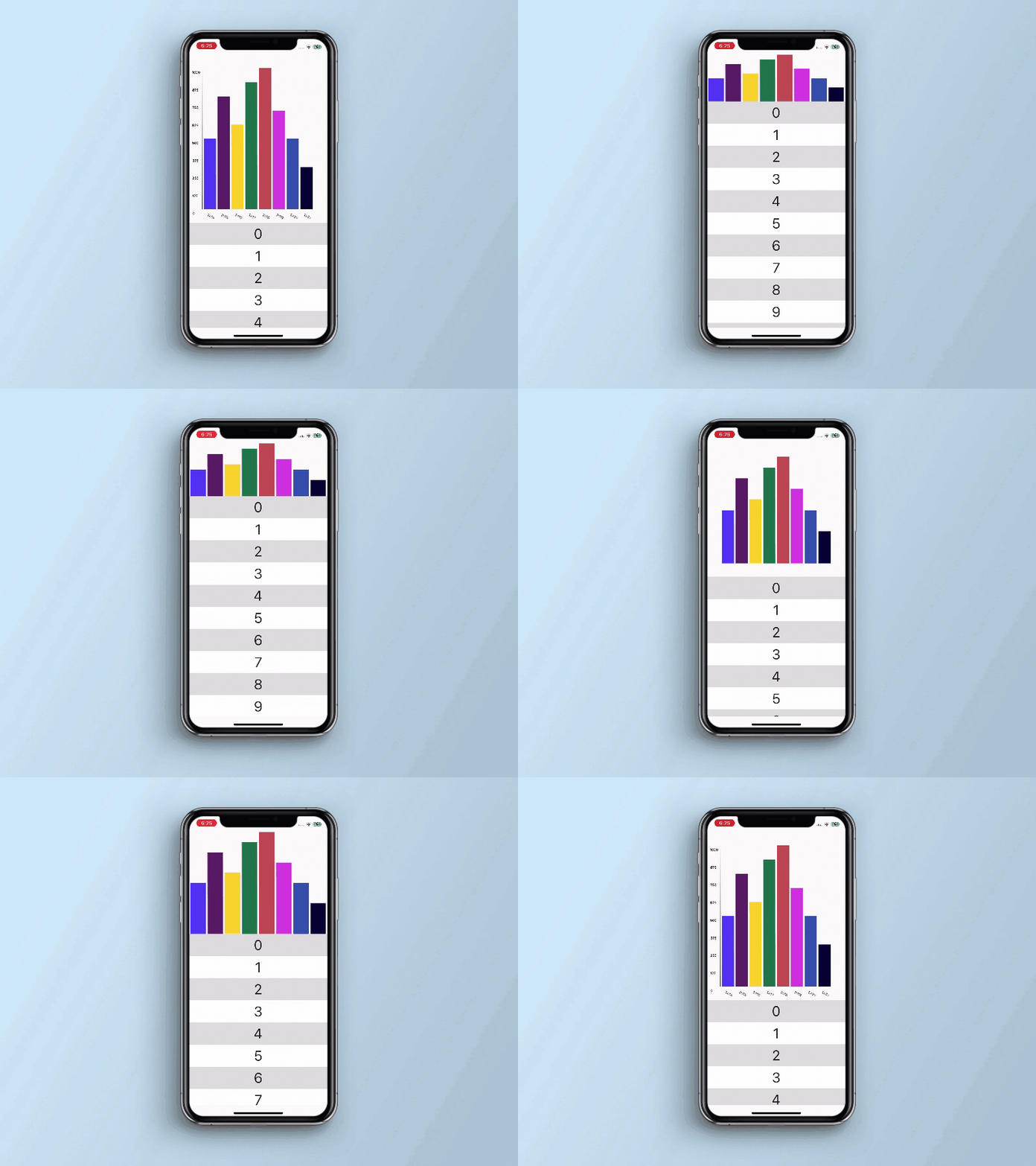
Import it to your project file
import 'package:sliver_bar_chart/sliver_bar_chart.dart';
And add it in its most basic form like it:
SliverBarChart(
  barWidget: BarChartWidget(
    minHeight: 100.0,
    maxHeight: 1000.0,
    barValues: [
      BarChartData(
        x: '2022',
        y: 500.0,
        barColor: Colors.blue,
      ),
    ],
    isScrolling: true,
  ),
);
| Parameter | Description |
|---|---|
| BarChartWidget barWidget | Used to paint bar chart using custom painter |
| Parameter | Default | Description |
|---|---|---|
| bool restrain | false | Whether to stick the header to the start of the viewport once it has reached its minimum size |
| bool scrolling | - | Whether sliver is scrolling or not |
| List heightArray | [50.0, 78.0, 90.0, 67.0, 36.0] | The array of height for generating the bars of the Bar Chart |
| double maxWidth | 75.0 | The maximum width dimensions of the sliver |
| double minHeight | 30.0 | The minimum height dimensions of the sliver |
| double maxHeight | 175.0 | The maximum height dimensions of the sliver |
| bool fluctuating | false | Whether the header should immediately grow again if the user reverses scroll direction |
| Parameter | Description |
|---|---|
| double minHeight | The minimum height dimensions of the BarChartWidget |
| double maxHeight | The maximum height dimensions of the BarChartWidget |
| List barValues | hold the list of bar chart data |
| bool isScrolling | Whether sliver is scrolling or not |
| Parameter | Default | Description |
|---|---|---|
| int yAxisIntervalCount | 5 | Used to set interval point on Y axis |
| double xAxisTextRotationAngle | 0.0 | Used to set X axis text on a rotation angle in case of larger text |
| Parameter | Description |
|---|---|
| String x | a text that visible on Bar Chart X axis |
| double y | a value that visible on Bar Chart Y axis |
| Parameter | Default | Description |
|---|---|---|
| Color barColor | Colors.grey | used to set color of the bar |
It would be great for us if the reporter can share the below things to understand the root cause of the issue.
sliver_bar_chart is MIT-licensed.
We’d be really happy if you send us links to your projects where you use our component. Just send an email to sales@mindinventory.com And do let us know if you have any questions or suggestion regarding our work.
의존성 목록 3 개
{"sdk":"flutter"}{"sdk":"flutter"}^1.0.0사용 목적에 따라 검색하고 개발 활동을 비교한 뒤 원본 저장소에서 요구 사항을 확인하세요.
“A repository is the most basic element of GitHub.”
GitHub Docs — About repositories ↗