
 v1.0.6
widget_to_marker
모든 Flutter 위젯을 google_maps_flutter 아이콘 마커에서 사용할 수 있는 BitmapDescriptor로 변환하는 패키지입니다.
133좋아요 1.5만30일 다운로드155Pub 점수
AndroidiOSWeb
Mohamedfaroouk/widget_to_marker open-source repository details.

{"sdk":"flutter"}^2.7.0{"sdk":"flutter"}^2.0.0^2.0.1아래는 영문 원문 스냅샷입니다. 최신 내용은 GitHub에서 확인하세요.
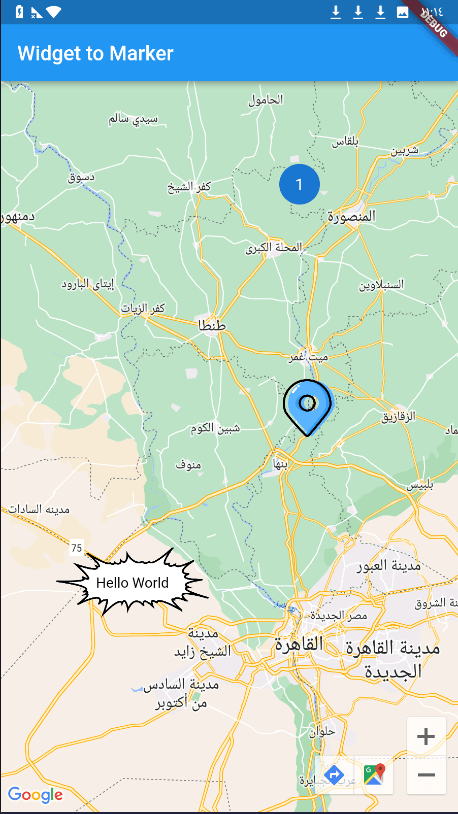
When using Google Maps, we always have a problem with adding a marker on the map, and the available tools were either drawing the marker through canvas path or using an image, but the problem is if we want to add words or data or add custom edit to this marker, but this package has solved the problem and now you can use any widget in flutter as a marker for google map ! using the .toBitmapDescriptor() function on the widget to use it as a marker icon!
dependencies:
  widget_to_marker: ^1.0.6
import 'package:widget_to_marker/widget_to_marker.dart';

class TextOnImage extends StatelessWidget {
  const TextOnImage({
    super.key,
    required this.text,
  });
  final String text;
  @override
  Widget build(BuildContext context) {
    return Stack(
      alignment: Alignment.center,
      children: [
        Image(
          image: const AssetImage(
            "assets/marker.png",
          ),
          height: 150,
          width: 150,
        ),
        Text(
          text,
          style: TextStyle(color: Colors.black),
        )
      ],
    );
  }
}
.toBitmapDescriptor():Marker(
markerId: const MarkerId("3"),
position: const LatLng(30.01124477440843, 30.78459296375513),
icon: await TextOnImage(
text: "Hello World",
).toBitmapDescriptor(
logicalSize: const Size(150, 150), imageSize: const Size(150, 150)
),
)
You Can Use waitToRender Attribute to set duration for rendering large network and asset images
image