

 v0.0.1
draggable_carousel_slider
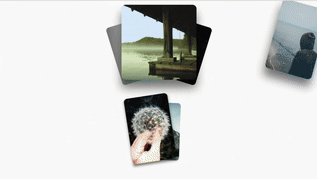
드래그 가능한 카루셀 슬라이더 위젯으로, 반복 및 사용자 정의 자식 위젯을 지원합니다.
25좋아요 4230일 다운로드140Pub 점수
AndroidiOSWebmacOSWindowsLinux
드래그 가능한 카루셀 슬라이더 플러터 위젯으로, 루프 및 사용자 정의 자식 위젯을 지원합니다.

아래는 영문 원문 스냅샷입니다. 최신 내용은 GitHub에서 확인하세요.

Draggable Carousel Slider is a Flutter package that provides a customizable carousel slider widget with draggable functionality. It allows users to easily create interactive carousel sliders where items can be dragged.
To start using the Draggable Carousel Slider package, you can simply add the package to your pubspec.yaml file and import it into your Flutter project.
dependencies:
  ...
  draggable_carousel_slider:
import 'package:draggable_carousel_slider/draggable_carousel_slider.dart';
import 'package:flutter/material.dart';
import 'package:shimmer/shimmer.dart';

void main() {
  runApp(const MyApp());
}

class MyApp extends StatefulWidget {
  const MyApp({super.key});
  @override
  State<MyApp> createState() => _MyAppPageState();
}

class _MyAppPageState extends State<MyApp> {
  @override
  void initState() {
    super.initState();
  }

  Widget _image(
    String path,
    double width,
    double height, [
    bool shimmer = false,
  ]) =>
      ClipRRect(
        borderRadius: BorderRadius.circular(16),
        child: Image.network(
          path,
          width: width,
          height: height,
          fit: BoxFit.cover,
          loadingBuilder: (
            BuildContext context,
            Widget child,
            ImageChunkEvent? loadingProgress,
          ) => AnimatedCrossFade(
              firstChild: child,
              secondChild: Shimmer.fromColors(
                baseColor: Colors.grey.shade400,
                highlightColor: Colors.grey.shade700,
                enabled: true,
                period: const Duration(seconds: 2),
                child: Container(
                  width: width,
                  height: height,
                  color: Colors.black,
                ),
              ),
              crossFadeState: shimmer ||
                      ((child as Semantics).child as RawImage).image == null
                  ? CrossFadeState.showSecond
                  : CrossFadeState.showFirst,
              duration: const Duration(milliseconds: 300),
            ),
        ),
      );

  @override
  Widget build(BuildContext context) {
    return MaterialApp(
      theme: ThemeData(
        colorScheme: ColorScheme.fromSeed(
          seedColor: Colors.deepPurple,
        ),
        useMaterial3: true,
      ),
      debugShowCheckedModeBanner: false,
      home: Scaffold(
        body: SafeArea(
          child: Padding(
            padding: const EdgeInsets.symmetric(vertical: 16.0),
            child: Center(
              child: DraggableSlider(
                loop: true,
                children: [
                  _image('https://picsum.photos/id/230/600/600', 300, 300),
                  _image(
                      'https://picsum.photos/id/431/600/600', 300, 300, true),
                  _image('https://picsum.photos/id/232/600/600', 300, 300),
                  _image('https://picsum.photos/id/433/600/600', 300, 300),
                  _image('https://picsum.photos/id/234/600/600', 300, 300),
                ],
              ),
            ),
          ),
        ),
      ),
    );
  }
}
의존성 목록 4 개
{"sdk":"flutter"}^4.0.0^2.1.4{"sdk":"flutter"}사용 목적에 따라 검색하고 개발 활동을 비교한 뒤 원본 저장소에서 요구 사항을 확인하세요.
“A repository is the most basic element of GitHub.”
GitHub Docs — About repositories ↗