
flutter_boom_menu
아이콘, 제목, 부제목, 애니메이션 FAB 아이콘 및 스크롤 시 숨기는 기능을 갖춘 Boom 메뉴를 구현하는 Flutter 플러그인입니다.

- 스타
- 88
- 포크
- 29
- 최근 푸시(UTC)
- 2021. 8. 2.
- 프로젝트 상태
- 활성
원본 README
아래는 영문 원문 스냅샷입니다. 최신 내용은 GitHub에서 확인하세요.
Flutter Boom Menu
Usage
The BoomMenu widget is built to be placed in the Scaffold.floatingActionButton argument, replacing the FloatingActionButton widget.
It's not possible to set its position with the Scaffold.floatingActionButtonLocation argument, but it's possible to set right/bottom margin with the marginRight and marginBottom arguments (default to 16) to place the button anywhere in the screen.
Using the Scaffold.bottomNavigationBar the floating button will be always placed above the bar, so the BottomAppBar.hasNotch should be always false.
Title
Every child button can have a Icon,Title, SubTitle which can be customized providing by yourself. If the Title parameter is not provided the title will be not rendered.
The package will handle the animation by itself.
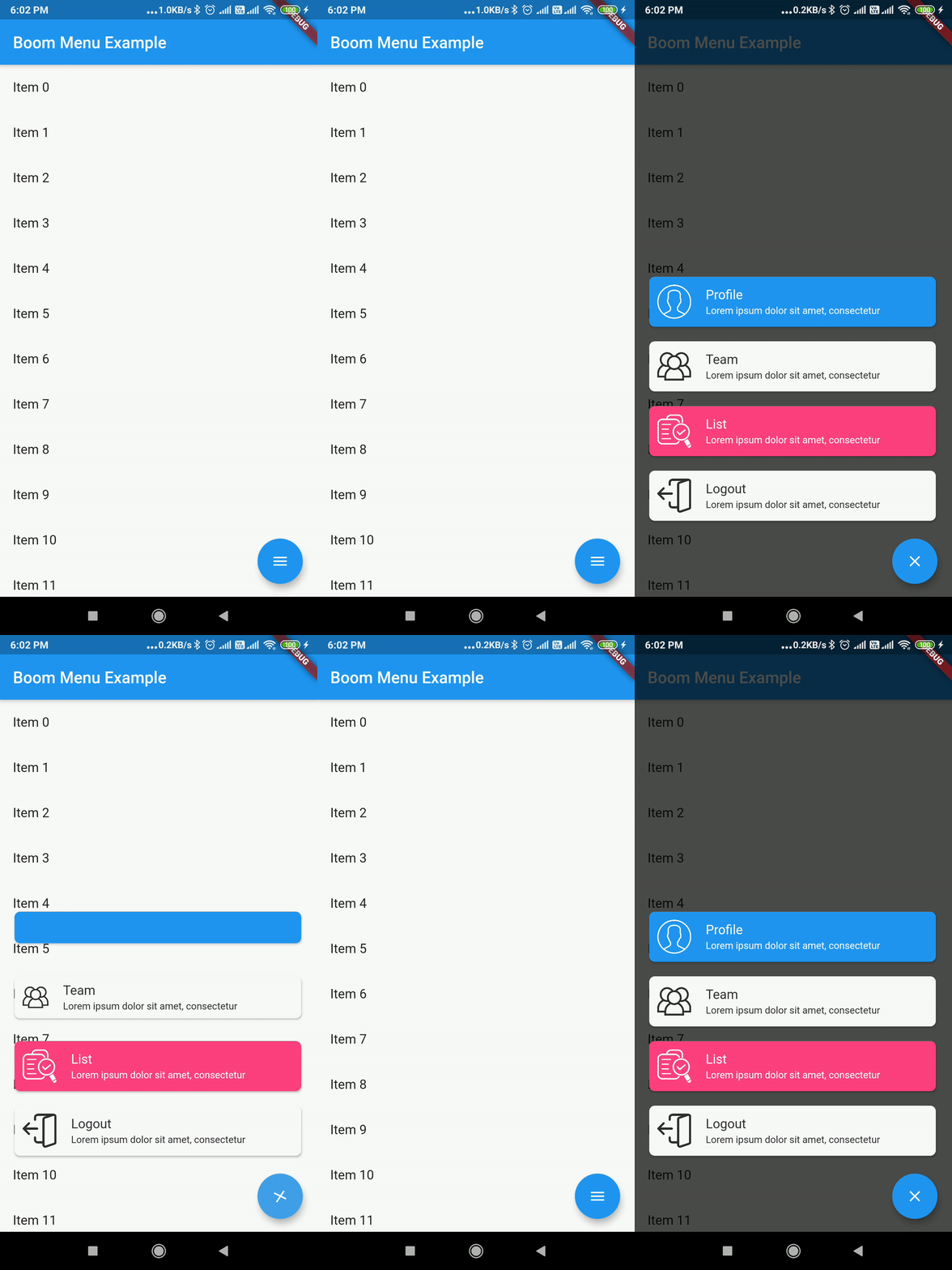
Example Usage ( complete with all params ):
Widget build(BuildContext context) {
    return Scaffold(
        floatingActionButton: BoomMenu(
      animatedIcon: AnimatedIcons.menu_close,
      animatedIconTheme: IconThemeData(size: 22.0),
      //child: Icon(Icons.add),
      onOpen: () => print('OPENING DIAL'),
      onClose: () => print('DIAL CLOSED'),
      scrollVisible: scrollVisible,
      overlayColor: Colors.black,
      overlayOpacity: 0.7,
      children: [
        MenuItem(
          child: Icon(Icons.accessibility, color: Colors.black),
          title: "Profiles",
          titleColor: Colors.white,
          subtitle: "You Can View the Noel Profile",
          subTitleColor: Colors.white,
          backgroundColor: Colors.deepOrange,
          onTap: () => print('FIRST CHILD'),
        ),
        MenuItem(
          child: Icon(Icons.brush, color: Colors.black),
          title: "Profiles",
          titleColor: Colors.white,
          subtitle: "You Can View the Noel Profile",
          subTitleColor: Colors.white,
          backgroundColor: Colors.green,
          onTap: () => print('SECOND CHILD'),
        ),
        MenuItem(
          child: Icon(Icons.keyboard_voice, color: Colors.black),
          title: "Profile",
          titleColor: Colors.white,
          subtitle: "You Can View the Noel Profile",
          subTitleColor: Colors.white,
          backgroundColor: Colors.blue,
          onTap: () => print('THIRD CHILD'),
        ),
        MenuItem(
          child: Icon(Icons.ac_unit, color: Colors.black),
          title: "Profiles",
          titleColor: Colors.white,
          subtitle: "You Can View the Noel Profile",
          subTitleColor: Colors.white,
          backgroundColor: Colors.blue,
          onTap: () => print('FOURTH CHILD'),
        )
      ],
    ),
    );
}
Issues & Feedback
Please file an issue to send feedback or report a bug. Thank you!
Contributing
Every pull request is welcome.

Mohanraj ↗
사용 중인 의존성
의존성 목록 2 개
- flutter
{"sdk":"flutter"} - flutter_test개발 의존성
{"sdk":"flutter"}
프로젝트에 맞는 저장소를 선택하려면?
사용 목적에 따라 검색하고 개발 활동을 비교한 뒤 원본 저장소에서 요구 사항을 확인하세요.
- 이름, 작성자 또는 설명으로 검색하고 기술 주제로 범위를 좁힙니다.
- 스타, 포크, 최근 푸시를 함께 비교하세요. 스타는 관심의 지표이며 품질을 보장하지 않습니다.
- 사용하기 전에 GitHub에서 README, 라이선스, Issues를 확인하세요.
출처 및 관리
“A repository is the most basic element of GitHub.”
GitHub Docs — About repositories ↗